


Participant
September 29, 2016
Answered

Set expiration date

  • September 29, 2016
  • 1 reply
  • 1911 views

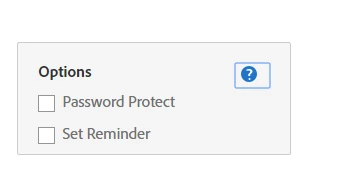
I do not have an option to set an expiration date on my documents to be signed. According to what I can find online it should be in these options, but it's not there. Has it moved? Is it available somewhere else? Do I need to upgrade my account?
This topic has been closed for replies.
Correct answer AadeshSingh

Hi ChronicIllnessBloggers

The feature is only available in Adobe Sign Business & Enterprise account (Adobe Sign plans for individuals and businesses | Adobe Document Cloud ).

- Set expiration date on agreement

Won't be available under your Adobe Sign Individual account. You can upgrade to avail this feature.

Regards,

Aadesh

1 reply

AadeshSingh
AadeshSinghCorrect answer
Participating Frequently
September 29, 2016

Hi ChronicIllnessBloggers

The feature is only available in Adobe Sign Business & Enterprise account (Adobe Sign plans for individuals and businesses | Adobe Document Cloud ).

- Set expiration date on agreement

Won't be available under your Adobe Sign Individual account. You can upgrade to avail this feature.

Regards,

Aadesh

Participant
January 19, 2018

I have the Enterprise version of Adobe Sign and I can't find the exp date option. I went to the exact place per guide. Nothing.

MichaelKazlow
Legend
January 20, 2018

I don't have it either. Maybe an admin turned off that option.