Participant
October 1, 2018
Answered

Share option after sending an e-signature document

  • October 1, 2018
  • 1 reply
  • 965 views

For E-Signatures you could click share and enter an email address to share what you sent. I see the share option is gone? Is there another way to share now?

This topic has been closed for replies.
Correct answer Meenakshi_Negi

Hi Jenniferc,

Sorry for the delay in response.

Our initial launch of the all-new Doc Cloud provides the functionality you've come to depend on, but thanks to your feedback, we realize that there is still room for improvement with the Sign experience. The requested changes are back.

For detailed information, please refer to updated Adobe article What’s changed with Adobe Sign

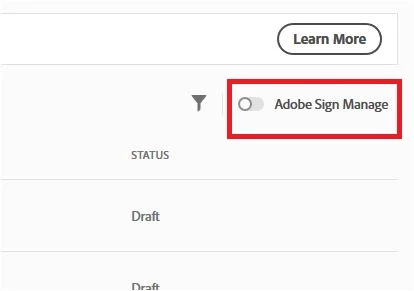
You can now easily get to the Old Manage tab by toggling the radio button for Adobe Sign Manage.

Check the screenshot below:

There you can find the Share and history tab that you are looking for.

Hope that helps.

Thanks for your time and patience thus far.

Regards,

Meenakshi

1 reply

Meenakshi_Negi
Legend
October 2, 2018

Hi Jenniferc,

Could you please confirm the Share option you are referring to?

Are you referring to the share tab that you get on the right window when you select the document from "out for signature" under the manage tab?

If yes, could you please share the screenshot of the window?

To share the screenshot here, use the steps provided below:

- Click on the insert icon provided in the reply window as shown below:

- An Insert Image window will appear.

- Then click on Insert Image and browse the location where you have saved the screenshot file.

- Select the file and click on Open > Insert Image.

We will be waiting for your response.

Regards,

Meenakshi

Participant
October 2, 2018

Can't it is gone. When you receive the email that your document has been sent for signature, you had an option that said click to view. Than click Manage. Than it would bring up the tab for history, share, etc. We really utilized the history and shared tabs and they are gone.

Meenakshi_Negi
Meenakshi_NegiCorrect answer
Legend
December 3, 2018

Hi Jenniferc,

Sorry for the delay in response.

Our initial launch of the all-new Doc Cloud provides the functionality you've come to depend on, but thanks to your feedback, we realize that there is still room for improvement with the Sign experience. The requested changes are back.

For detailed information, please refer to updated Adobe article What’s changed with Adobe Sign

You can now easily get to the Old Manage tab by toggling the radio button for Adobe Sign Manage.

Check the screenshot below:

There you can find the Share and history tab that you are looking for.

Hope that helps.

Thanks for your time and patience thus far.

Regards,

Meenakshi