Participant
February 6, 2023
Question

Signing all the same document, where their names appear in a table

  • February 6, 2023
  • 1 reply
  • 582 views

Hi all,

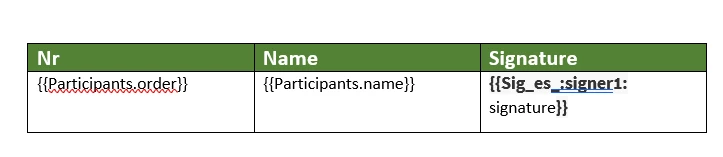
I have a .docx template where the name of the participants is populated in a table and they each receive a PDF and need to sign in the Signature column. Do I need to put some conditions in the .docx file when I generate the tags for Adobe Sign (Adobe Document Generation) to only show the signature field if the name of the participant is the same of the one that receives the email? I have no field name set (don't know how, is just a simple doc file).

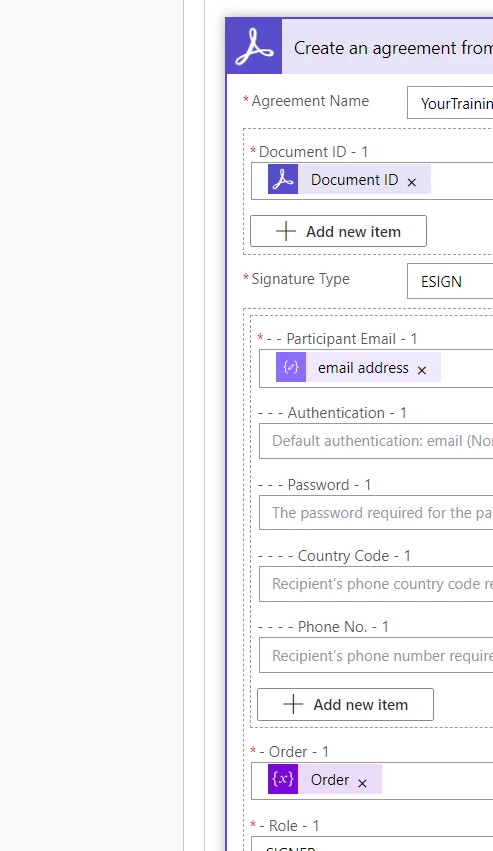
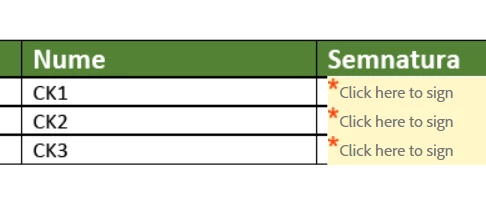
Currently, the columns "Nr" and "Name" from my table are automatically well populated, I use Power Automate, the document is generated and uploaded in Adobe but, the column for Signature is not  working as I need to, and I don't know what to try next. Each of the participants receives a PDF with the request to sign in ALL the cells, for all the participants.
 

Any suggestions, please?

Thank you!

This topic has been closed for replies.

1 reply

Meenakshi Negi
Community Manager
Community Manager
February 7, 2023

Hi Claudia282749058y4y,


Thank you for reaching out.


Could you please confirm the Adobe Acrobat plan you are using?

How have you created the form? As you add the text tags for signature fields, are you sending a single document for signature to multiple people or sending an individual document to each recipient?

Please share more information about how you have added the text tags for each row.

In the meantime, also refer to the following help document: https://helpx.adobe.com/sign/using/text-tag.html

Check if you get any help.


Thanks,

Meenakshi


Participant
February 7, 2023

Hi MeenakshiNegi,


Thank you so much for responding me!

In my plan I have: DC Standard, Enterprise PDF Services Developer, PDF Services, Acrobat Sign and the rest I think maybe is not of interest. I am tagging a .docx file using Document Generation. This file is read further by my flow in Power Automate, then I use the action Generate document from Word template to send my json data to the template in order to populate it with my data. I save a copy of this generated document as a pdf file (last screenshot, ListPartDocGenerated.pdf), then I use aother actions from Power Automate Microsoft to upload the file to Adobe account then send for signature to each of them). Now I was trying to make the identifier signer1 to change dynamically when the table is populated, "signer" plus nr 1, nr2... (signer1, in the first row, signer2 in the second row and so on). Let me know if you need more details!


Thank you so much!

Claudia Kiss