
Participant
February 6, 2020
Question

Tags not appearing?

  • February 6, 2020
  • 1 reply
  • 815 views

Hi - I'm brand new to Adobe Sign and just created my first web form. I added several standard tags to my doc, but when I publish it, just one of them (the "full name" tag) does not appear on my document. I've deleted the tag & readded to no avail. Here is what it looks like while I'm modifying the web form: 
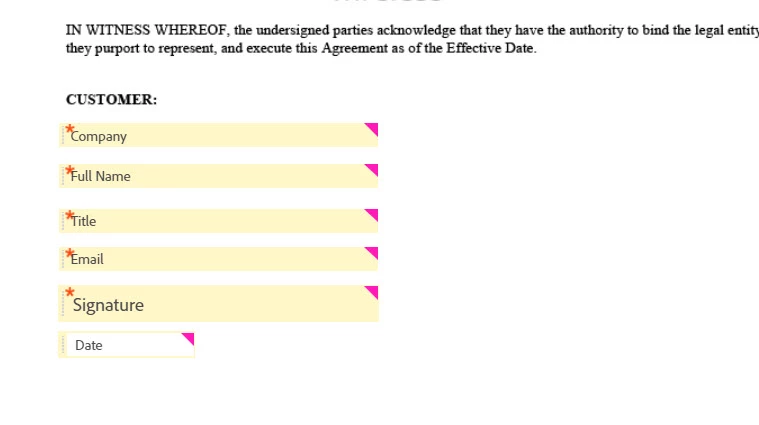
...and here's what I get as soon as click save:
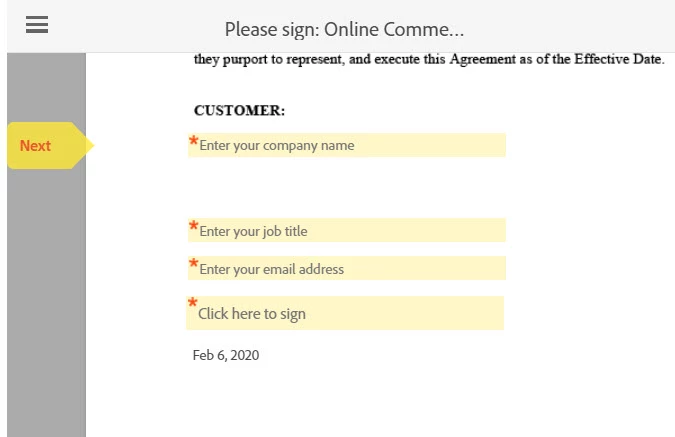
 

Anything I should be doing differently or can troubleshoot? 

This topic has been closed for replies.

1 reply

Allta Media
Community Expert
Community Expert
February 7, 2020

Have you tried a different browser? Logging out/in again?

Participant
February 7, 2020

I have logged in/out several times to no avail. I have been exclusively in Chrome so far - just opened the webform in IE though, exact same experience: all tags render aside from the Full Name tag. 😞

Allta Media
Community Expert
Community Expert
February 13, 2020

This is just a pre-built field. I would just try creating a new Text Input data field with the same values to get you moving forward.