Participant
December 28, 2018
Answered

Templates Are Gone

  • December 28, 2018
  • 1 reply
  • 2134 views

Typically I find my templates in "For Signature" > Library Templates. I am looking to refresh some old documents so I'm needing to delete old templates and enter new ones. In the past couple of days when I go to For Signature> Library Templates I only see 4 templates (I have many more than that). When I go to send a template for signature they all show up there however in that area I can't delete.

Did I do something that would have made most but not all of my templates not be found in my template library?

This topic has been closed for replies.
Correct answer Meenakshi_Negi

Hi Alyssak,

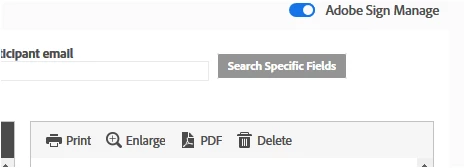
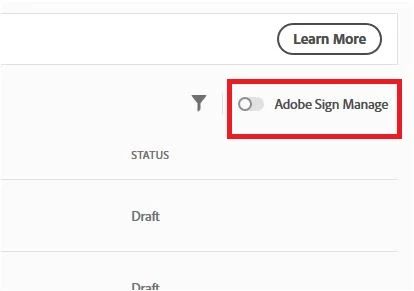
As you are trying to check the templates, please try once to check the templates on the Adobe Sign manage page.

Refer to the steps mentioned below:

- Go to

- Enable the Adobe Sign Manage radio button.

- Then go to Library templates

- Select the template and click on delete option provided on the right-hand side.

Let us know how it goes.

Regards,

Meenakshi

1 reply

Meenakshi_Negi
Meenakshi_NegiCorrect answer
Legend
January 2, 2019

Hi Alyssak,

As you are trying to check the templates, please try once to check the templates on the Adobe Sign manage page.

Refer to the steps mentioned below:

- Go to

- Enable the Adobe Sign Manage radio button.

- Then go to Library templates

- Select the template and click on delete option provided on the right-hand side.

Let us know how it goes.

Regards,

Meenakshi