
Participant
November 21, 2023
Question

Text tags for checkbox not showing box

  • November 21, 2023
  • 1 reply
  • 303 views

Hi,


I am using textags to generate aour agreements linked to Salesforce. We have a checkbox to let our subscribers to accept ou Sales General Conditions. Tags are working fine but once the agremment is generated, the box around the check mark has gone. 
I tried this:

{{CB2_es_:required:checkbox}}
or {*check_es_:signer1:checkbox(unchecked):tooltip("Check to accept our SalesGeneral Conditions")}}

Both are showing the same: (below it's our French aggreement extract)
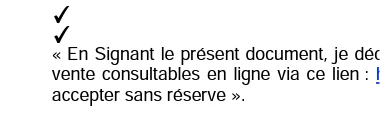
Is there a way to show the box with a check in it? It seems to be clearer to me.


Thanks for the help.


This topic has been closed for replies.

1 reply

Meenakshi_Negi
Legend
December 3, 2023

Hi guillaumer26736558,


Thank you for reaching out, and sorry about the delay in response.


We have checked that you are using the Adobe Sign Enterprise plan. If you have an integration-related question, the experts can best answer it. Please contact our Adobe Sign Enterprise support team for the correct information. You may contact them using the steps in the following help document: https://helpx.adobe.com/sign/using/adobesign-support-resources.html.

Refer to the following help document for more information on Acrobat Sign Integration: https://helpx.adobe.com/sign/integrations/home.html. For text tags, refer to the following help document: https://helpx.adobe.com/sign/using/text-tag.html


Thanks,

Meenakshi