
Participant
November 21, 2023
Question

Text tags Initials align right

  • November 21, 2023
  • 1 reply
  • 350 views

Hi,


I am using text tags to build our agreements to use in Salesforce. To include initials on each page I use the text tag: {{*Init_es_:signer1:initials}}

But by default everything is aligned left. I found settings to customize tags alignments:


:align(left) – Aligns the text in the field to the left. This is the default behavior for form fields and the directive does not need to be satisfied.

:align(right) – Aligns the data in the field to the right.

:align(center) – Center aligns the data entered in the form field.


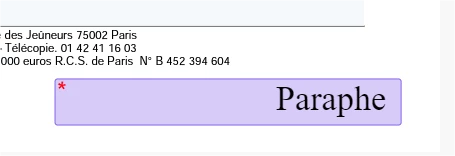
I used :align(right) but before signature it seem to be fine but when signin it's going back tp left.

Here is my tag: {{*Init_es_:signer1:initials:align(right)}}

When previewing the document before validation: (paraphe is initials in French)
 

And when signing:
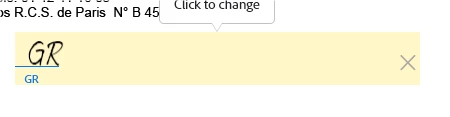
 

May I missing something?


Thanks for the help


Guillaume

This topic has been closed for replies.

1 reply

Meenakshi Negi
Community Manager
Community Manager
December 3, 2023

Hi guillaumer26736558,


Thank you for reaching out, and sorry about the delay in response.


We have checked that you are using the Adobe Sign Enterprise plan. If you have an integration-related question, the experts can best answer it. Please contact our Adobe Sign Enterprise support team for the correct information. You may contact them using the steps in the following help document: https://helpx.adobe.com/sign/using/adobesign-support-resources.html.

Refer to the following help document for more information on Acrobat Sign Integration: https://helpx.adobe.com/sign/integrations/home.html. For text tags, refer to the following help document: https://helpx.adobe.com/sign/using/text-tag.html


Thanks,

Meenakshi