


Participant
December 16, 2018
Answered

Unable to log in after changing log in email- please help!

  • December 16, 2018
  • 1 reply
  • 953 views

Hello,

I changed my adobe sign in ID & password last night as well as on my Creative Cloud. I'm able to sign in just fine on Creative Cloud, however unable to sign in on Adobe sign. I keep getting the same error message.

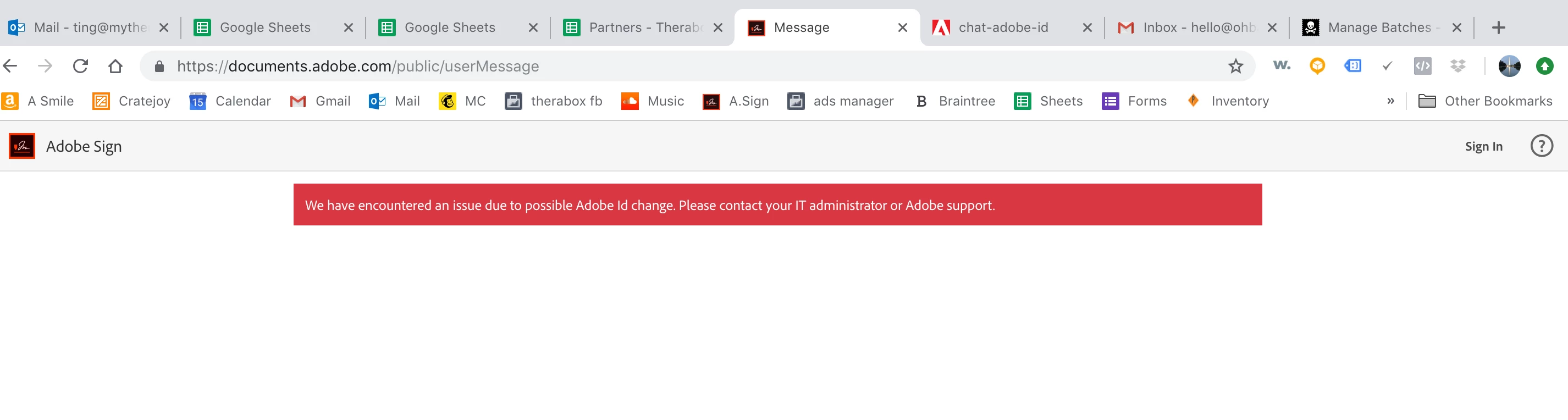
I've tried clearing my browser cache, using new computers and browsers to sign in but still getting same error message  "we have encountered an issue due to possible adobe ID change. please contact your IT administrator or adobe support" (please see attached).

This topic has been closed for replies.
Correct answer Meenakshi_Negi

Hi THERABOX,

As you have mentioned above, you have recently changed the email address linked to your Adobe ID.

Now, you are not able to sign in to your Adobe Sign account.

It seems that the email address that you used for your Adobe Sign account already registered under the other Adobe Sign account.

In this case, you will need to free your email address from the other account. Then you will be able to use this email for the current account.

If you remember the password for that other account, you may take help of the steps mentioned under Common errors here Change your e-mail address to free your email address.

If that does not help then contact Adobe Sign support team to help you with this issue.

I have sent you a private message, please check your inbox.

Refer to the steps mentioned there to contact the support team.

Let us know if you need any help.

Regards,

Meenakshi

1 reply

Meenakshi_Negi
Meenakshi_NegiCorrect answer
Legend
December 17, 2018

Hi THERABOX,

As you have mentioned above, you have recently changed the email address linked to your Adobe ID.

Now, you are not able to sign in to your Adobe Sign account.

It seems that the email address that you used for your Adobe Sign account already registered under the other Adobe Sign account.

In this case, you will need to free your email address from the other account. Then you will be able to use this email for the current account.

If you remember the password for that other account, you may take help of the steps mentioned under Common errors here Change your e-mail address to free your email address.

If that does not help then contact Adobe Sign support team to help you with this issue.

I have sent you a private message, please check your inbox.

Refer to the steps mentioned there to contact the support team.

Let us know if you need any help.

Regards,

Meenakshi