


KhestraKaramak
Participant
February 6, 2019
Answered

Unable to send docs to be signed in Acrobat after Adobe ID change

  • February 6, 2019
  • 1 reply
  • 6412 views

I've recently updated my Adobe ID and attached email, and am now unable to send documents to be signed by my customers.  I've tried to start a help chat, but no one actually shows up on the other end, and calling the 1-800 ended up with a CSR insisting that it wasn't the software, and I just haven't signed out and signed back in properly -- wanted to take control of my computer remotely to prove it. 

I've signed out of all sessions of Adobe Acrobat, my InDesign, and Adobe Creative Cloud, and signed back in repeatedly; restarted my computer;  but am still receiving the error.  I receive the error even in the browser version of the signing feature.  Actually scratch that -- the browser feature will not even load any more as of my typing this message, even though I'm logged in.

This is a monthly subscription of Adobe Acrobat, paid up, on Mac.

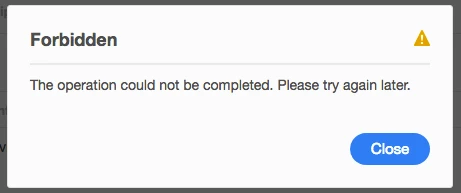
Any suggestions??  As of yesterday when I first changed my ID, I received an error stating that my ID hadn't updated properly...but today this is the error I receive on my computer:

This topic has been closed for replies.
Correct answer Meenakshi_Negi

Hi KhestraKaramak,

As you have mentioned above, you are not able to send the document after changing the Adobe and receive the error message.

This generally happens when you set an email address which is already registered under an Adobe Sign account.

That means you already had an Adobe Sign account with that email address.

In this case, you will need to free that email from the old account.

Then only it will be able to send a document for signature using the current account.

I would request you to contact support to get help with this.

You may use this link Contact Customer Care

I have also sent a private message with the contact details.

Please check your inbox.

Let us know if you need any help.

Regards,

Meenakshi

1 reply

Meenakshi_Negi
Meenakshi_NegiCorrect answer
Legend
February 8, 2019

Hi KhestraKaramak,

As you have mentioned above, you are not able to send the document after changing the Adobe and receive the error message.

This generally happens when you set an email address which is already registered under an Adobe Sign account.

That means you already had an Adobe Sign account with that email address.

In this case, you will need to free that email from the old account.

Then only it will be able to send a document for signature using the current account.

I would request you to contact support to get help with this.

You may use this link Contact Customer Care

I have also sent a private message with the contact details.

Please check your inbox.

Let us know if you need any help.

Regards,

Meenakshi