
Participant
March 8, 2017
Answered

Upload different content for emails using CSV files

  • March 8, 2017
  • 2 replies
  • 1066 views

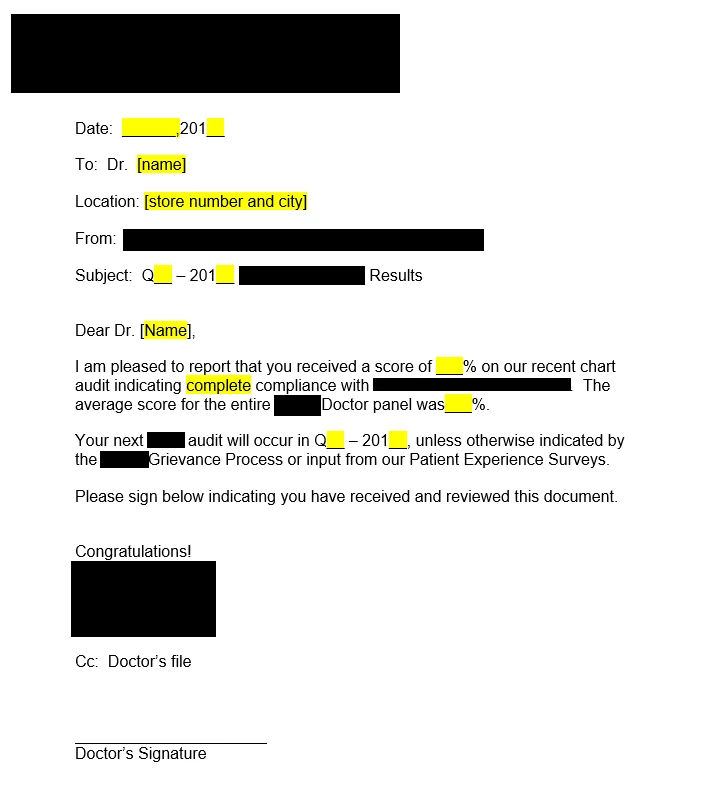
Everywhere you see in yellow I want to provide those values in my CSV and then the doctor will sign.  The only thing the doctor does is sign, I need to automate the different values in the fields in yellow below. Thanks.
This topic has been closed for replies.
Correct answer Tariq Dar

Hi jeffc2017,

This can be done in Adobe Sign under mega sign feature: Send a Mega Sign with a CSV file | Adobe Sign

Let us know if you have further questions.

-Tariq Dar.

2 replies

Participating Frequently
November 10, 2020

I have watched the tutorial, and have inserted my fields but they show as blank spaces.  No data inserted. How do we get the specific personlized fields from the CSV to insert in the specific signers document?


Tariq DarCorrect answer
Legend
April 6, 2017

Hi jeffc2017,

This can be done in Adobe Sign under mega sign feature: Send a Mega Sign with a CSV file | Adobe Sign

Let us know if you have further questions.

-Tariq Dar.

Participant
March 25, 2020

Hi,


How exactly can this be done? I've watched all tutorials avaliable and none explains how you actually insert the filed from a csv into the document template.


Thank you.

Participant
May 14, 2020

Hi,

I wonder how this works too, even the extra fields in the sample file do not appear. Would like to use Mega sign to sign for bonus calculation payout forms, similar to your layout...