
Users Not Redirected to Authoring Page After Uploading Documents via OAuth Integration
Hi Adobe Support,
I'm currently facing an issue where users trying to upload and prepare documents for signature are not redirected to the expected authoring page. Instead, they are taken to the Adobe Acrobat homepage/dashboard (e.g., https://acrobat.adobe.com/link/home/).
For example, the user dev.demoxpath@17413941—who has an active paid subscription/license (including a free trial)—is attempting to use our platform to initiate a signing process via Adobe Sign. The OAuth scopes for this user are:
user_login:self
agreement_write:self
agreement_read:self
agreement_send:self
workflow_read:self
workflow_write:self
Authentication succeeds without issue. However, when the user uploads a document and proceeds to prepare it for signature, they are not redirected to the authoring interface (e.g., https://eu1.documents.adobe.com/account/documentEdit?...). Instead, the redirect lands them on their Adobe account homepage (https://acrobat.adobe.com/link/home/)).
Notably, we’ve observed that only users listed under the "Users" section in the Adobe Acrobat Sign admin panel are redirected correctly to the authoring page. The user dev.demoxpath@gmail.com is not registered there.
Could you please provide any guidance or clarification on why this is happening and how we might resolve it?
Note: The application is certified.
Our configuration scopes: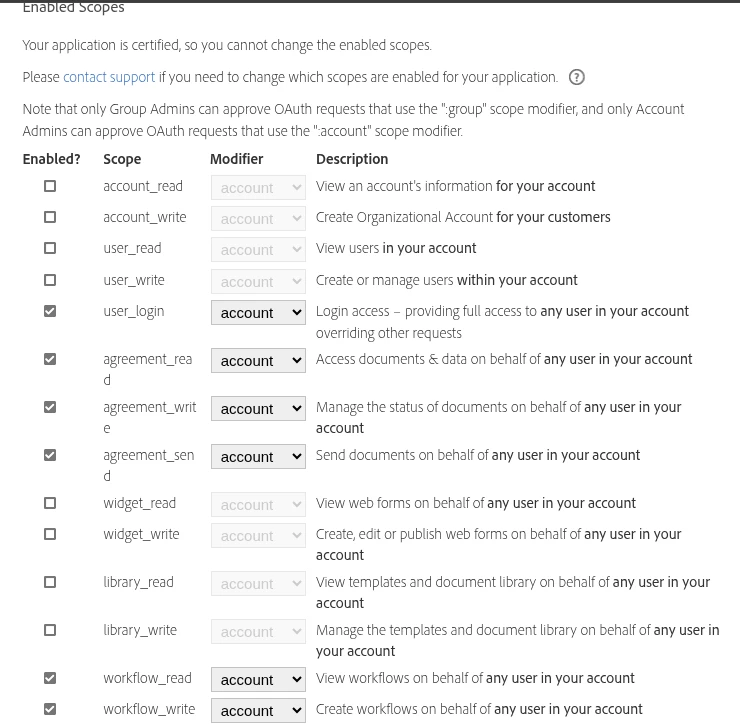
Thank you in advance for your support.
Best regards,
Xpath global


 AdChoices