
Participant
March 30, 2022
Question

Web Form Participants roles

  • March 30, 2022
  • 2 replies
  • 992 views

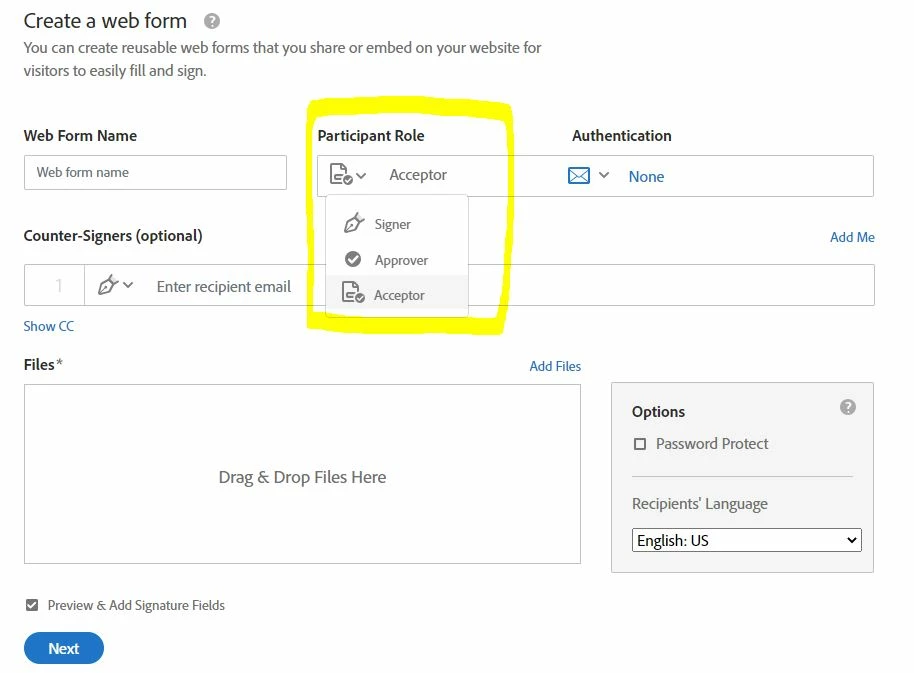
I am creating a web form but I cannot create a "Form fill Role" 

I dont know if there is any issue or why I have not the opption to be selected. And in Authentication is the same. Based on help docs should be 3 options (None, KBA & Password) but I cannot see anything here
This topic has been closed for replies.

2 replies

Meenakshi_Negi
Legend
April 4, 2022

Hi Gonzalo,


Thank you for reaching out.


Please check if the options are enabled under the account settings. Use the following steps to check the settings or ask the account admin:

1. Open the following link:  and sign in using your credentials.

2. Go to Account > Account Settings > Send Settings.

3. Ensure that the box for the Form filler is marked under the "Allowed recipient roles."

Check the screenshot below:


Let us know how it goes.


Thanks,

Meenakshi

Participant
April 4, 2022

Hi Meenakshi,


Thanks for your answer. I have tryed to follow your instructions but I can't, as there is not these "Send Settings" option under my Account. 


Do you know why?


Kind regards,

Gonzalo 


try67
Community Expert
Community Expert
March 30, 2022

Is this using Adobe Sign?

Participant
March 30, 2022

yes 
I am using adobe sign web form

try67
Community Expert
Community Expert
March 31, 2022

Thought so. I moved your question to that product's forum.