inxpress
Participant
August 19, 2015
Answered

when I send docs for singnature, I also need to send non signature docs in the same email....the field for "signature" shows at the top of the last page but I need it to show at the bottom of the second??

  • August 19, 2015
  • 1 reply
  • 483 views

I am new to the Adobe service and have 5 documents I send with every email.  Two of the docs require signatures, but the others though important, do not require signing.  I want to send all of the documents in one email but it appears that the platform sees all 5 docs as a single document requiring a signature which ends up appearing at the top of the last page (ends up being a document that does not require a signature).  Everything works fine except for the signature field that the platform assigns to the document.  Is there any way to change this?  Have the final signature field appear at the bottom of the second page of the document?

    This topic has been closed for replies.
    Correct answer NakulB

    Hello,

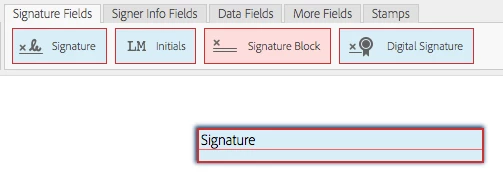
    In this scenario, you can manually place the signature fields in the first two pages.

    When you do not place the signature fields manually, system automatically places a signature filed at the last page of the document.

    Please make sure that you are placing the signature field manually, so the system does not place the field automatically.

    - Go to the send page

    - Select Preview, position signatures or add form fields

    - Click next to add the signature fields

    Regards,

    Nakul

    1 reply

    NakulBCorrect answer
    Adobe Employee
    August 20, 2015

    Hello,

    In this scenario, you can manually place the signature fields in the first two pages.

    When you do not place the signature fields manually, system automatically places a signature filed at the last page of the document.

    Please make sure that you are placing the signature field manually, so the system does not place the field automatically.

    - Go to the send page

    - Select Preview, position signatures or add form fields

    - Click next to add the signature fields

    Regards,

    Nakul