

Adi Ravid
Adobe Employee
Adobe Employee
August 7, 2025
Question

You must accept the legal notices before proceeding error on iPhone

  • August 7, 2025
  • 2 replies
  • 502 views

When customer's try to access the document on a mobile device, they're propted to accept the legal notice before proceeding to sign it.

Recently, we encounterd issues with customers using iPhones, that the notification to accept is not displayed, and they get an error saying "You must accept the legal notices before proceeding".
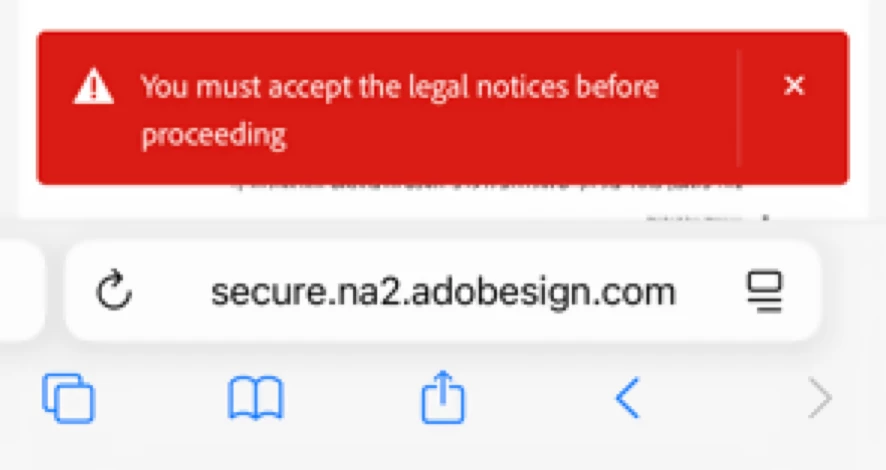
 

Any idea on the cause and how to resolve it?

2 replies

Participant
September 10, 2025

Hi

I tried to log in on Adobe to access the documents but failed there. I don't know to do it in fact. 

S_S
Community Manager
Community Manager
September 12, 2025

Hi @iman_4096,


Hope you are doing well. Thanks for writing in!


You might want to try accessing the website: https://adobe.ly/46ywyJY and check if it helps.


If you are referring to your cloud documents, you can try: https://adobe.ly/4mZLYwH;


Hope this helps.


Regards,
Souvik.

Participant
September 12, 2025

Your first link points to a page tha doesn't exists.

The issue occurs during the signing experience of the recipient and is not related to the cloud documents.


Anyway, the issue was identified as a bug that is currently being investigated and fixed.

Meenakshi Negi
Community Manager
Community Manager
August 7, 2025

Hi Adi Ravid,


Thank you for reaching out here.


We see that you are using the web version. Please refer to the information in the following help document to accept the legal notices for Acrobat Sign: https://adobe.ly/4m84lPC


Let us know how it goes.


Thanks,

Meenakshi

Adi Ravid
Adobe Employee
Adi RavidAuthor
Adobe Employee
August 9, 2025

Hi,

I'm not using the web version.

What you see is the customer experience side of accessing the document in order to sign it.

Anyway, I continued my investigation of this issue, and found out that it's actually bug related to the iOS interface language.

When the interface is set to RTL language (Arabuc or Hebrew), the legal notice is not showing.


This is how the legal notice looks when the device is interface is set to LTR language (English):


But, when the device is set to RTL language (Arabic or Hebrew), the legal notice is not showing, and you get the error when you try to sign the document. as below:


To bypass the issue and sign the document, you need to either:

  • Temorarelly change the interface language, or
  • To guide the signer on how to switch to the classic experience, or use the Request Desktop Website option.


I also verified that the issue exists on the iOS version of both Safari and Chrome, and that it affects all the users of the Adobe Sign service and all the variations of the product.