


leocetke
Known Participant
Feb 27, 2026 12:10 AM UTC
Question

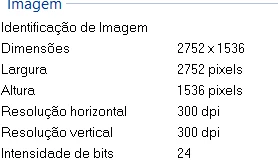
Adobes says the minimum dimension for an image is 4 MP (mega pixels), but i uplouded an image with 2752x1536 and it got "not accepted" for: "dimensions too small", i'm just unlucky?

 

    5 replies

    RALPH_L
    Community Expert
    Community Expert
    Feb 27, 2026 8:44 AM UTC

    I do not recognize the screen that you posted. How are you uploading? From a tool? I have never seen the error “Dimensions too small”. Only “file too small”.

    Translate
    leocetke
    leocetkeAuthor
    Known Participant
    Feb 28, 2026 2:09 PM UTC

    Im uplouding normally by adobe…
    They sey the problem is quality issues and the failure reason is: “dimensions too small”.
    I had 3 images like that actually (but i didnt upscaled 2 of them).

    Translate
    Nancy OShea
    Community Expert
    Community Expert
    Feb 27, 2026 12:16 AM UTC

    Failure during upload means the image data didn’t transfer. 

    Try again on a more stable internet connection. 


    Translate
    Nancy O'Shea— Product User & Community Expert
    leocetke
    leocetkeAuthor
    Known Participant
    Feb 27, 2026 12:12 AM UTC

    And another image that i uplouded had the exactly same amount of pixels, and it got accepted… this is nonsense…
    Can anyone understand what happened?

    Translate
