


Peter_Tran_1711
Participant
May 4, 2024
Answered

AI QUALITY ISSUES!!! SOMEONE PLEASE HELP ME WITH THIS!!

  • May 4, 2024
  • 5 replies
  • 1087 views

I received a warning about AI image QUALITY ISSUES. Below I have attached the AI images that I rendered using stable diffusion. So, can someone tell me what's wrong with my photos? Are they defective in which body parts (face, hands, arms, legs)? Or is the tone of my photo too warm? Even though I've upscaled those pictures, I still don't know what the problem is. Please help me and sincerely thank you if anyone can give me a solution!
Please contact me at tomato.comedian@gmail.com if you have an answer! Once again thank you everyone from the bottom of my heart

This topic has been closed for replies.
Correct answer daniellei4510

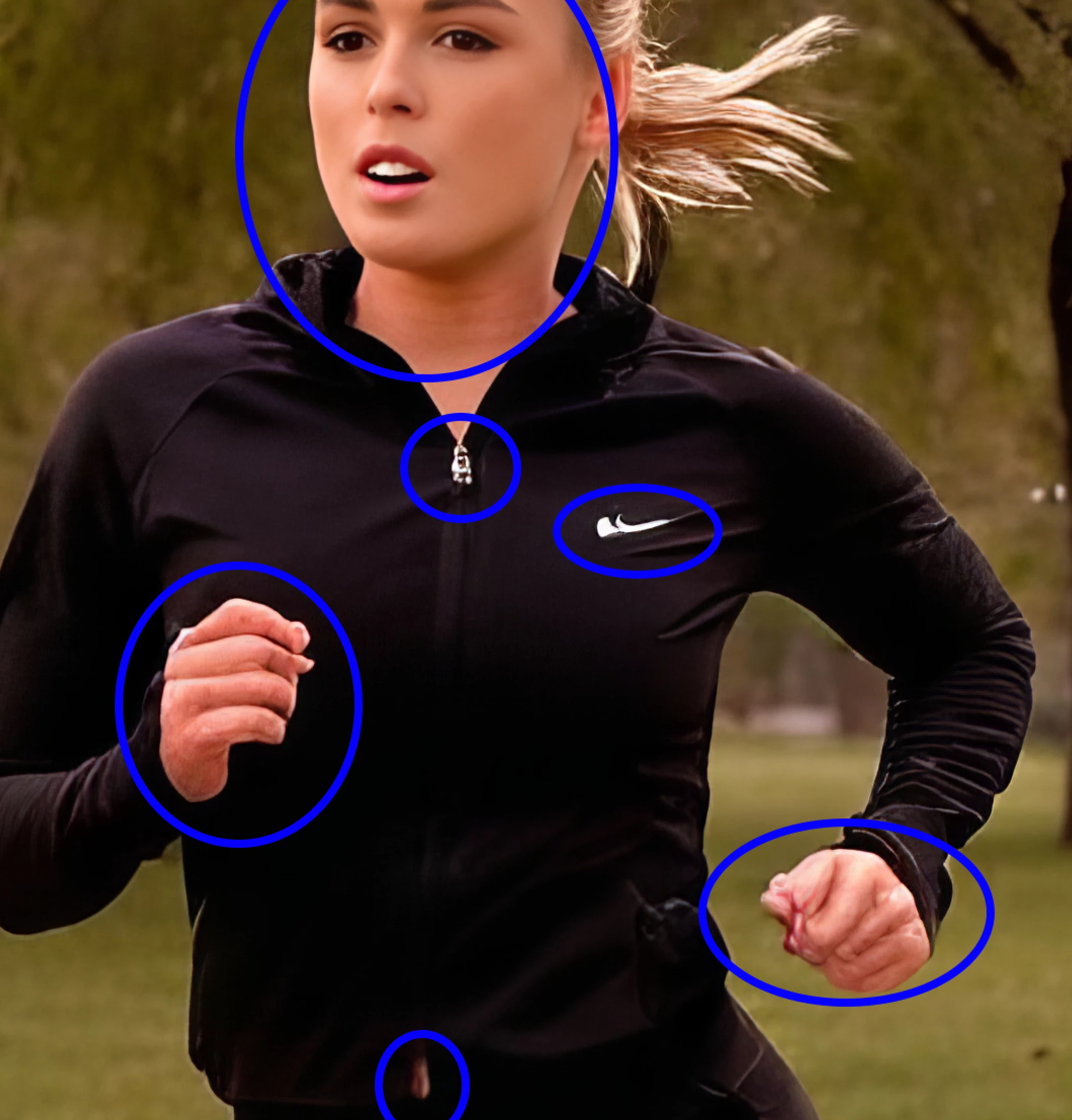
More of the same. You need to review your images at a minimum of 100%. Also, in this one, the logo should be removed. It bears some resemblance to the Nike swoosh.


5 replies

RALPH_L
Community Expert
Community Expert
May 5, 2024

Looking at the first photo the left eye, the ear and the hand are definite quality errors that should have been seen before you submitted. Alos the images with the distorted Nike logo is a "no go".

Jill_C
Community Expert
Community Expert
May 4, 2024

x400001-1955157129.jpeg - the ear is malformed, as is the mouth and the left hand

x400011-2091810160.jpeg - hands and mouth are malformed

x400007-3460370940.jpeg - same as above

x400012-2091810161.jpeg - hands, chest and ear are malformed


Jill C., Forum Volunteer
Abambo
Community Expert
Community Expert
May 4, 2024

X40009: you have an unexplained blur on the grass, and you have a white line and other artefacts around her leggings.

The elbow position of her left arm does not look right.


There is a weird texture at the height of the shoulder.


Check your assets at full size (100%), and you will see the many defects.

ABAMBO | Hard- and Software Engineer | Photographer
daniellei4510
Community Expert
daniellei4510Community ExpertCorrect answer
Community Expert
May 4, 2024

More of the same. You need to review your images at a minimum of 100%. Also, in this one, the logo should be removed. It bears some resemblance to the Nike swoosh.


Adobe Community Expert | If you can't fix it, hide it; if you can't hide it, delete it.
daniellei4510
Community Expert
Community Expert
May 4, 2024

And when I say 100%, that's AFTER upscaling. Review the original results BEFORE upscaling at 200% to 300% and you might save yourself some time. 🙂

Adobe Community Expert | If you can't fix it, hide it; if you can't hide it, delete it.
daniellei4510
Community Expert
Community Expert
May 4, 2024

You pretty much critiqued your own photos. There are issues with eyes, ears, hands, arms, legs, etc. in all of these to one degree or another. Also, you shouldn't include personal information such as your email address in the forums. A moderator will most likely remove it at some point.


Adobe Community Expert | If you can't fix it, hide it; if you can't hide it, delete it.