Participant
July 31, 2025
Answered

All of my AI images are rejected for quality reasons that I'm unable to pinpoint.

  • July 31, 2025
  • 4 replies
  • 1646 views

Hello Adobe community,


I'm new here, and just starting to upload AI generated images for stock photo purposes. Could you guys help me to understand better the reason as of why my images are all getting rejected? Sorry that I think the Adobe guidelines are too general without showing explicit examples, IMO.


If the problem was blurry backgrounds, there are a lot of photographers who intentionally use blurry backgrounds, and many are accepted here. So I think probably that wasn't the problem? I'm not sure.


Attached are some of the images. Your help is much appreciated. Thanks before.

Correct answer daniellei4510

4 replies

jacquelingphoto2017
Community Expert
Community Expert
July 31, 2025

Hi @revyrain ,

The first file - The space between the banana and the other fruits is not correctly rendered.

Another poor rendering of the space between fruits. The green color fruit has lost its edge.

Seem to be a four seater table in the second picture, but there is a twin chair on the right side.

The third image has an issue with the rendering of all the fingers. They are looking deformed.

The fourth image sofa back-rest seem to extend beyond the handle on your right, while it stops inside the handle on your left.

There's also an issue with the rendering of the lap suspension that seem to run vertically along the frame of the window other than hanging before it.

The fifth image - this finger is not correctly rendered. It's deformed and also the angle is not correct.

The little finger inter-twines with the mobile phone as though the phone is soft.

The sixth image - An eye is deformed and sunken.

Image seven - the left side of her face is flattened from her cheek up giving a slight twist appearance.

The eight image fingers are not rendered correctly

When your assets are ready for submission, zoom in and examine them carefully for issues.

Best wishes

Jacquelin

revyrainAuthor
Participant
August 1, 2025

Many thanks, @jacquelingphoto2017, another superb examination. I'll sure to note all these points for my next iterations as well.

jacquelingphoto2017
Community Expert
Community Expert
August 1, 2025

You are welcome @revyrain 

Best wishes

Jacquelin

Jill_C
Community Expert
Community Expert
July 31, 2025

Skin lacks any realistic texture and here's a drawing error:

Jill C., Forum Volunteer
revyrainAuthor
Participant
July 31, 2025

Thanks for this. Noted. Should be fixable.

But, is it the only reason for this picture to be rejected, though..?

Known Participant
July 31, 2025

Yes it is a severe reason. Moderation of people is very strict, you need to check every detail incuding eyelashes, nails,teeth and so on, buttons on clothes. etc.

yamato713108855
Community Expert
Community Expert
July 31, 2025

Please enlarge to 100% and check.
There is an image with a rendering error.


Also, there are jagged edges due to a processing issue when enlarging.
Your image will not pass the review unless you improve the processing.


revyrainAuthor
Participant
July 31, 2025

Thanks for pointing this out. I'll fix the sink.

Though for the jagged edges, do you have suggestion for me? Do increasing resolution can fix the edges?

yamato713108855
Community Expert
Community Expert
July 31, 2025

Jagged edges occur during the process of enlarging a small image.
Your image will not pass the review unless you review the enlargement process or make improvements such as not enlarging it too much.
Please enlarge it to 100% and check it before submitting.

daniellei4510
Community Expert
daniellei4510Community ExpertCorrect answer
Community Expert
July 31, 2025

Adobe Community Expert | If you can't fix it, hide it; if you can't hide it, delete it.
revyrainAuthor
Participant
July 31, 2025

Thanks for the reply. I'd like to discuss them, if you don't mind.


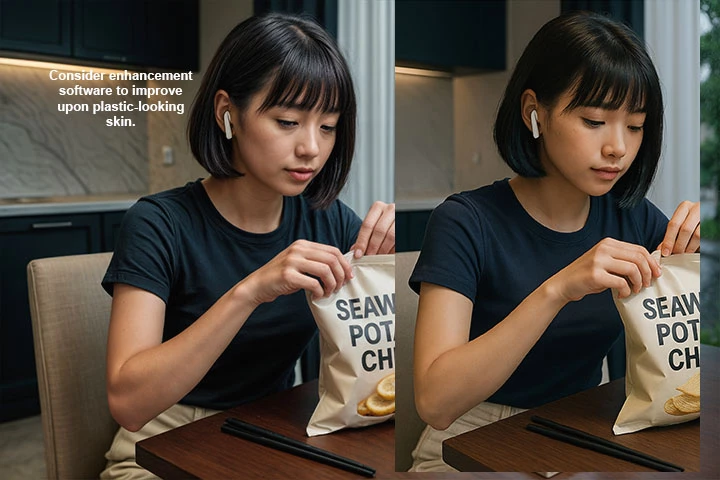
Number 1, sorry I don't understand why would you want to make the skin looks much older than the designated depiction? The person in the picture is an Asian under 20 years old. Is it a violation to have a 'plastic-like' skin at a young age? It seems like you applied a HDR technique and changed the details of the background as well, which isn't my intention to show the detailed background. Anyway, I'll take note and try to detail more of the skin realism.

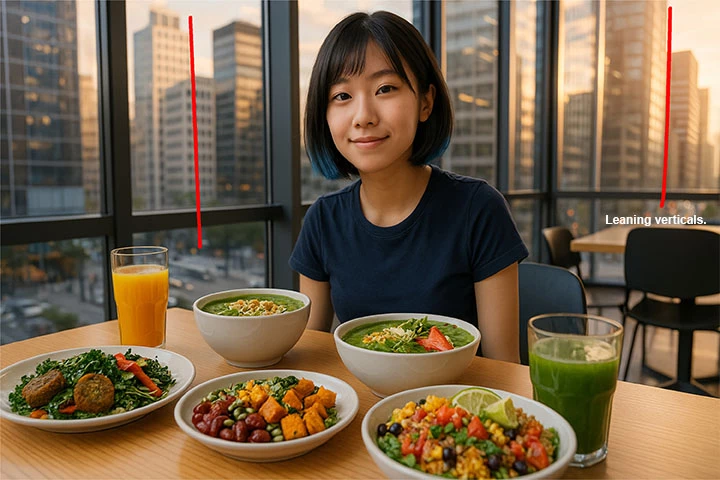
Number 2, okay I saw the leaning building and thought it was a common lens distortion (or depth distortion) in 3D rendering. Noted, I'll try to fix that.

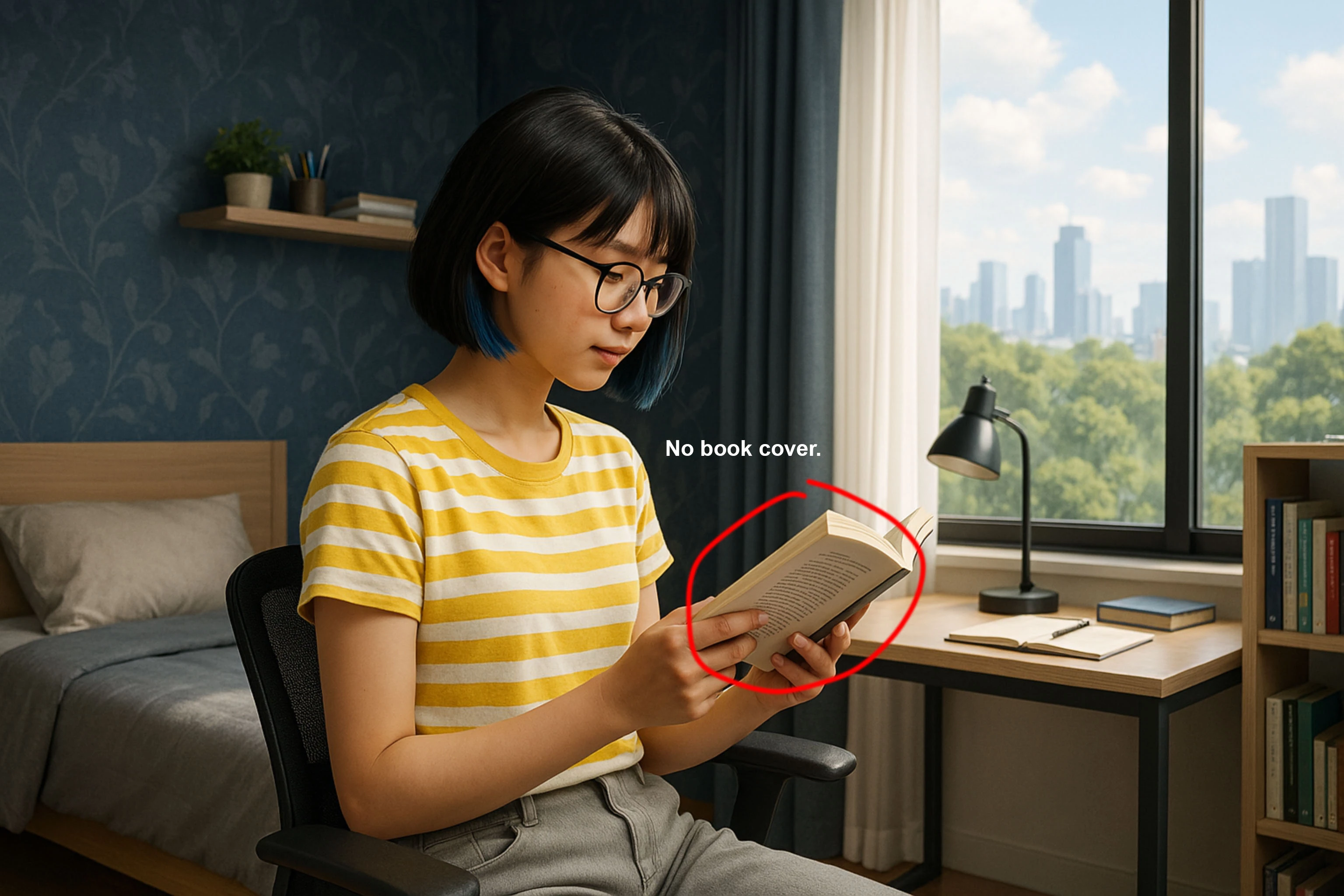
Number 3, since the AI purposely obscures text illustrations, my first thought was that IT IS the back cover of the book already. But I reconsidered after seeing your suggestion. I'll redo this picture.

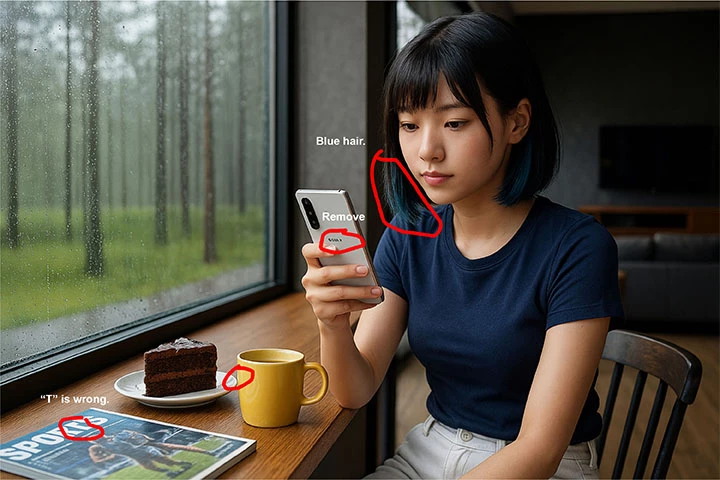
Number 4a. The blue hair was intentional. It's a highlight at the hair-ends (or dip-dye ends) which gained popularity in the youth fashion trends from several years back, if you haven't heard. Is it not allowed to have dyed hair in a stock photo?

Number 4b,c,d. For the phone logo, I acknowledge, and will erase it. The magazine, again it's commonly intentional by AI to obscure texts, but I think should be fixable. Also the collision between the small plate and the mug.

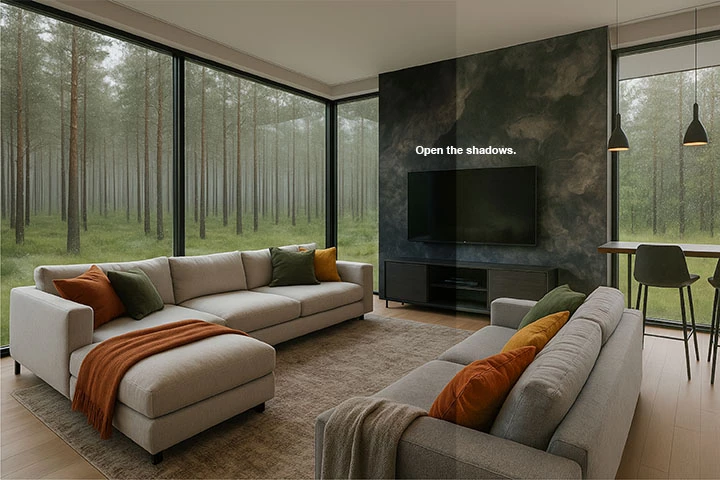
Number 5, I don't understand what you mean by "open the shadows". Please kindly elaborate, which shadow? What's the object(s)?


Much gratitude, sir.

daniellei4510
Community Expert
Community Expert
July 31, 2025

Number 1: I'm not suggesting it's a perfect example. I would normally overlay the enhanced version over the original and fade the enhanced version until it was suitable. Or, I would find another AI software altogether. Whatever you are using is not well suited for photo realistic people. The skin lacks texture.


Number 4a. Nothing about AI is intentional. It's all random. And speaking as a moderator (which I'm not), the blue tint comes across as a random error.


5. It's a very well-lit room and details are obscured by underexposure.


Adobe Community Expert | If you can't fix it, hide it; if you can't hide it, delete it.