


Known Participant
February 29, 2024
Answered

Am I in trouble?

  • February 29, 2024
  • 5 replies
  • 1406 views

Hello!
I generate my images in Midjourney and scale them with Topaz Photo AI, but recently (after a short creative break), I noticed that in the image properties after scaling, it writes the prompt indicating how the image was generated. I don’t remember this happening before my break. When uploaded to Adobe Stock, it retrieves the title from this data. I then write my description for the image and add my keywords, but I’m already tormented by paranoia that after 2-3 months (moderation time), I may encounter problems because of this.
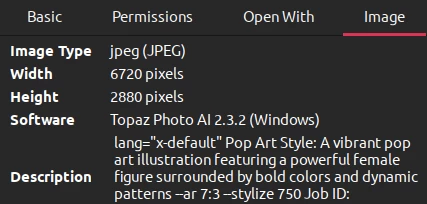


What do you say about this, dear and experienced contributors? Should I revoke all assets and clean up the metadata?

This topic has been closed for replies.
Correct answer Abambo

Adobe does not consider the metadata. The buyer, however, will see them. If you do not want them let to know your secrets, you will need to clean them up before submitting.

5 replies

Inspiring
March 1, 2024

You are right, we are having this issue right now. It's normal and you should clear the prompt from the title and then re write the title as you do before. Just one step is added more to remove the prompt from title before writing title. I think it's not a big deal.

Abambo
Community Expert
Community Expert
March 2, 2024
quote

You are right, we are having this issue right now.


By @DailyLifeImages


There is no issue.

ABAMBO | Hard- and Software Engineer | Photographer
daniellei4510
Community Expert
Community Expert
February 29, 2024

Are you using Photoshop? Here's a tip (assuming it's at all related to your issue): Go to File > File Info and enter your title (under Description) and keywords there. Make it the one of the steps in your normal editing process with each image you edit before saving your file for the last time. When you submit your images, whether it's one or a dozen, the title and keywords will be automatically entered in the appropriate boxes for each image. And, unlike the keywords being sorted in alphabetical order as they appear in Lightroom (again, assuming you use it), the keywords will appear in the order that you entered them. Then all that's left to do is selecting the File Type and Category (which more often than not is done for you) and clicking a couple of boxes as appropriate. No more titling and entering keywords for a dozen or so images and driving your brain crazy, since that process has already been done for you, by you.


If I edit six to a dozen images a day, then upload them before hitting the sack or heading out for some socializing, the last thing I want to do is enter titles and keywords for the next 15 to 20 minutes.

Adobe Community Expert | If you can't fix it, hide it; if you can't hide it, delete it.
Abambo
Community Expert
AbamboCommunity ExpertCorrect answer
Community Expert
February 29, 2024

Adobe does not consider the metadata. The buyer, however, will see them. If you do not want them let to know your secrets, you will need to clean them up before submitting.

ABAMBO | Hard- and Software Engineer | Photographer
HaunterrrAuthor
Known Participant
February 29, 2024

I don’t think it’s advisable to hide 'secrets' from the client. Even if they enter the same prompt, it won’t generate exactly the same image. The only thing that worries me is ensuring I don’t break any rules when submitting, to avoid being banned.
Thanks for the response

Abambo
Community Expert
Community Expert
February 29, 2024
quote

I don’t think it’s advisable to hide 'secrets' from the client. Even if they enter the same prompt, it won’t generate exactly the same image.


By @Haunterrr

But they may learn from your highly successful prompts. It's not that I say that you need to edit your EXIF data. It's your choice if you leave them.

quote

The only thing that worries me is ensuring I don’t break any rules when submitting, to avoid being banned.


By @Haunterrr

I haven't read about a rule that does disallow this. When I learned about that, I changed my metadata before submitting. Little things that I normally have in my metadata, for me to organize my files. But as long as there is no terrible text in, I doubt that there are any actions. Adobe could easily decide to strip the EXIF data, if they were interested in that.

ABAMBO | Hard- and Software Engineer | Photographer
daniellei4510
Community Expert
Community Expert
February 29, 2024

If you're giving your images their own titles/descriptions during submission, I doubt that you need to be concerned about information embedded in the file. This information might even be stripped during the upload process (but I'm not sure about that). That said, I'd recommend shortening your titles based on the subject, rather than title them with the original prompt. 

Adobe Community Expert | If you can't fix it, hide it; if you can't hide it, delete it.
HaunterrrAuthor
Known Participant
February 29, 2024

I'm also unsure if the image data changes when the client receives it. As for the title length, I refer to the titles of top authors on the second monitor when writing my own to match the best. However, it's generally unclear; some have very long image descriptions, separated by commas (indicating that the words didn't fit), while others have only three words, and yet they are inaccurate.

Abambo
Community Expert
Community Expert
February 29, 2024

You can have up to 78 70 characters for your titles. That number is because most search engines set a cape on that, so that anything behind won't be checked by Google & Co.


I checked the docs: https://helpx.adobe.com/stock/contributor/help/titles-and-keyword.html, so I modified my text above.

ABAMBO | Hard- and Software Engineer | Photographer
Jill_C
Community Expert
Community Expert
February 29, 2024

You can change the title on accepted images by going to your dashboard clicking on the image and selecting the pencil icon adjacent to the title field. No need to delete and re-upload.

Jill C., Forum Volunteer
HaunterrrAuthor
Known Participant
February 29, 2024

No, it already fills in during submission, but of course I delete this prompt and write my normal description for the image.


I just don’t know if it’s normal to submit the original image with this metadata for moderation...

For editing already accepted images I know. 


Abambo
Community Expert
Community Expert
February 29, 2024

Yes, Adobe is reading the description field and takes that as an entry point to your asset's title. But when you change that, those changes will be visible on the Adobe website. The buyer will see your entry, if they look into the EXIF data.

ABAMBO | Hard- and Software Engineer | Photographer