
Known Participant
May 28, 2020
Answered

Can someone give me focused critique of my file quality. Thank you! :)

  • May 28, 2020
  • 1 reply
  • 1398 views

So, I uploaded an image to Adobe stock and it was declined because of the file quality. Now I would like to know what exactly is wrong with it.

This is the message I got from them:
After careful consideration, we can't accept your file for the following reason: image quality.
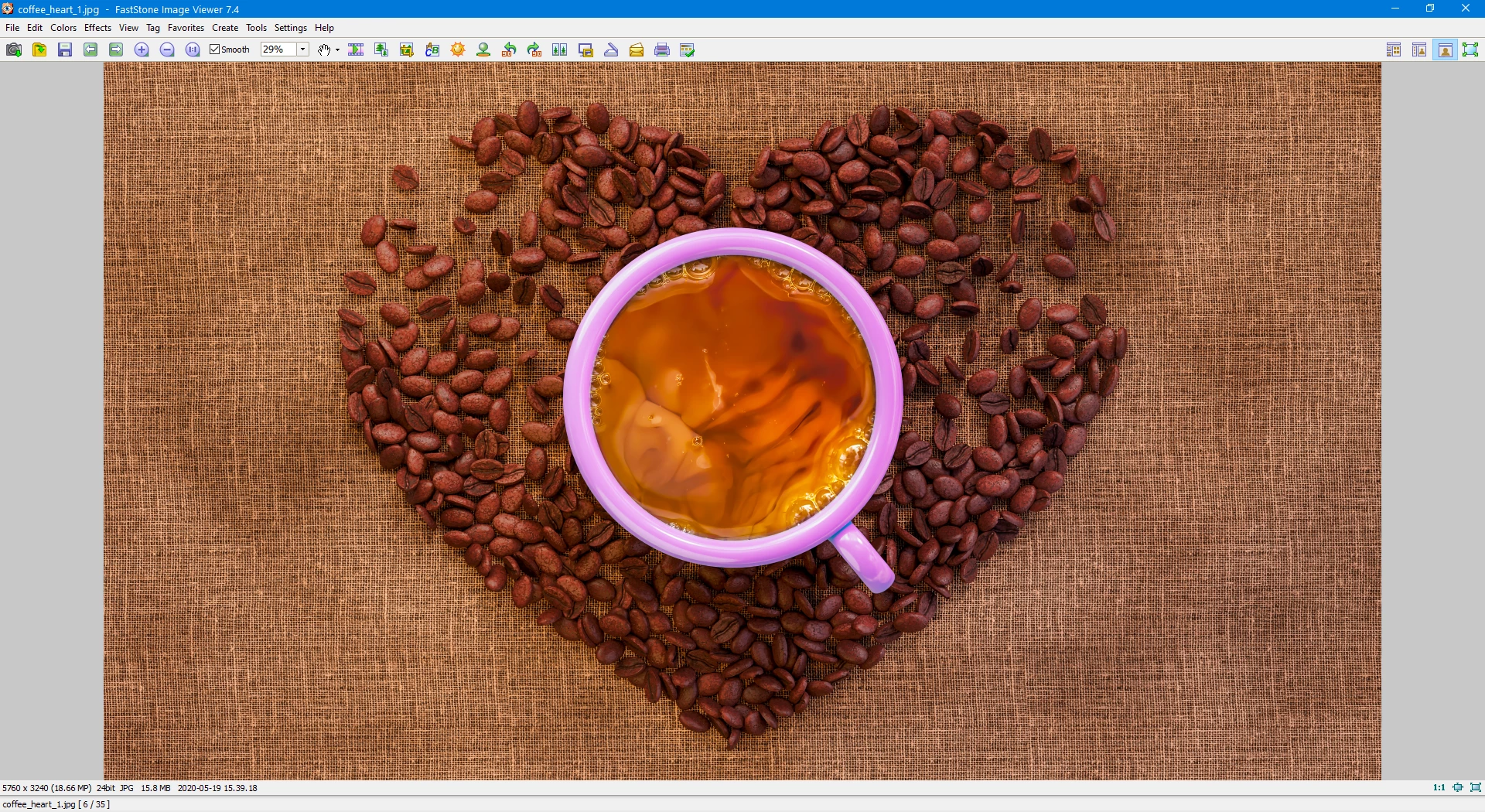


The thing is little confusing, because my other file from the series was accepted and I don't know what makes that other one more special compared to that with coffee cup. Vignette?

This topic has been closed for replies.
Correct answer jacquelingphoto2017

Hi Aartturi, 

Thank you. That size is fine.


There are a number of issues, but I'll address the technical issue first. You may zoom to between 100 and 200% to see what I speak of.

Technical Issue:

There is a thin line of blue color fringing to the right edge of the cup. At the top of the handle there is a wider band of purple color fringing.


Other Issues:

This capture is a bit under exposed.

The black, or shadow, or both may need to be adjusted in order to remove the dense black around the beans, especially those nearer to the cup handle.


If I were to correct this in post processing, I would increase exposure, reduce highlights and white a bit to maintain balance; increase shadows and black (by increase I mean slide slider to the right). This should give a better lighting balance other than the right being much darker than the left.


Lens correction in cameraraw sometimes takes care of color fringing. However if that does not work, and you use photoshop, the noise reduction filter tool does a good job most of the time.


I do hope this helps


Best wishes

JG


1 reply

jacquelingphoto2017
Community Expert
Community Expert
May 28, 2020

Hi Aartturi,


Your images are beautiful. I am sure it is something minor that can be corrected. However we will not be able to correctly analyze screenpint. You need to upload a copy of the file itself.


Best wishes

JG

aartturiAuthor
Known Participant
May 28, 2020

Thank you for responding. Here is a compressed version of the file. (ther original is bigger than this, but the forum doesn't allow such big files)

jacquelingphoto2017
Community Expert
jacquelingphoto2017Community ExpertCorrect answer
Community Expert
May 28, 2020

Hi Aartturi, 

Thank you. That size is fine.


There are a number of issues, but I'll address the technical issue first. You may zoom to between 100 and 200% to see what I speak of.

Technical Issue:

There is a thin line of blue color fringing to the right edge of the cup. At the top of the handle there is a wider band of purple color fringing.


Other Issues:

This capture is a bit under exposed.

The black, or shadow, or both may need to be adjusted in order to remove the dense black around the beans, especially those nearer to the cup handle.


If I were to correct this in post processing, I would increase exposure, reduce highlights and white a bit to maintain balance; increase shadows and black (by increase I mean slide slider to the right). This should give a better lighting balance other than the right being much darker than the left.


Lens correction in cameraraw sometimes takes care of color fringing. However if that does not work, and you use photoshop, the noise reduction filter tool does a good job most of the time.


I do hope this helps


Best wishes

JG