
jodij28273193
Inspiring
May 27, 2026
質問

Can someone please tell me How to make some thing different than 2 million images on Adobe

  • May 27, 2026
  • 返信数 9.
  • 172 ビュー

Can someone please tell me how to make something different than 2 million images on Adobe?

I work with my own prompts; I don’t use anyone else's images, and I am tired of spending 2 hours on each picture only to have it rejected because there are similar images. There are over 2 million! let the buyers decide which they want and which artist they want to work with! How can you make anything different>
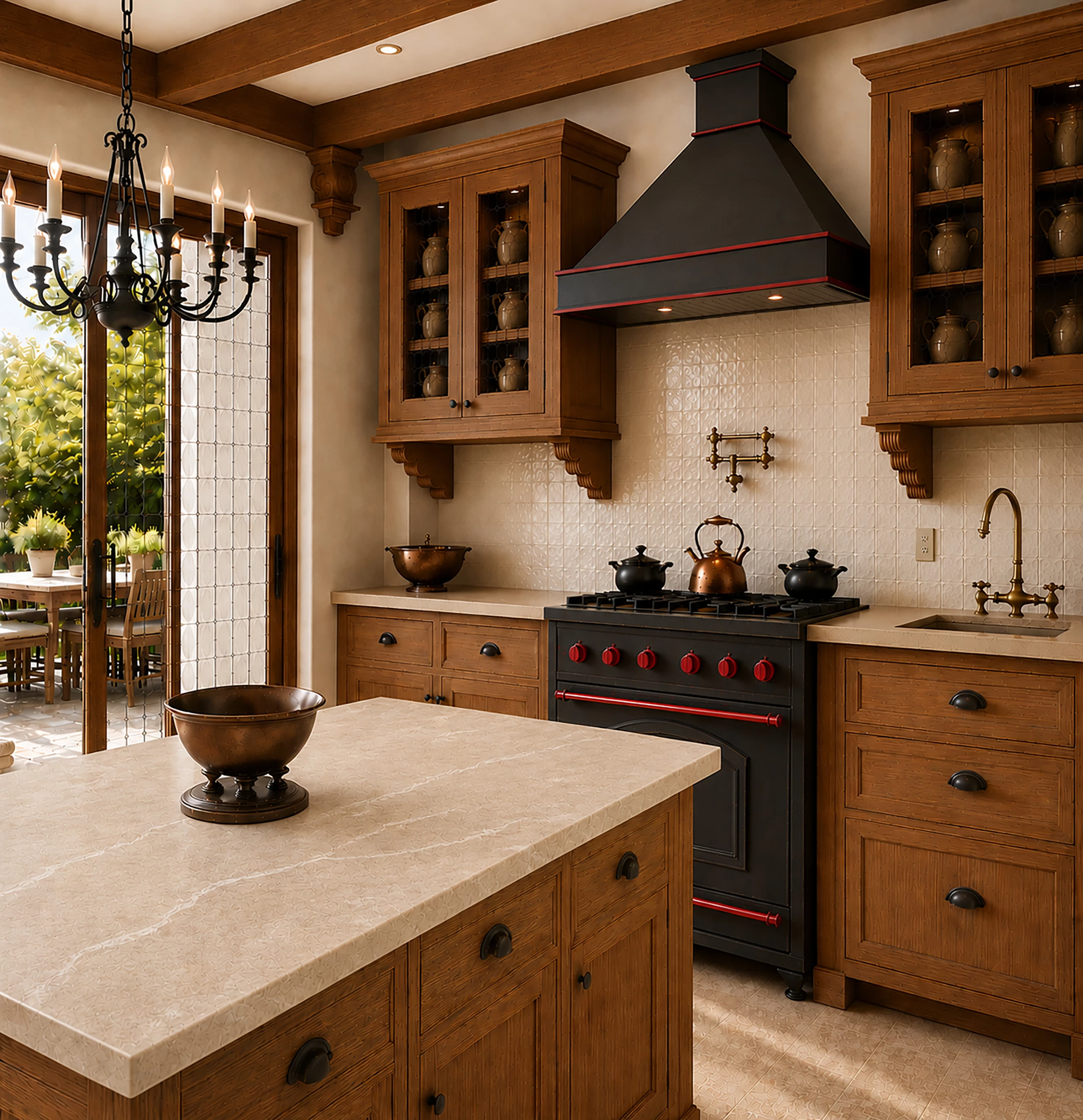
I made red bands, worked 2 hours , made sure kitchen was different.


I checked to make sure there were different pieces and movement. Let the buyers decide. I worked too hard on these! 2 million pictures, it is not possible to make a different AI that will sell. My psychodilic butterfly got accepted, but it will never sell. I am upset! The kitchen is the one I am most upset about. And there were no quality issues because I ran them through an AI generator to find mistakes.

    返信数 9

    jodij28273193
    jodij28273193作成者
    Inspiring
    May 29, 2026

    Your work is beautiful. You said, “So I selected each section separately”. One more question, how do you select a piece of the section? You have given me such good advice. I really thank you. I will not give up!

    daniellei4510
    Community Expert
    Community Expert
    May 29, 2026

    Well, let’s take your kitchen image for example. I’d take a section of the chandelier (1:1 more often than not, and based on ​@Nancy OShea’s comments) and prompt to have it centered over the bowl on the kitchen counter. I’d prompt to have the  hood over the stove lowered and the exhaust section to be lengthened. I’d prompt to remove the drawers under the sink and turn it into a single cupboard. I’d prompt to improve the quality and detail of the cupboards; another one for their contents. It’s always difficult to tell for sure what needs addressing until you upscale the asset to 300 ppi and then view the asset at 200%. 100% is fine for photographs, but AI requires 200%, because I’m convinced that is how the moderators are reviewing AI submissions. 

    Adobe Community Expert | If you aren't submitting your assets in sRGB, you probably didn't read the rules.
    jodij28273193
    jodij28273193作成者
    Inspiring
    May 29, 2026

    Thank you, that helps a lot

    jodij28273193
    jodij28273193作成者
    Inspiring
    May 28, 2026

    I was wondering, how do you get rid of the triangle pattern and micro-texturing? Each of them had about 20 renderings.

    daniellei4510
    Community Expert
    Community Expert
    May 29, 2026

    I’m confused about your question? What particular examples are you referring to?

    Adobe Community Expert | If you aren't submitting your assets in sRGB, you probably didn't read the rules.
    jodij28273193
    jodij28273193作成者
    Inspiring
    May 29, 2026

    For instance, I couldn’t put this up because no matter how many times I generated it, I couldn’t get rid of the triangle or x pattern at the bottom of the splash, or the design in the splash in the air. I did try Photoshop, but I’m not good enough with the program, unless there is a quick fix. Among a few other problems, I see.

    but I’m not good enough with the program, unless there is a quick fix.

    Nancy OShea
    Community Expert
    Community Expert
    May 28, 2026

    I noticed many things about the GenAI kitchen that make no sense. 

    • Exterior window curtains— who does that?
    • The low-hanging chandelier between an island and sliding door is an obstacle course.  Lots of headache potential there.
    • A sink & faucet next to a cook top would never happen for safety reasons.
    • The ventilation hood is too high for practical purposes.
    • Cabinet bank containing identical ginger jars is unrealistic. Cabinets hold dishes & glassware that people use.

    At first glance, the kitchen looks nice but on closer inspection, it’s obviously GenAI. 


    Nancy O'Shea— Product User & Community Expert
    jodij28273193
    jodij28273193作成者
    Inspiring
    May 28, 2026

    It isn’t an exterior curtain; it is a fabric screen. I have them at home, so I put them in.

    May 28, 2026

    Hey ​@jodij28273193 
    I also noticed that the plugs on the wall looked a bit wonky/ unclear.

    ZALEZPHOTO
    Inspiring
    May 28, 2026

    I understand your frustration after putting so much time into this.

    The fact is that right away I saw big issues with three of your assets.

    -In the first of the kitchen, the marble countertop in the foreground has a weird pattern that you will never see in real stone, and it’s the same with the landscape outside. 

    -On the second photo, my eye immediately went to a blurred square area on the bottom of the table close to the book spine.

    -The third is the one is the best, but it’s likely the moderator rejected it bc all the assets have issues specially the last one.  Look at the flag stripes…

    I think we all have gotten caught up in the hype of AI. When it comes to generated images by stock contributors, most seem to think they found a golden pot creating quantity.

    Think about the huge challenge moderators have, having to see… a lot of “junk” or assets that are great, but little mistakes forces them to reject. 

    Don’t be discourage, this is a new art, consider your work school assignments that are teaching and preparing you for the real world. One thing I would keep the same, is your approach that a great finish piece will require a lot of time. Also staying focus on subjects and industries like you shared.

    I truly believe you will conquer this.

    Cheers!   

    ZALEZPHOTO
    May 28, 2026

    Hey ​@jodij28273193 

    The Kitchen looks cool.


    ChatGPT is a great start for Keywords. I also have found starting w a search in Adobe Stock w a rough image first helps save time.
    2nd, with the image uploaded, use different keywords and see what comes up.
    For example, I was messing around w yoga. I found that a man wearing a blue shirt doing yoga only has 20 images or something silly like this. Is there a demand for a many wearing a blue shirt doin yoga … I don’t know. 

    The point is how niche do you want to go w your keywords. sometimes too many is a bad thing as well (possibly). 
    30 hashtags use to be the norm on IG now it’s 3 or something.

    Cheers

    Nate

    Nancy OShea
    Community Expert
    Community Expert
    May 27, 2026

    A search for Legal or Law yields over 2 million results containing the same 4 tropes of the trade:

    • books,
    • briefs,
    • gavels
    • scales. 

    https://stock.adobe.com/search?k=legal 2.3 million

    https://stock.adobe.com/search?k=law 2.9 million


    Choosing Stock subjects is like investing in a multi-level marketing scheme. If you didn’t get there first, it’s too late now.  Find something else.


    Nancy O'Shea— Product User & Community Expert
    daniellei4510
    Community Expert
    Community Expert
    May 27, 2026

    Maddening, isn’t it? It’s all about the keywords. I can kind of understand the kitchen, as those are in abundance. But “judge’s, gavel,” and “judges’s gavel” only gave 300+ results. What keywords did you use for the gavels? Did you come up with your own or did you rely on Adobe’s suggestions?

    Adobe Community Expert | If you aren't submitting your assets in sRGB, you probably didn't read the rules.
    jodij28273193
    jodij28273193作成者
    Inspiring
    May 27, 2026

    I use ChatGPT for my keywords, 49 of them in every picture. There are only so many correct keywords before it becomes spam. I would really like the kitchen relooked at. I mostly saw modern kitchens..

    daniellei4510
    Community Expert
    Community Expert
    May 27, 2026

    Too many. You’re giving the “similar content” algorithm too much ammunition to find words that have been repeated throughout the database. I limit mine to 15-25, with the most common ones moved to the bottom of the list. For example, I post a lot of people, fashion, for example, and the keyword woman gets moved down to the middle or even bottom of my list.

    Adobe Community Expert | If you aren't submitting your assets in sRGB, you probably didn't read the rules.