Answered
Cant select multiple frames with Ctrl
I can select individual files, or multiple consecutive files with shift, but the ability to select multiple no consecutive files using Ctrl doesn't appear to work?

I can select individual files, or multiple consecutive files with shift, but the ability to select multiple no consecutive files using Ctrl doesn't appear to work?
I wasn't aware there was another place I could edit / add keywords as described, but here, this is the page I cannot select multiple images using Ctrl+Left Click. If I select the dog picture top left (shown selected) but then wish to add the 3 further dog images to enable me to add keywords to all those images, I cannot select them. Nothing happens, they don't 'blue surround'. If the images are consecutive, then Shift+Left Click works fine as expected.
I've tried on my desktop and my Laptop both running Windows 10. Ctrl+Left Click works fine on all other Programs, Including Lightroom
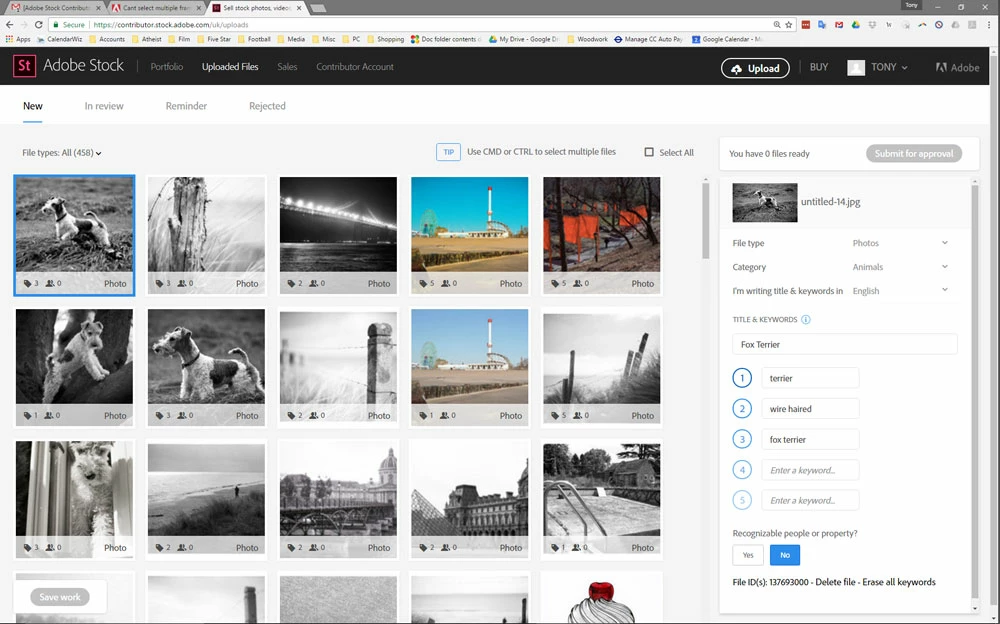
Try doing a right click on screen, do “Inspect Element”, attempt CTRL + Left Click to multi-select again. (do you see errors in console?)
If nothing else works:
1. Clear cache & close browsers… Then retry and see if it fixes it.
2. Try latest version of Firefox
Already have an account? Login
Enter your E-mail address. We'll send you an e-mail with instructions to reset your password.
 AdChoices