



yamato713108855
Community Expert
Community Expert
July 3, 2024
Question

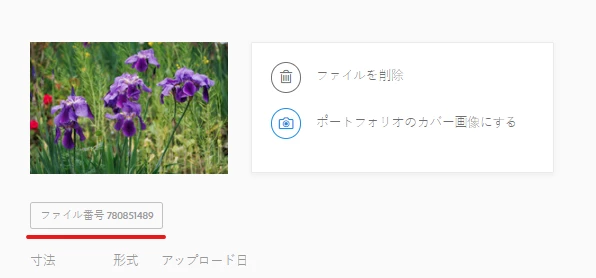
Click on "FILE#XXX" to display the global version page.
  • July 3, 2024
  • 5 replies
  • 1598 views

From the Japanese contributor page, click on the asset's "FILE#XXX".
Previously, the page for that file was displayed in the set language (Japanese), but since the last update, the global version (English) page is now displayed.
Please modify it to display the page in the set language.


Now

https://stock.adobe.com/stock-photo/id/780851489

Previous

https://stock.adobe.com/jp/stock-photo/id/780851489


This topic has been closed for replies.

5 replies

yamato713108855
Community Expert
Community Expert
July 12, 2024

This issue seems to have been fixed.
Even if you post on the community, you can still discuss it, but it won't reach the staff, so you'll need to contact support separately.
Adobe Stock is handled differently from other solutions.

Abambo
Community Expert
Community Expert
July 12, 2024
quoteEven if you post on the community, you can still discuss it, but it won't reach the staff, so you'll need to contact support separately.

By @yamato713108855


It's a user to user forum with some Adobe participation. The contributor forum has very little interaction with Adobe employees. 

ABAMBO | Hard- and Software Engineer | Photographer
yamato713108855
Community Expert
Community Expert
July 6, 2024

There is a link to the global version, but if you are in Japanese, it automatically redirects you to the Japanese version.
If you only look at the global version (English), you won't notice this.


If I change my region setting to Japan, it no longer redirects.
This is a server-side issue.

Abambo
Community Expert
Community Expert
July 8, 2024

I get redirected to French, after I changed the preferred region. 


But the buying pages are in English. Whatever I do set as language. This is not my former the experience. Before, they did a fall-back to my country in French, even that I preferred English (I can select French, German or English for my country). This also happened in Belgium, and the Dutch speaking people complained. And for them it's political. 


And yes, I now believe this to be a bug in the stock site, not the contributor site. So you should file a bug report in the stock forum. 

ABAMBO | Hard- and Software Engineer | Photographer
Nancy OShea
Community Expert
Community Expert
July 5, 2024

JP = Japanese language site. Clear your browser's cached memory with Ctrl + F5 or Ctrl + R.


Nancy O'Shea— Product User & Community Expert
Abambo
Community Expert
Community Expert
July 5, 2024

I still get the assets shown in my region, wich is st to French language. And my region allows to set it to English, German, and French. I prefer English, but it always resets to French. What happens when you set the region to Japan? 

ABAMBO | Hard- and Software Engineer | Photographer
yamato713108855
Community Expert
Community Expert
July 5, 2024

Log in as a Google Chrome guest user.
This user will not receive any existing cache or cookie settings.


https://stock.adobe.com/jp/
Log in to the contributor page from the Japanese AdobeStock site.
Clicking on the file number from that page will take you to the Japanese page.


When viewing Adobe Stock from a Discord post or search page, it may change to another language.
To fix this, change the region at the bottom of the page to "Japan", which seems to cause this phenomenon.
In other words, it seems that this phenomenon is caused by a malfunction of Adobe Stock.
It's a bug.

Abambo
Community Expert
Community Expert
July 6, 2024

In general, when someone posts a link to an asset, and you click the asset, it will show the asset in the posters region, except if they use the generic url, with the country code removed. 

ABAMBO | Hard- and Software Engineer | Photographer
PaintedKitty
Community Expert
Community Expert
July 4, 2024

Never mind. I guess this is yet another tech issue.