Known Participant
September 1, 2023
Answered

Deleting Submitted Files

  • September 1, 2023
  • 2 replies
  • 881 views

I need to delete a few files that were submitted for approval.  How do I do that?  

This topic has been closed for replies.
Correct answer daniellei4510

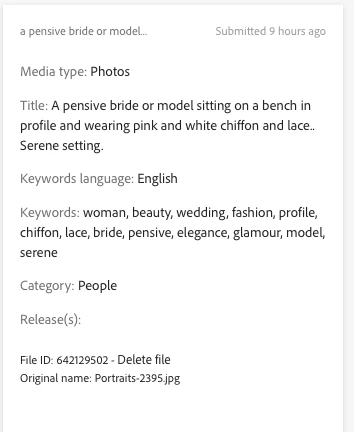
Oh, wait. Now I see what you mean. Notice the bottom of this image there is a Delete file link.

2 replies

FernLAuthor
Known Participant
September 2, 2023

The files are in Review and I don't see a trash can


daniellei4510
Community Expert
daniellei4510Community ExpertCorrect answer
Community Expert
September 2, 2023

Oh, wait. Now I see what you mean. Notice the bottom of this image there is a Delete file link.

Adobe Community Expert | If you aren't submitting your assets in sRGB, you probably didn't read the rules.
FernLAuthor
Known Participant
September 2, 2023

It is missing.  I don't see anything after Release(s):   UGH UGH


daniellei4510
Community Expert
Community Expert
September 1, 2023

Easy. Go to your "New" page where the files are awaiting approval, and on the far right side you will see a trash can. Select the images you wanted deleted and click on the trash can icon.

Adobe Community Expert | If you aren't submitting your assets in sRGB, you probably didn't read the rules.
FernLAuthor
Known Participant
September 1, 2023

They are in review.  I don't see a trash can for this section

daniellei4510
Community Expert
Community Expert
September 2, 2023

Not even here? 

Adobe Community Expert | If you aren't submitting your assets in sRGB, you probably didn't read the rules.