PorroPete
Inspiring
December 19, 2025
Answered

EPS upload rejection for these reasons, that I don't understand

  • December 19, 2025
  • 3 replies
  • 647 views

Your file has one or more of these issues:

  • Your vector file contains a raster/bitmap image, and vector files must not contain raster elements.
  • Your JPEG preview file has been compressed too much, so textural problems have occurred in the file.
  • Your JPEG preview resolution must not be less than 5,000 X 3,000 (15 million pixels)
  • You didn't use anti-aliasing when exporting your vector file to JPEG, so there are problems with lines on the JPEG file.

#1 possible but it's a vector?

#2 What preview, it's imbedded, and a TIFF, I didn't upload a JPG

#3 Maybe, if there was a preview?

#4 I didn't export a vector to a JPG, it is a Vector.


Am I totally missing this? I uload a Vector, EPS, I add the data, and I supposed to be somehow uploading image pairs, with a JPG, instead of a stand alone EPS? A year ago when I was uploading both, I was told that it's possible that Adobe would consider that spamming my files, and I should only upload a vector.


Which leaves me with, maybe, if I'n guessing right, I need to have the artboard on the vector 15MP minimum? But honest, it's a scalable vector.


Can someone translate or decipher this please?

 

Correct answer Nancy OShea
quote

I'm a photographer, so Illustrator and CS, is like which is which, the Greek Gods or the Roman Gods, and which is which. Raster or Vector? They are both images to me. 😁

By @focused_Breeze157F

============

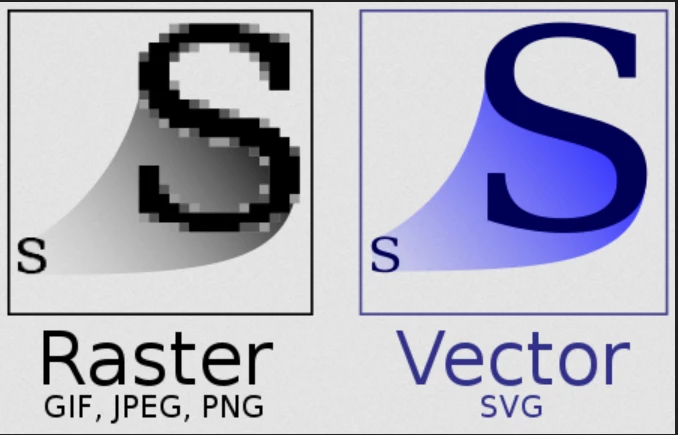
Raster is pixel-based for photos and photorealistic images or paintings.


Vector is math-based, for text, icons, logos, drawings, flat colored illustrations (cartoons & comics).

See screenshot.


The main benefit of vectors is that they are resolution independent, meaning they can be rescaled to any size without quality loss. You can't do that with pixel-based rasters. 


3 replies

Abambo
Community Expert
Community Expert
December 22, 2025
quote

Your file has one or more of these issues:

  • Your vector file contains a raster/bitmap image, and vector files must not contain raster elements.
  • Your JPEG preview file has been compressed too much, so textural problems have occurred in the file.
  • Your JPEG preview resolution must not be less than 5,000 X 3,000 (15 million pixels)
  • You didn't use anti-aliasing when exporting your vector file to JPEG, so there are problems with lines on the JPEG file.

#1 possible but it's a vector?

#2 What preview, it's imbedded, and a TIFF, I didn't upload a JPG

#3 Maybe, if there was a preview?

#4 I didn't export a vector to a JPG, it is a Vector.


Am I totally missing this? I uload a Vector, EPS, I add the data, and I supposed to be somehow uploading image pairs, with a JPG, instead of a stand alone EPS? A year ago when I was uploading both, I was told that it's possible that Adobe would consider that spamming my files, and I should only upload a vector.


Which leaves me with, maybe, if I'n guessing right, I need to have the artboard on the vector 15MP minimum? But honest, it's a scalable vector.


Can someone translate or decipher this please?


By @focused_Breeze157F

The fast answer is: the boilertext here is really outdated and nobody at Adobe knows it, because they do not follow this forum. Shame on them. Just ignore it.


1: If it's a vector, it can't contain raster assets. this, however, is complicated, and depends on how the asset has been created and if there is transparency, which isn't supported by EPS.


2, 3, 4: It's not targeted to your situation, but to a theoretical issue, that could have occured (and was not theoretical, but still wasn't targeted) a few years ago, where the user uploaded both, the vector asset and the JPEG preview. 


It's very probably that you have a different issue. Check the quality requirements as given by @Nancy OShea .

ABAMBO | Hard- and Software Engineer | Photographer
Nancy OShea
Community Expert
Community Expert
December 19, 2025

That email is a generic list of POSSIBLE reasons for refusal. Take it with a liberal dose of salt. Nothing in that blurb is specific to you or your asset. 


Read the Vector Requirements below for more details about what Stock expects.


Also keep in mind that EPS is a legacy file type that's rarely used by designers anymore. Most Stock customers prefer vectors sold as Adobe Illustrator .AI or .SVG files. These file types provide more functionality for experienced vector users.


Hope that helps. 


Nancy O'Shea— Product User & Community Expert
PorroPete
PorroPeteAuthor
Inspiring
December 19, 2025

Thanks for that and also for answering the question I didn't ask, but I had been wondering about. I know we are guessing sometimes at multiple possible rejection reasons, but I think from what's been accepted in the past and the latest batch, it was the size.

I wondered about uploading .AI files and it's actually easier than EPS for me. I'm a photographer, so Illustrator and CS, is like which is which, the Greek Gods or the Roman Gods, and which is which. Raster or Vector? They are both images to me. 😁


Todays and yesterdays uploads were accepted. I'll take that as a sign. I also deleted the marginal useful images, and I'm starting over, only the most useful, instead of how many images do I have. Good luck everyone else who's trying to get their workflow down and have consistant review results. I don't blame Adobe for being cautious. I'm just working at getting mine right and having them done the right way.

﹏𓊝﹏ Great Place on a Great Lake = My Port of call ☠︎
Nancy OShea
Community Expert
Nancy OSheaCommunity ExpertCorrect answer
Community Expert
December 19, 2025
quote

I'm a photographer, so Illustrator and CS, is like which is which, the Greek Gods or the Roman Gods, and which is which. Raster or Vector? They are both images to me. 😁

By @focused_Breeze157F

============

Raster is pixel-based for photos and photorealistic images or paintings.


Vector is math-based, for text, icons, logos, drawings, flat colored illustrations (cartoons & comics).

See screenshot.


The main benefit of vectors is that they are resolution independent, meaning they can be rescaled to any size without quality loss. You can't do that with pixel-based rasters. 


Nancy O'Shea— Product User & Community Expert
AlexBond
Inspiring
December 19, 2025

Forget it.
The text that accompanies an asset rejected for “quality issues” is one of the few, but quite vivid, real-world examples of Gregory Bateson’s "double bind" concept ( https://en.wikipedia.org/wiki/Double_bind ), which Adobe uses to confuse contributors. Don’t read it, and don’t take that text seriously.


The current requirements for vector files can be found here:
https://helpx.adobe.com/stock/contributor/help/vector-requirements.html


Just check your asset against those requirements, and if everything is fine, you’ll get a “similar content” rejection instead of a “quality issue.” (That’s sarcasm, of course.)