
scottsegler
Participant
September 1, 2018
Answered

Exposure Problem

  • September 1, 2018
  • 3 replies
  • 1458 views

It can be very frustrating when the reviewers give no feedback, beside the generic 'exposure problem.'  Is there a place where they are typing clues but I just haven't found it?  I already brightened this picture 0.5 stops in another version and resubmitted, but that too was rejected for the generic 'exposure problem' (no feedback provided that I can find).  I assume they're not looking for me to turn night into day, which would be comical. Is it the camera screen?  Is it the rocks (which has some clipped shadows in the cracks where there is no light, it's night). 

This one really has me scratching my head, but one can only spend so much time on a stock photo.  Since I can't seem to find any notes, I have since sent this picture to two other stock services where the photo was twice accepted, which is a shame because I enjoy using Adobe.  I would really appreciate it if someone could help me understand for future submissions.  It must be right in front of my nose, but for some reason I just can't see it.
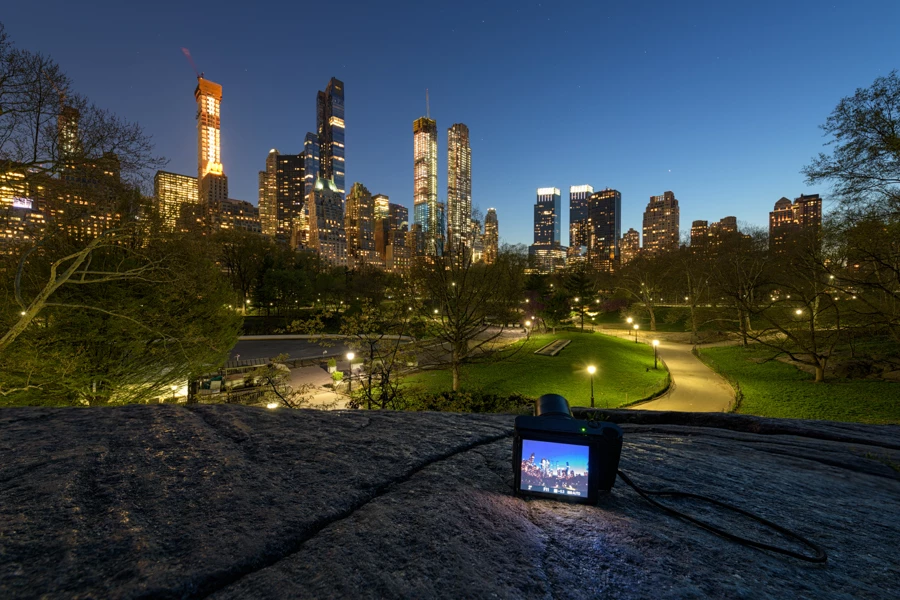
8256x5504, 30 sec. f/8 14mm, D850, 14-24mm f/2.8, ISO 80
This topic has been closed for replies.
Correct answer Ricky336

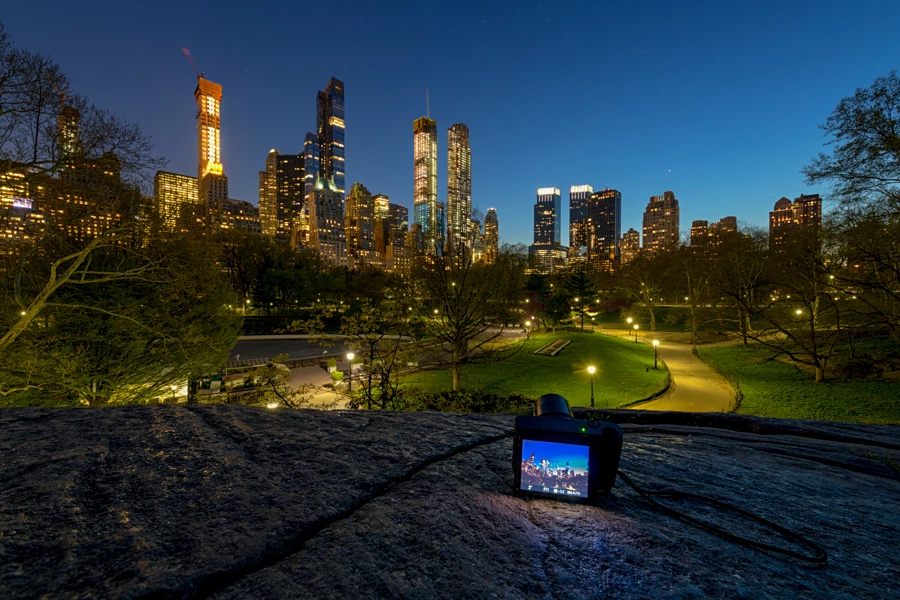
As it is a night time shot, you don't seem to have a lot of depth to your colours - kind of washed out a bit. I think you need you to darken your exposure a bit. The sky is a bit washed out and not a deeper blue as it should be. I guess you took this in raw, so I would suggest that you darken your exposure a bit. Something like this maybe! Although the difference here is subtle, it is more noticeable in Adobe Photoshop. However, this could also be a matter of opinion! Sometimes, it is only a subtle difference between acceptance and rejection, as I have found out myself!

3 replies

joanH
Inspiring
September 1, 2018

Hello scottsegler,

Abambo and rickey336 are very good with this sort of thing. I do notice something not mentioned by either. The very strong white in places of the picture from the tv screen in the foreground to the street lights and many building lights. If you will take down any glare and mute the whites that stand out, it will help your next review. I presume you are looking at this shot at 100-200 % magnification where all things show up.  Is there a reason you left the bottom part in? The tv set seems to have a picture of a picture in a picture, but I wonder if a buyer could find a use for it.  Take a look and do look at the guidelines for contributors to Adobe Stock. Best regards, JH

https://helpx.adobe.com/stock/contributor/help/quality-and-technical-issues.html

Select an article:

ON THIS PAGE

Applies to: Stock Contributor

Last Published: September 25, 2017

Abambo
Community Expert
Community Expert
September 1, 2018

joanh22203655  wrote

Is there a reason you left the bottom part in? The tv set seems to have a picture of a picture in a picture, but I wonder if a buyer could find a use for it. 

Hi Joan!

Thanks for the flowers. Just to say: The "TV set" is really a camera and there is a reflection of that on the rock. If you take that part away, you need to cut of the whole rocky part.

ABAMBO | Hard- and Software Engineer | Photographer
joanH
Inspiring
September 1, 2018

You are right and I was hinting that might be a good thing, crop the entire bottom/rock section. Best regards, JH

Ricky336
Community Expert
Ricky336Community ExpertCorrect answer
Community Expert
September 1, 2018

As it is a night time shot, you don't seem to have a lot of depth to your colours - kind of washed out a bit. I think you need you to darken your exposure a bit. The sky is a bit washed out and not a deeper blue as it should be. I guess you took this in raw, so I would suggest that you darken your exposure a bit. Something like this maybe! Although the difference here is subtle, it is more noticeable in Adobe Photoshop. However, this could also be a matter of opinion! Sometimes, it is only a subtle difference between acceptance and rejection, as I have found out myself!

Legend
September 4, 2018

Much better image if you cut away the monitor imo.

scottsegler
Participant
September 6, 2018

Thanks so much oleschwander, I appreciate the feedback. I took the picture that you suggested.  That is a different shot and is in the native 8256x5504 without being cropped.  This one here was intended to be a recreation shot about photography or travel related, with the theme of taking pictures in Central Park with the night lights.  It's not a big deal and really doesn't matter.  This image is now available for sale elsewhere so I won't be editing it any further.

I was just hoping to understand the mysterious "exposure problem" that has me scratching my head and is not clear in the histogram.  Some people have suggested it needs brightening while others think it needs to be darkened with, perhaps, increased saturation.  I just wanted to know for future submissions so that I could improve and better meet the guidelines.  The note that I was given doesn't provide any guidance on this shot.

Abambo
Community Expert
Community Expert
September 1, 2018

At a first sight, the picture seams to be ok. I suppose it’s that stripe of trees causing problems. It took me some time to understand that part of the image. Slight editing in that part could help.

ABAMBO | Hard- and Software Engineer | Photographer