hansy35196041
Participant
May 22, 2018
Answered

Exposure problems... I realy don´t understand the problems...

  • May 22, 2018
  • 2 replies
  • 1406 views

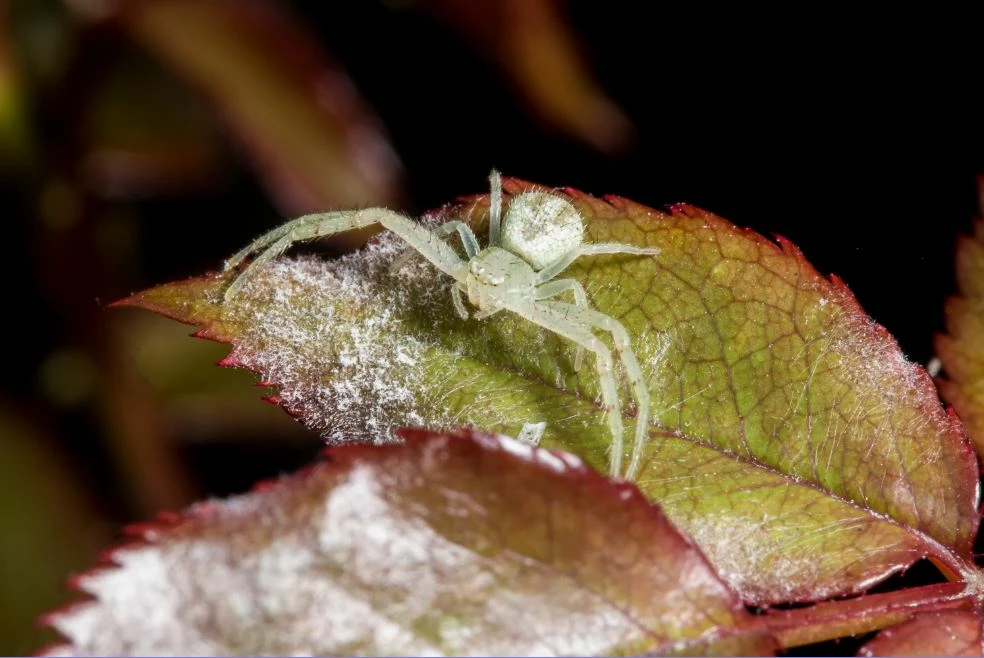
The reason for rejection indicates that it may be due to an incorrect exposure (overexposed or underexposed) ,the subject of the photo is the spider, is overexposed?

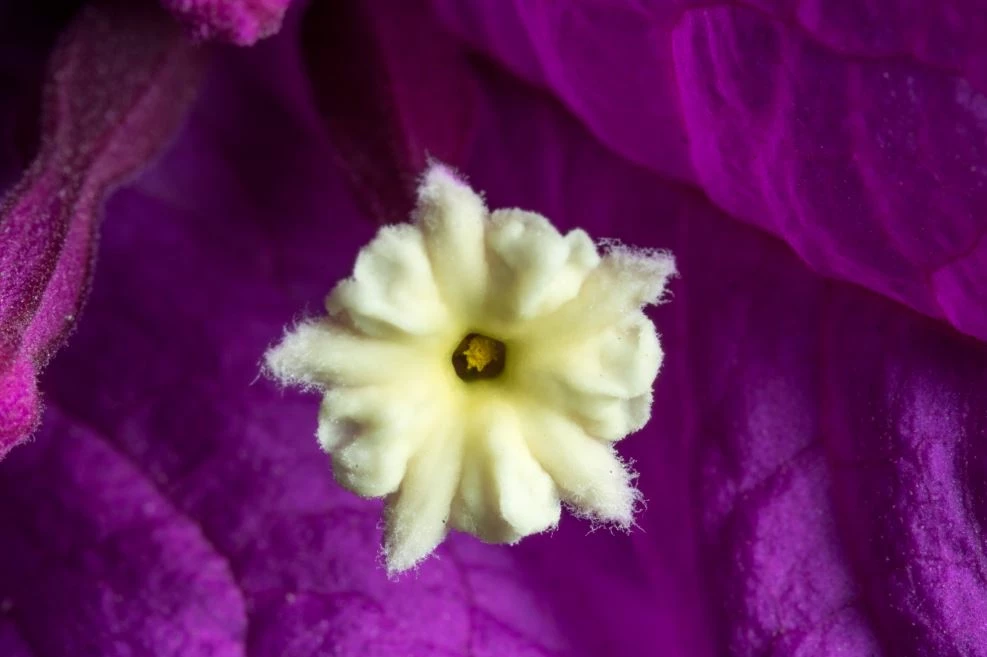
Tell me the same reason for rejection in the flower (the bugainvillea real flower is the white one), is overexposed or underexposed? or is the rest of the photo?

This topic has been closed for replies.
Correct answer v.poth

Thanks for your comments, all are helpful.  At the end, I understand that the pictures, in most cases, are appreciated about the technical aspects... and of course not everyone has the same point of view.  Some times artistic aspects can't be measured only with the technical aspects and some times for me is more important to show something that looks just like it is in the real world.  Most of the time I don't like to modify the scenarios where I capture the subjects, but it's OK, like I said, every person will judge from their own perspective or in this case, by the rules of the site.

Thanks to all for your comments, I appreciate all of them and I think there is no correct answer... and at the end, every one is giving their opinion on what is their best guest about the reasons of the rejections... so again, thanks to every one to share some of your knowledge in these cases.


Hi,

I think as experienced providers we have analyzed all aspects concerning the reasons for rejection correctly and here you can learn something for yourself concerning the microstock industry and photography in general. If you can't find an answer here then you have to acquire a lot of knowledge here.

If you mean that you photograph things somehow and they look the way they just looked to you through the viewfinder at that moment and find that natural, is your view certainly not based with photographic knowledge and skill.

I think it's pretty presumptuous to associate your beginner-level photography with any artistic aspects. And this is certainly not a question of the viewer's taste, it can be objectively assessed.

I don't think you can take big steps forward with this attitude in photography in general and certainly not in the field of stock photography either.

2 replies

Ricky336
Community Expert
Community Expert
May 23, 2018

You have to pay attention to your histogram. The histogram shows both pictures are slightly underexposed, (you have a lot of dark areas) but you also need to determine what is important in your picture to determine the correct exposure. If you don't know much about this, then research on this. There is a ton of information about how to use histograms on the internet.

You could try and use curves in Photoshop, or similar editing programme. Both pictures look a bit 'flat'.

Subtle changes on the leaf, the spider and background need to be made. By using curves, you can also alter the contrast. The spider needs to stand out a bit more. I also think that the leaf in the foreground is distracting, but that is another issue. In this case, you need to think about composition.

Regarding the flower shot - I also think the background is overpowering the flower. So, again curves would be good here. You also need to be careful of the white areas on the petals.

Hope this helps.

hansy35196041
Participant
May 23, 2018

Thank you for your comments, I will pay more attention to that in the future.

joanH
Inspiring
May 22, 2018

These are good examples to send to this forum. Let's see what comes of this one.

My eyes tell me that there is a color mix between the purple background and the fuzzy edges of the flower. While this might not be exposed incorrectly, it is some bleeding of color that is a problem. In Photoshop I would lessen the background color which is overpowering the flower. One can fade the background using curves and several other tools.

Hopefully, you own these programs.

The spider probably needs less exposure to sharpen the lines of the spider and have it stand out from the backgrounds.

So, in Adobe Lightroom or Photoshop you can test various exposures and lighting to help color and saturation. Camera Raw is a good one to look at also.

I have a problem with the foreground leaf which is out of focus and in the way of the true subject. I might select and cut out the foreground leaf and select and copy the sharp pieces of the leaf and paste into the photo.  Layers must then be. To get a sharp leaf in the foreground I would select - copy - paste the leaf on the upper right side. Using free-transform I would then turn that piece upside down so it fits the lower leaf in this mage and then stop there  - unless you need to do a bit of patchwork using the healing tool.

I hope you try this - it is very useful and can save a very good photograph from the trash. Best to you. JH

hansy35196041
Participant
May 23, 2018

Thank you for your time...I will try to take care of those details.