
Known Participant
March 19, 2026
Question

Fails Quality Standards

  • March 19, 2026
  • 6 replies
  • 122 views

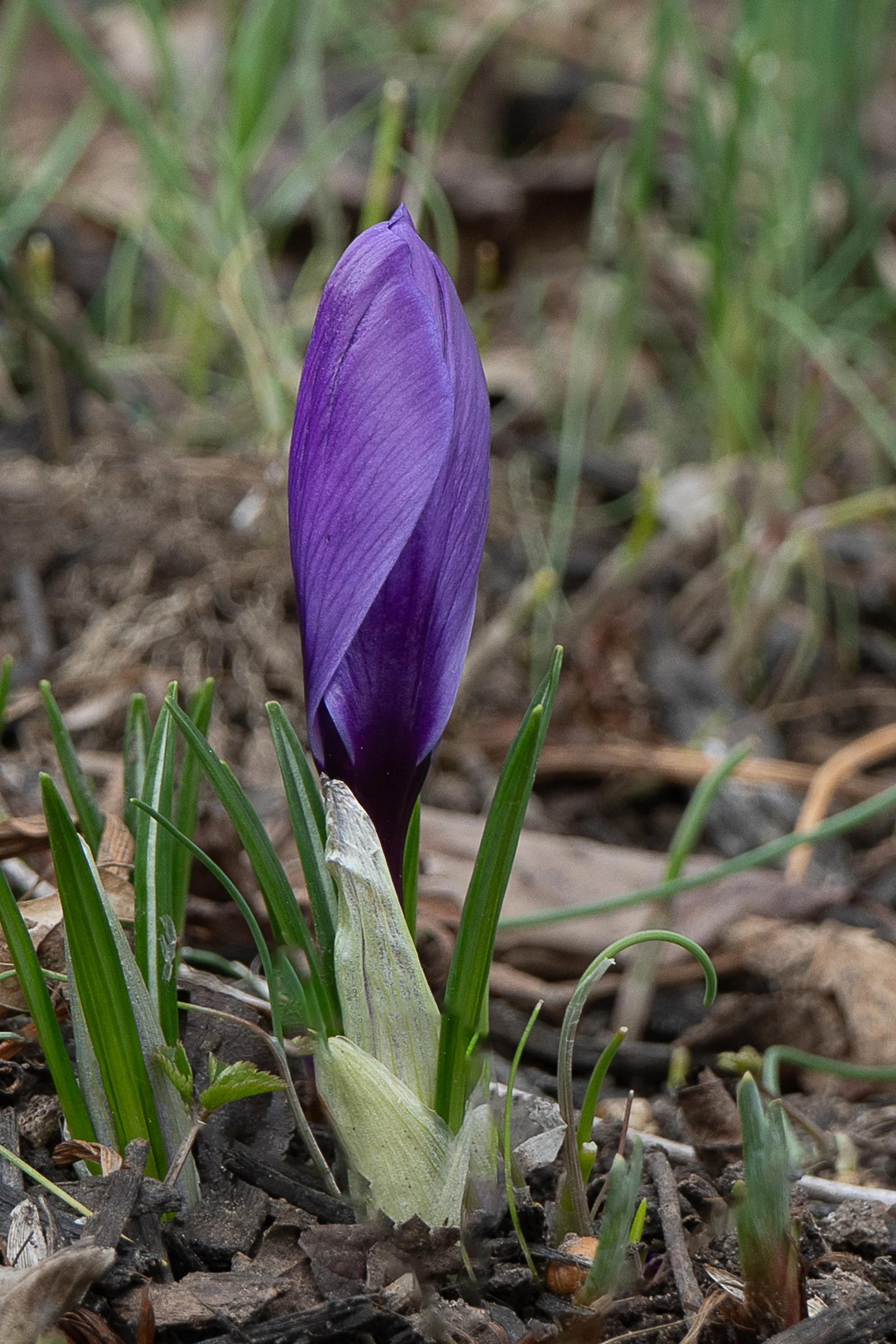
This is a photo I submitted which was rejected for the reasons below.  I’m hoping to get some CC so I can understand how to do better.  Thank you.

Unfortunately, this image doesn't meet our quality standards so we can’t accept it into our collection.
Common issues that can impact the technical quality of images include exposure issues, soft focus, excessive filtering or artifacts/noise.
 

    6 replies

    March 19, 2026

    Hey ​@Inspiring_Brilliance157F 
    Consider landscape ratio. 
    Where would this image be used?
    Who is going to want to buy the image?
    What/ how is the consumer going to use this image?

    If it is for social media… then consider zooming in and remove a lot of those sprouting bits, twigs, and other distractions. Especially if there is something coming out of the top.

    Cheers

    Nate

    Known Participant
    March 19, 2026

    I understand your point thank you.  But surfing through posts and expert comments in the forum I’ve seen the experts tell people to not crop too tight and leave room for the customer to crop themselves …”It’s the clients responsibility to crop…”.  How tight is too tight?

    jacquelingphoto2017
    Community Expert
    Community Expert
    March 19, 2026

    Hi ​@Inspiring_Brilliance157F 

    Too tight means cropping too close to the main subject. Copping too close to the subject could create an issue when the customer is cropping. Also a customer might need a small amount of negative space for use. As I said to you before, focus on the camera cropping and let the customer decide the rest. Once you get the subject with a small amount of negative space around it, that is good enough. You’re producing raw material, not finished product. The only thing you must remove after shooting are IP and MR elements that you have no permit for. And if there is an element in you subject’s way that might distract from it, in which case you should have removed before taking the picture.

    Best wishes

    Jacquelin


    jacquelingphoto2017
    Community Expert
    Community Expert
    March 19, 2026

    Hi ​@Inspiring_Brilliance157F 

    Your photo is excessively noisy.

    There is a blue color fringing on the edge of the petal and details are lost in the dark areas.

    Your subject might be slightly underexposed or you needed to direct some light in the shadow areas.

    Best wishes

    Jacquelin

    Known Participant
    March 19, 2026

    Thank you Jaquelin

    I thought that noise was bokeh.  The out of focus distance behind the image  

    the light color you see is the color the flower opens to be when the petals are not closed tight.  That edge is the beginning of that process.  It. Was a gray overcast, day with light rain so there was no detected light.   
     

    I put the full un touched photo and one of the opened flower in Facebook, where you can see there was a lot of cropping done and the color of the flower .  Could the noise and soft edges be from

    1) the distance I cropped in to

    2) the quality of my lens (kit 38-70, not a macro lens)

    jacquelingphoto2017
    Community Expert
    Community Expert
    March 19, 2026

    Hi ​@Inspiring_Brilliance157F ,

    I’m not sure what light you’re talking about. Your bokeh should be smooth, not grainy. You have a dark area that needed light. So I am saying you should have shone some light there. That could have be done by reflection. The edges have a blue color that is not natural. The color is an in camera issue. You need to do post processing to correct those. Those are the quality issues with you picture:

    Color fringing

    Dark area where details are lost

    Noise Grain

    Those need to be corrected before Adobe consider accepting your file.

    Best wishes

    Jacquelin

    Cosmic Studio
    Known Participant
    March 19, 2026

    One thing I’ve found helpful when resubmitting an asset is choosing a title that highlights what makes the image different. For example, you could emphasize that it’s a “single closed crocus.” That narrows the competition to around 66 results, which may help your image stand out and be approved.

    English isn’t my native language, but I’ve also noticed that terms like ‘bud’ or ‘in bud’ are commonly used in these cases. 

    And be careful when resubmitting the same photo multiple times, as it may be considered spam by the third submission.

    Known Participant
    March 19, 2026

     Good advice, thank you.  

    I’ve had photos fail for quality 2 or 3x then for being too similar to other photos.   I was not aware the name was part of the similarity check. Only that the Guide says to rename resubmissions.   I’ve been using [filename]-2, -3….for my convenience to track submissions.  A behavior from work where we used tags like  R1, R2…Rev1, Rev2, U1, U2 for tracking and sorting purposes.  
     

    Being new at this I’m still developing my methods.  

    Nancy OShea
    Community Expert
    Community Expert
    March 19, 2026

    I think what ​@daniellei4510  was trying to say is that flowers are very generously represented in Stock inventory. It’s a tough sell because there’s too much competition from other flowers.

    Ditto for sunsets, trees, leaves, plants and pets. To succeed at Stock, you have to think outside the mainstream box.


    Nancy O'Shea— Product User & Community Expert
    Nancy OShea
    Community Expert
    Community Expert
    March 19, 2026

    It’s underexposed and lacks much color vibrance.

    This is what you’re competing with in Stock inventory.

    https://stock.adobe.com/search?k=purple+crocus

    Nancy O'Shea— Product User & Community Expert
    daniellei4510
    Community Expert
    Community Expert
    March 19, 2026

    Yes. Failed to type the word flowers in there. Thanks for nothing, Grammerly.

    Adobe Community Expert | If you can't fix it, hide it; if you can't hide it, delete it.
    daniellei4510
    Community Expert
    Community Expert
    March 19, 2026

    The dead center subject makes a a weak composition. There are also over 76 million images on Adobe Stock, though the number is far lower if someone is looking specifically for crocuses. But do a search for same and look at your competition. 

    Adobe Community Expert | If you can't fix it, hide it; if you can't hide it, delete it.