
Known Participant
December 16, 2022
Answered

Feed back required

  • December 16, 2022
  • 6 replies
  • 828 views

"Thanks for giving us the chance to consider your image. Unfortunately, this image doesn't meet our quality standards so we can’t accept it into our collection.

Common issues that can impact the technical quality of images include exposure issues, soft focus, excessive filtering or artifacts/noise. Learn more about our technical requirements"


This topic has been closed for replies.
Correct answer Abambo

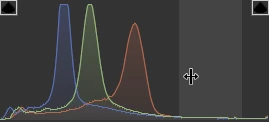
Sharpness is not great, but it's OK. The histogram shows a highly underexposed picture.

Whites and highlights are missing.


Your framing is not great. You should have put the whole chain in the frame, instead of having cut off elements to the right and lower border. The shadow in the upper-left corner is disturbing.


You can try to correct the exposure and crop out the shadow and resubmit.

6 replies

Known Participant
December 16, 2022

Abambo
Community Expert
AbamboCommunity ExpertCorrect answer
Community Expert
December 16, 2022

Sharpness is not great, but it's OK. The histogram shows a highly underexposed picture.

Whites and highlights are missing.


Your framing is not great. You should have put the whole chain in the frame, instead of having cut off elements to the right and lower border. The shadow in the upper-left corner is disturbing.


You can try to correct the exposure and crop out the shadow and resubmit.

ABAMBO | Hard- and Software Engineer | Photographer
Known Participant
December 16, 2022

Thanks for that advice, where can I learn more about histograms and how to use them?

Abambo
Community Expert
Community Expert
December 16, 2022

You need to upload the file, as submitted to Adobe stock so that we can analyse it. Either you use “Insert Photos”, or you use the drag-and-drop area of this forum. But please don't attach more than two or three pictures.

If you are new to stock, you should consider these resources: https://helpx.adobe.com/stock/contributor/tutorials.html
Please read the contributor user manual for more information on Adobe stock contributions: https://helpx.adobe.com/stock/contributor/user-guide.html
See here for rejection reasons: https://helpx.adobe.com/stock/contributor/help/reasons-for-content-rejection.html
and especially quality and technical issues: https://helpx.adobe.com/stock/contributor/help/quality-and-technical-issues.html

ABAMBO | Hard- and Software Engineer | Photographer
Ricky336
Community Expert
Community Expert
December 16, 2022

Hello,

Are you trying to upload your rejected photos to your post?

Have you tried this method?

Use the picture icon to upload to your post.


Known Participant
December 17, 2022

I had to switch off my anti track software

Legend
December 16, 2022

Please try different ways. Or tell us the errors you get when uploading. For sure, we can't comment on your pictures until we can see them...

Henrik Heigl
Community Expert
Community Expert
December 16, 2022
regards,Henrik
Known Participant
December 16, 2022

I have tried uploading the reject images but for some reason I am not having any luck with that process