


Inspiring
Jul 31, 2021 9:52 AM UTC
Answered

Filezilla can not connect to FTP for uploading video. timed out.

I can not connect to contributor ftp account for video uploading, i increased filezilla timeout setting but not help.


Here filezilla log messages:


Status: Connecting to sftp.contributor.adobestock.com...
Status: Using username "xxxxxxxxxx".
Command: Pass: *********
Error: Connection timed out after 20 seconds of inactivity
Error: Could not connect to server
Status: Waiting to retry...
Status: Connecting to sftp.contributor.adobestock.com...
Response: fzSftp started, protocol_version=11
Command: open "xxxxxxxxxx@sftp.contributor.adobestock.com" 22
Status: Using username "xxxxxxxxxx".
Command: Pass: *********
Error: Connection timed out after 20 seconds of inactivity
Error: Could not connect to server


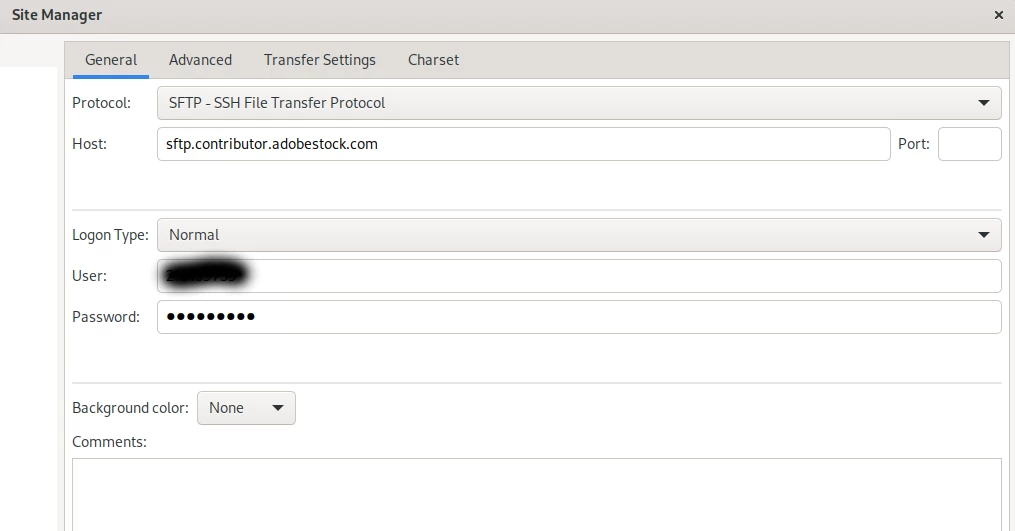
Here filezilla setting.
This topic is closed to new replies. Start a new post to keep the conversation going.
SANALRENKCorrect answer
Inspiring
Aug 2, 2021 10:15 AM UTC

When I create a new password and copy it with the mouse, there seems to be no space in sight, but when I paste it into a text document, the space is also copied.


My issuse is resolved.

5 replies

jacquelingphoto2017
Community Expert
Community Expert
Aug 1, 2021 12:56 AM UTC

Hi @SANALRENK ,

I'm sorry to hear about your experience. I suggest you first check your Internet speed and ping using a speed test application. speedtest.net is one you can try. For upload you must see at least half the speed of you service. Ping must not exceed 50ms. Do the test multiple times in succession so that you'll identify glitches or interruption of service if there's any. If all is well please send a ticket to Adobe using the Contact us at the bottom of your contributor page. Explain in details the issue you experience.


Best wishes

JG

Photographer and Nutrition Author


Translate
SANALRENKAuthorCorrect answer
Inspiring
Aug 2, 2021 10:15 AM UTC

When I create a new password and copy it with the mouse, there seems to be no space in sight, but when I paste it into a text document, the space is also copied.


My issuse is resolved.

Translate
EYEIDEA
Inspiring
Sep 1, 2021 4:35 AM UTC

this worked for me too

Translate