
Participant
November 15, 2022
Answered

Filling out form W-8BEN

  • November 15, 2022
  • 4 replies
  • 3884 views

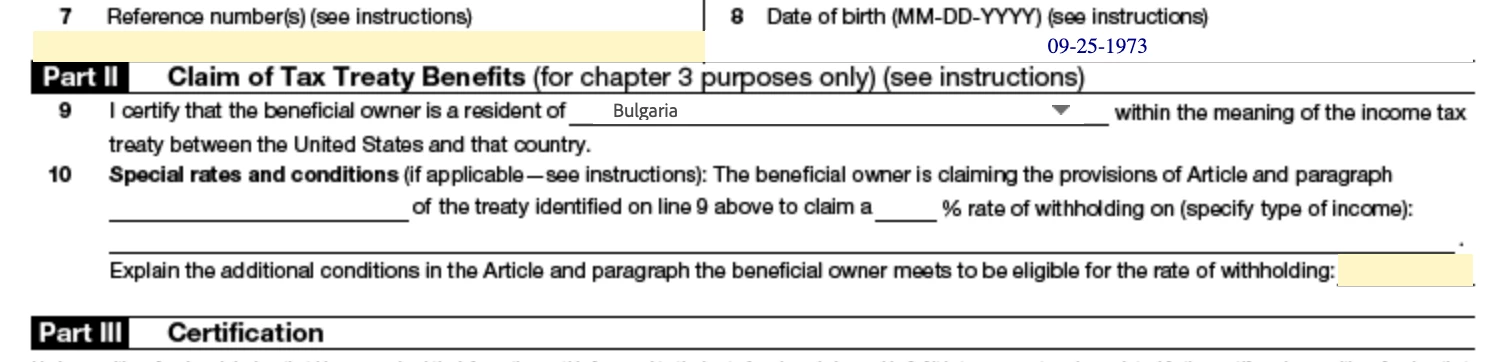
Hi, I am trying to update my tax form. Unfortunately in Part II point 10 is not fillable(yellow bar does not exist). I can not fill in the Article, the percent of rate and additional conditions(space is too small for a centance.)
This topic has been closed for replies.
Correct answer Abambo

The IRS provides the form. I suggest you go to https://helpx.adobe.com/stock/contributor/help/Contributor-tax-FAQ.html and use the e-mail given at the first question to ask how you should fill in the formulary.


4 replies

carlosb87782097
Participating Frequently
November 17, 2022

For other who can have the same doubt,I contacted Adobe tax team and got this anwser:
"the system is not allowing you to fill out this section because, under the U.S. / Spain Tax Treaty, all types of royalties are withheld at exactly 0%. Therefore, you do not need to specify the rate in the form. 0% will automatically apply. The system only allows contributors to fill out this section if they are from a country where they will need to specify what rate they are claiming. For you, that section is removed for simplicity."

carlosb87782097
Participating Frequently
November 16, 2022

I am also having this issue,in Spain.The tax rates (https://helpx.adobe.com/es/stock/contributor/help/withholding-rates-country.html?cq_ck=1503513388328) has changed from 5% I had so far to 0%,also the article from 12(2) to 12(1). I have checked other countries with 0% rate and neither enabled those fields.Just the ones with different rates to 0%.
I was also wondering if is ok leave those fields unfilled for a total tax exemption ,or if is a bug of the Adobe code.
Maybe some staff member can answer this.


carlosb87782097
Participating Frequently
November 16, 2022

I see you are in Bulgaria that has a 5% ,so I checked more countries and some ones enables the fields and others no. Nothing to view to the withholding rate. I have no idea what is the reason. In other posts I have seen that Adobe staff doesn't provide info about how to fill the form, but since this is done by their code I guess they can clarify something about it.

Abambo
Community Expert
Community Expert
November 16, 2022

The original form can be downloaded and inspected on the website from the IRS. https://www.irs.gov/forms-pubs/about-form-w-8-ben


(with instructions)

ABAMBO | Hard- and Software Engineer | Photographer
RALPH_L
Community Expert
Community Expert
November 16, 2022

If you specify that a treaty exists, you do not have to fill in 10. The provisions are in the treaty.

Abambo
Community Expert
Community Expert
November 16, 2022

Bulgaria has a treaty.

ABAMBO | Hard- and Software Engineer | Photographer
Abambo
Community Expert
AbamboCommunity ExpertCorrect answer
Community Expert
November 16, 2022

The IRS provides the form. I suggest you go to https://helpx.adobe.com/stock/contributor/help/Contributor-tax-FAQ.html and use the e-mail given at the first question to ask how you should fill in the formulary.


ABAMBO | Hard- and Software Engineer | Photographer