Participant
November 5, 2020
Question

FTP upload of videos doesnt work!?

  • November 5, 2020
  • 6 replies
  • 700 views

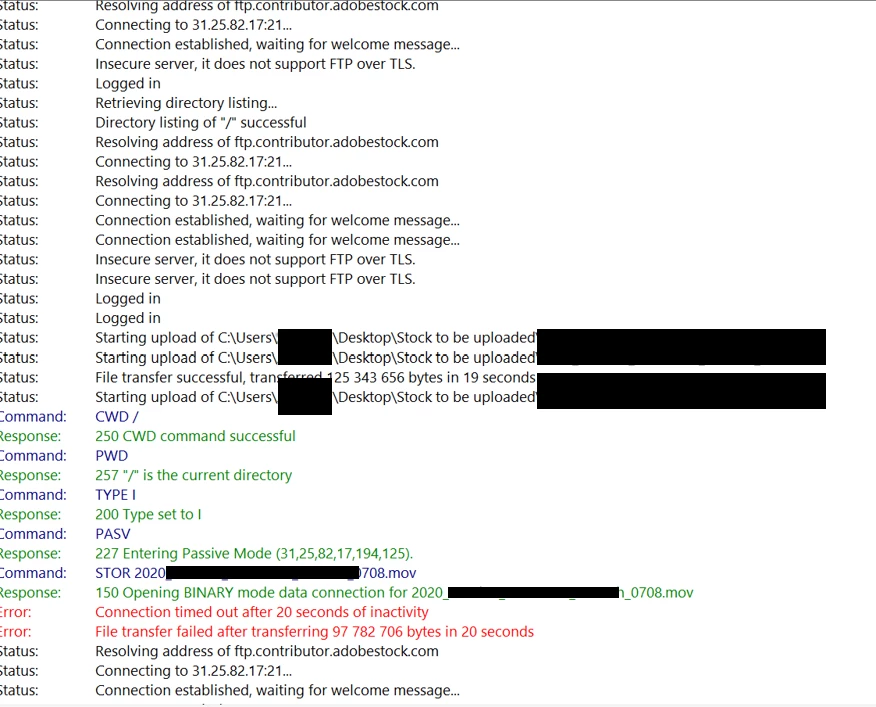
Im getting an Erroro and files are not transferred. See attached screenshot. I'm running on the latest Filezilla. How can this be solved? 
This topic has been closed for replies.

6 replies

Participant
November 11, 2020

Still the same issue with latest version of Filezilla. Some files get through, some get duplicates and some fail. Most frustrating experience to try to upload videos to Adobe Stock!

Nancy OShea
Community Expert
Community Expert
November 11, 2020

Did you try another FTP client:  Cute, Smart, Transmit, Core, Cyberduck, etc...


Nancy O'Shea— Product User & Community Expert
jacquelingphoto2017
Community Expert
Community Expert
November 12, 2020

It would appear @mathiasa46705117 has a preference for Filezilla and do not care to change. I did suggest "WINSCP" ( https://community.adobe.com/t5/stock-contributors/ftp-upload-of-videos-doesnt-work/m-p/11570865#M25471) in the outset. That suggestion was based on the fact that I too had a problem with Filezilla, but none with WINSCP. That suggestion seem not to be taken up. 

Regards

JG


Community Manager
November 9, 2020

Updated to the latest version of FileZilla and not seeing any issues, possibly give that a try if it's still not working.
(v 3.51.0)

Nancy OShea
Community Expert
Community Expert
November 5, 2020

I'll ask an Adobe staff member to check on the status.


Nancy O'Shea— Product User & Community Expert
jacquelingphoto2017
Community Expert
Community Expert
November 5, 2020

Hi @mathiasa46705117 ,

Filezilla seem to be having a problem. I tried it a few weeks back and could get nothing up. I suggest you try WinSCP,. It works well with me.


Best wishes

JG

Participant
November 5, 2020

Some of my files get through to the website but at the same time duplicates are being created on the portal.!?

Abambo
Community Expert
Community Expert
November 5, 2020

Still having the problem? It may well be a temporary situation!

ABAMBO | Hard- and Software Engineer | Photographer
Participant
November 5, 2020

I have the same issue. Any idea how this can be solved

Nancy OShea
Community Expert
Community Expert
November 6, 2020

No need to duplicate posts.


Nancy O'Shea— Product User & Community Expert
