
rxxcreative
Participant
August 3, 2018
Question

Grain/Noise Problem

  • August 3, 2018
  • 3 replies
  • 581 views

Hello!

I am completely new to Adobe Stock. This is the first picture I submitted to try to figure out what Adobe accepts for Stock Imaging. Unfortunately, it was rejected for a "Grain/Noise" issue. How big of an image do you guys save your RAW files for uploads?

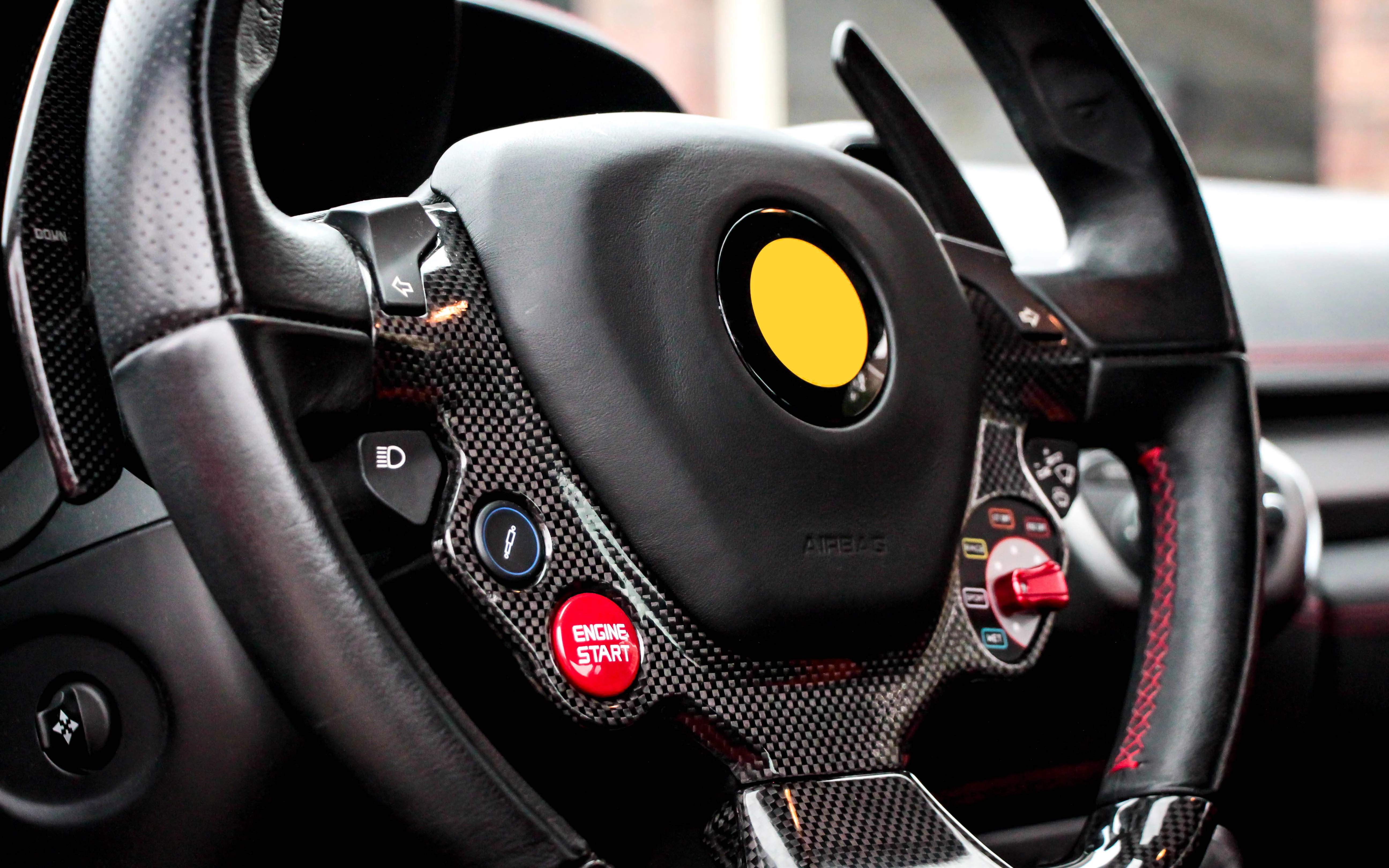
Here is the image I uploaded, please advise how I can improve on the photo composition and quality:
Thanks guys!

This topic has been closed for replies.

3 replies

Ricky336
Community Expert
Community Expert
August 9, 2018

So, for example:

Notice the coloured patches - this is chroma noise.

But, another issue maybe IP rights. It's of a Ferrari's steering wheel,  so, you will probably need a release!

As for raw file uploads and the size of the raw file - it's not an issue if you submit through Lightroom's Adobe Stock Publisher, the file is automatically converted to JPEG. So,  the best rule of thumb is to upload to the file's maximum resolution. And even converting raw to JPEG, use 100%.

Abambo
Community Expert
Community Expert
August 9, 2018

Yes, the rejection reason is probably more colour noise than blur. The colour noise is quite visible.

As for the resolution: The original shooting resolution is just high enough. Try to get your pictures correct at the highest resolution possible. What you shouldn't do in no case is up-sample your picture. If you downsample, you will lower the value of your picture and probably generate less sales.

ABAMBO | Hard- and Software Engineer | Photographer
Abambo
Community Expert
Community Expert
August 9, 2018

May I add, that even you edited the logo, the wheel is highly recognizable as a Ferrari wheel. Before downloading your file, I new it cam from a Ferrari because of the Yellow middle point/Red sewing marks. And I do not own one... This may or may not get you a second refusal, if you resubmit after correcting the noise problem. I got an IP refusal because of the round button on a smart phone... :-)

ABAMBO | Hard- and Software Engineer | Photographer
jacquelingphoto2017
Community Expert
Community Expert
August 4, 2018

Hi rxxcreaive,

Welcome to Adobe. Inspect your image at a little more than 100% magnification. You will note the entire image tend to be very colorful. That's referred to as artifacts. Take a look at the darker area of the switch; you'll notice the grains. Also in the dark area above the center of the wheel, towards the point is grainy. There's also in the same area a streak of grains extending from the upper part of that black areas to the lower part. In addition, there might also be a reason for rejecting for technical issue. It would be better taking the entire wheel. It is very important that you read-up the "Adobe Stock Contributor Guide". A link of the aforementioned caption is found at tagproducts_SG_STOCK-CONTRIBUTOR_i18nKeyHelppagetitle . Read it through carefully; also read the links at the end of the PDF document. The reference link joan includes in her post is also important. I hope this helps.

Best wishes

JG

joanH
Inspiring
August 3, 2018

Well hello!

Happy to welcome you here. If you are very new to Adobe Stock than let me introduce you to the many places you may graze and gaze at the Adobe Stock, the contributors stock offerings and the very clear and detailed guidelines you must follow to gain acceptance into the Adobe stock collection.

The quick and simple reply to your question about this photo of yours is - only the very center of the photo is in focus. That means a rejection- almost 100% of the time. So, remember to review your finished product before you send it to Adobe. Examine it at at least 100% magnification. You will see the blurs and the noise. This looks like a good photo but buyers want unusual great shots

You can find information similar to what you have requested at this link: https://helpx.adobe.com/stock/contributor/help/rejection-reasons.html

Reasons for content rejection

rxxcreative
Participant
August 8, 2018

Thank you very much for your response! That was very helpful