Participant
June 5, 2025
Answered

Help to find quality issues (rejection reason)

  • June 5, 2025
  • 5 replies
  • 740 views

These images obviously are created through artificial intelligence now I don't know why for which particular reason Adobe is rejecting these images the statement says that these images have some quality issues but this statement is very vague and I am not able to find out the exact reason if you could help me to identify that it will be a great help looking forward for your suggestions so that I do not repeat same mistakes in future 

Correct answer RALPH_L

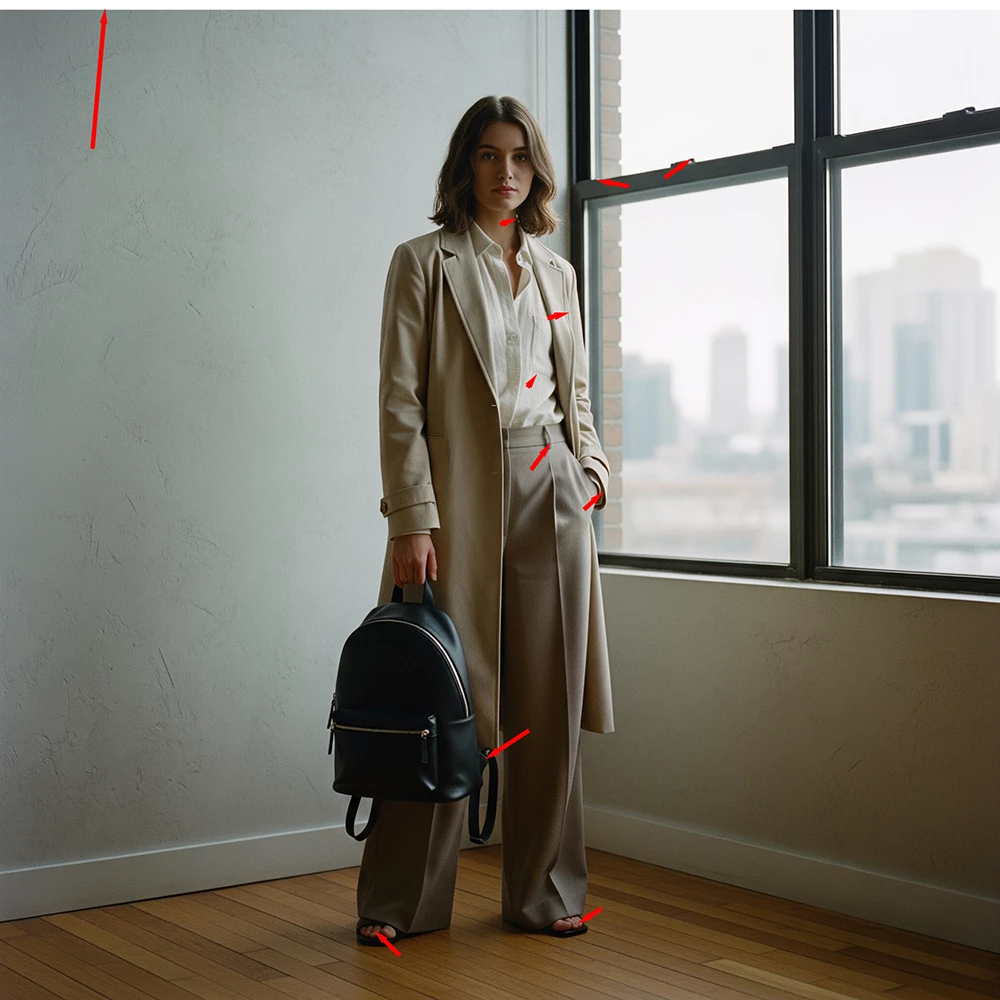
You are not able to find the reason because you are relying on AI to make perfect images.

Pay attention to detail.

What is the white margin at the top?
Why is the belt loop sewn on the pant leg?
What good are theese shoulder straps if they are only at the bottom?

Why does she only have four toes on each foot?

The exposure may also be a little dark. I would check the histogram.


5 replies

jacquelingphoto2017
Community Expert
Community Expert
June 6, 2025

Hi @Waqas_Ali9042 ,

Just to add, there is an issue with the rendering of the fingers of the first model. Also, the picture is grainy.

There's a problem with the teeth and earring/ear of the second model.

The third model eyes are looking in different directions. Also I think there is a problem with her ear.

You need to zoom in on your images and look for details.

Best wishes

Jacquelin


Participant
June 6, 2025
Thankful 🙏 for your time and advice
Nancy OShea
Community Expert
Community Expert
June 5, 2025

In addition to excellent visual and technical quality, your AI images must be checked for accuracy.  AI makes many mistakes, especially with details.  Machines are too stupid to know what mistakes they make or how to correct them. That's your job. 


Read your Contributor User Guide for more tips:


Nancy O'Shea— Product User & Community Expert
daniellei4510
Community Expert
Community Expert
June 5, 2025

I would also suggest that you get away from the default AI square format when there are so many other aspect ratios available today. Leave room for cropping or adding text as the buyer wishes.

Adobe Community Expert | If you can't fix it, hide it; if you can't hide it, delete it.
RALPH_L
Community Expert
RALPH_LCommunity ExpertCorrect answer
Community Expert
June 5, 2025

You are not able to find the reason because you are relying on AI to make perfect images.

Pay attention to detail.

What is the white margin at the top?
Why is the belt loop sewn on the pant leg?
What good are theese shoulder straps if they are only at the bottom?

Why does she only have four toes on each foot?

The exposure may also be a little dark. I would check the histogram.


Participant
June 5, 2025
I have tried my best not to repeat those mistakes but you said it right
relying solely on ai isn't the right approach ai isn't that reliables yet
anyway can you you share some more details with me it will be a great help..
daniellei4510
Community Expert
Community Expert
June 5, 2025

Adobe Community Expert | If you can't fix it, hide it; if you can't hide it, delete it.
daniellei4510
Community Expert
Community Expert
June 5, 2025

You also have no color profile. They should be submitted as sRGB.

Adobe Community Expert | If you can't fix it, hide it; if you can't hide it, delete it.