


ImaRetiredTeacher
Known Participant
July 15, 2024
Answered

Help with rejection, please?

  • July 15, 2024
  • 4 replies
  • 1247 views

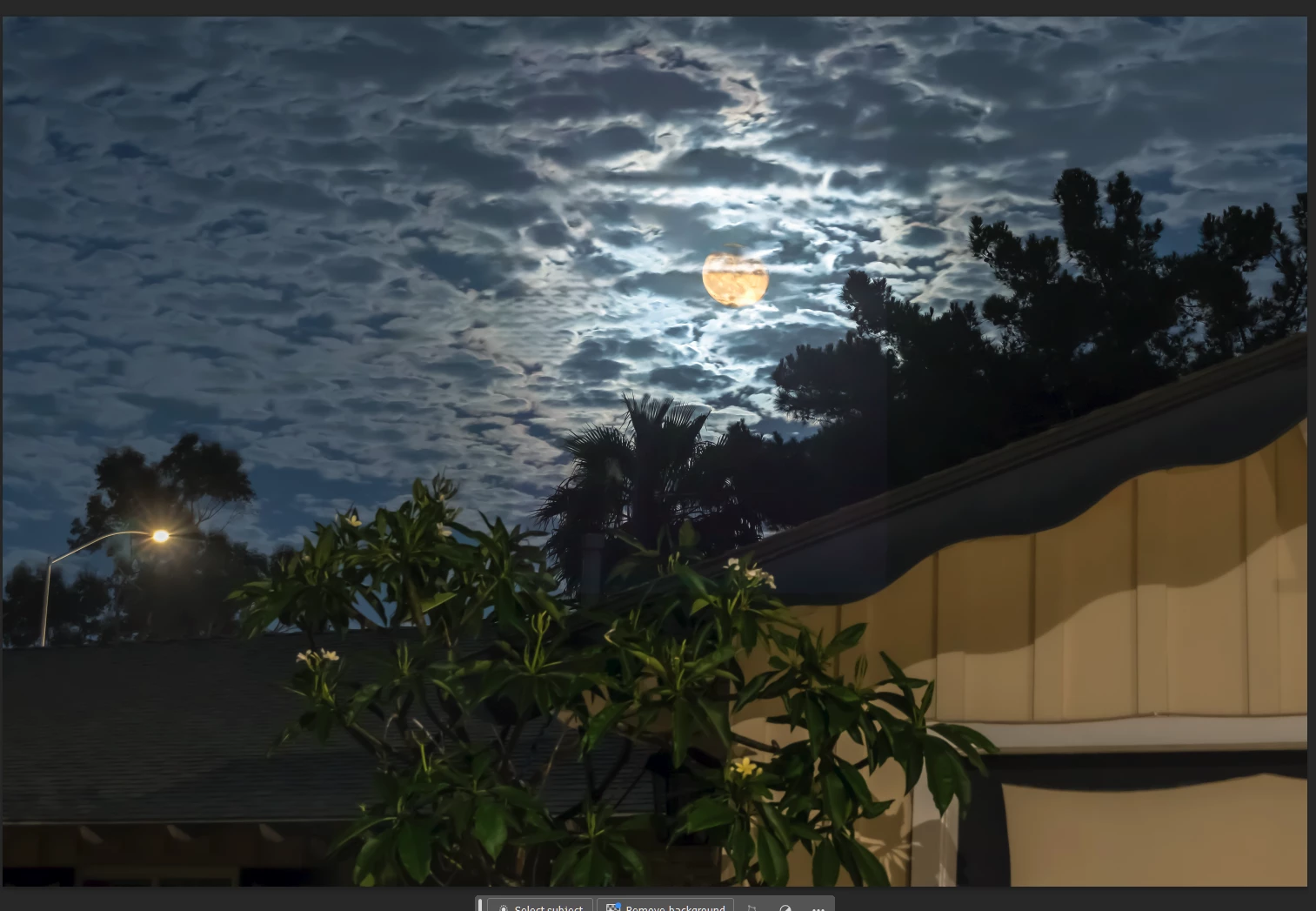
This has been rejected numerous times and I'm stumped. My only thought at this point is they want the streetlight gone. I left it because it goes with a neighborhood house and I liked the starring.

Thx in advance!


** I appreciate all the feedback and apologize for my late responses. My computer keeps having issues with turning on. It's working today after a 2nd repair trip so I finally got to this. Again, thanks for helping!

This topic has been closed for replies.
Correct answer Ricky336

I personally think from a compositional point of view, it doesn't add to the picture. It rather distracts from it, so this could very well be a reason. Was it rejected due to quality reasons? If so, remember composition is part of the 'quality' list.

But, I will add another possibility. White balance. One could argue that it is a bit warm, so as it was taken at night, perhaps a cooler tone might be in order.

For example:

The tree still bothers me though!

4 replies

daniellei4510
Community Expert
Community Expert
July 15, 2024

As per your title, this is a photo where the  moon is the main subject, but it is overtaken by the bush or tree in the foreground, which is out of focus. So I'm in agreement with ricky and Jill_C.

Adobe Community Expert | If you can't fix it, hide it; if you can't hide it, delete it.
ImaRetiredTeacher
Known Participant
July 17, 2024

The tree actually is focused but it was suggested to me the tree might be why it was kicked back so I adjusted the brightness and clarity, which clearly helped nothing! Thx

Ricky336
Community Expert
Ricky336Community ExpertCorrect answer
Community Expert
July 18, 2024

I personally think from a compositional point of view, it doesn't add to the picture. It rather distracts from it, so this could very well be a reason. Was it rejected due to quality reasons? If so, remember composition is part of the 'quality' list.

But, I will add another possibility. White balance. One could argue that it is a bit warm, so as it was taken at night, perhaps a cooler tone might be in order.

For example:

The tree still bothers me though!

Abambo
Community Expert
Community Expert
July 15, 2024

If you check the moon and the clouds, they look overprocessed.

Like a lot of noise reduction and after that some higher level sharpening.

ABAMBO | Hard- and Software Engineer | Photographer
ImaRetiredTeacher
Known Participant
July 17, 2024

Most of the cloud cover was as you see it, except for a few of the usual adjustments. It was a very unusual sky, which is why I broke out the camera on my own house 😃 There is a portion where I made some changes to get ride of a telephone pole and wires, which may include the circled portion, but I believe the arrow areas were not part of that--I'll go back and check. Thx

Jill_C
Community Expert
Community Expert
July 15, 2024

The trees are blurry, and as @Ricky336  indicated, there is a pale square reflection, as if it was shot through a window. If this has already been rejected numerous times, don't submit it again. You run the risk of being accused of spamming, which can cause your account to be suspended.

Jill C., Forum Volunteer
ImaRetiredTeacher
Known Participant
July 17, 2024

That weird square happened in photoshop, but I know how to get rid of it--totally my bad. Definitely not shot through a window or anything else except the night air 😃 The tree is actually sharp, but I purposely blurred it cuz another photog thought maybe that was the issue and I couldn't imagine being able to remove that complicated thing. 

Ricky336
Community Expert
Community Expert
July 15, 2024

Hello,

I think the tree in the foreground is quite distracting so I would remove that, but that could be quite difficult. If you remove the streetlight, the picture becomes unbalanced.

 There is another thing though:


What is the faint outline of a square? Did you take this through a window? There seems to be some reflection.


ImaRetiredTeacher
Known Participant
July 15, 2024
Hi Ricky, I did not take it through a window, but I did see the "square" in an earlier version. It appeared during the Photoshop edit. Frustrating. I will scrutinize because I thought it was gone. Thank you so much! 😃
Abambo
Community Expert
Community Expert
July 15, 2024

If it is a Photoshop issue, check your layers. 

ABAMBO | Hard- and Software Engineer | Photographer