Participant
February 10, 2023
Answered

How can I change my name in my Adobe Stock profile?

  • February 10, 2023
  • 1 reply
  • 2013 views

I'm trying to figure out how to change the name of my Adobe Stock profile so that it no longer displays my real name. I'd like to use my artist name instead. I already have my artist name set up in my account settings, which you can find here: https://account.adobe.com/profile. Does anyone know how to switch over the profile name?


[Moderator moved the thread to the correct forum]

This topic has been closed for replies.
Correct answer Abambo

Contributor? I ask, because if you are a contributor, you posted in the wrong forum. 


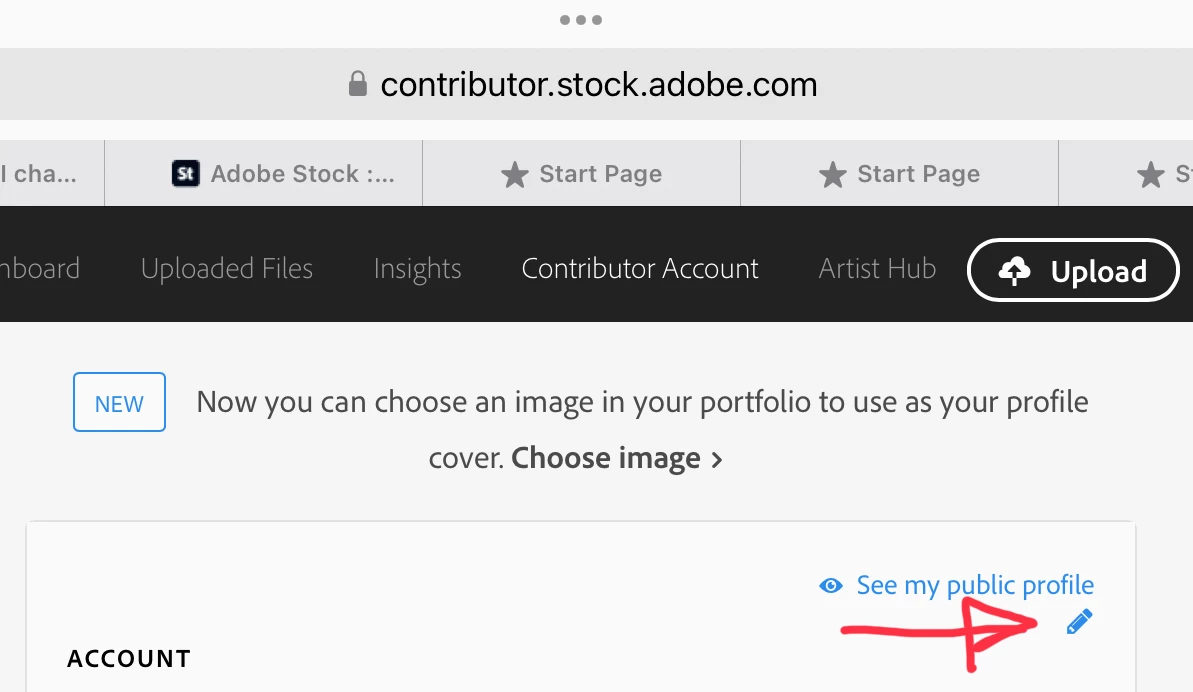
Go to https://contributor.stock.adobe.com/account and click the pencil, when you hover the mouse over the account part and change your display name. 

1 reply

Abambo
Community Expert
AbamboCommunity ExpertCorrect answer
Community Expert
February 10, 2023

Contributor? I ask, because if you are a contributor, you posted in the wrong forum. 


Go to https://contributor.stock.adobe.com/account and click the pencil, when you hover the mouse over the account part and change your display name. 

ABAMBO | Hard- and Software Engineer | Photographer