


Participant
May 15, 2019
Answered

How much post processing do we do?

  • May 15, 2019
  • 4 replies
  • 609 views

Hello,

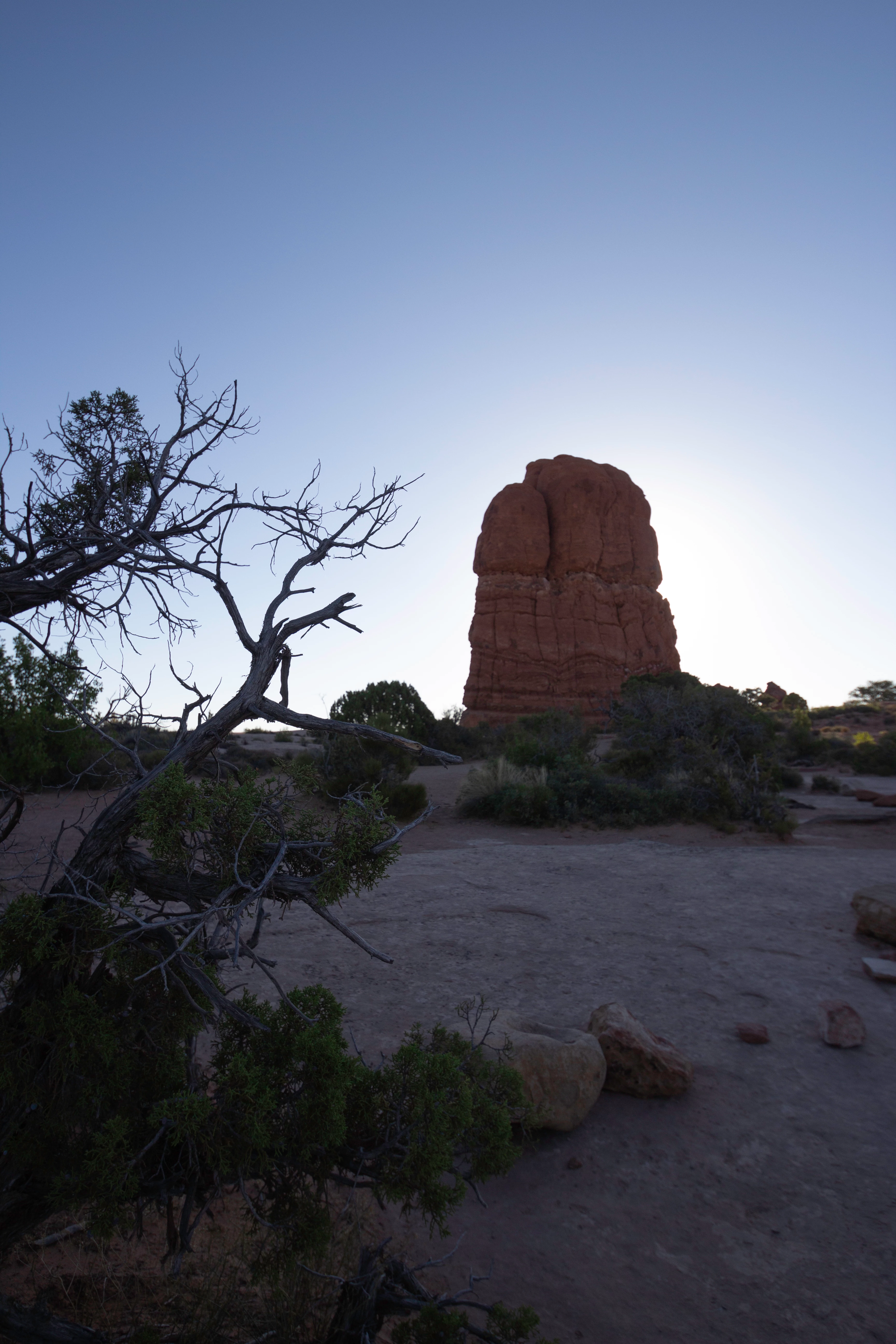
I am confused as to how much post processing to do on my photos.  One photo was rejected because buyers "...prefer to do their own processing..." .  In this second case, this photo was rejected due to "image quality" issues.  I shot it in RAW and did very little post processing to it.  I was afraid to increase the exposure too much, for one thing.  Another thing I did notice about this photo is when I examined it in Lightroom as a JPG in the catalog, it was not as sharp as when I looked at it RAW. 

I would appreciate constructive criticism on this photo.
This topic has been closed for replies.
Correct answer Abambo

First: shoot raw

Second: do as much postprocessing as necessary to get a picture that looks like no postprocessing has been applied. Reduce noise, but not that much that details get blown out. Add saturation but not too much so that the picture does not look oversaturated. Sharpen, but not so much that there is a halo around the picture. Do your white balance so that the colours are natural. Etc, etc.

You get the trick? The image should appear to be unprocessed, even if you did heavy processing. When you export your raw file, the resulting JPEG should look exactly as your processed raw file. If it does not, you made an error. If it io not sharp, may be you down sampled the image. Or you did apply compression.  JPEG quality should be at max. Anytime! Except if you have a such high resolution camera that the resulting file gets to big. I doubt there is something on the market you can buy with money that will create to high resolution pictures (well if I remember well, the max is 100Mp and there are cameras having more than that ).

Ok and as the forum thread did not show me your attached picture, I will have a look at that in a second post!

4 replies

Nancy OShea
Community Expert
Community Expert
May 19, 2023

Customers won't pay for images that need correction & retouching.  That would be like buying an unfinished suit.


Before you submit, compare your work with current Stock inventory to see if your quality & composition measures up.   Ideally, your work should be as good or better than what Stock has.

https://stock.adobe.com/search?k=rock%20formation


Hope that helps.


Nancy O'Shea— Product User & Community Expert
RALPH_L
Community Expert
Community Expert
May 19, 2023

The shadows on this photo are underexposed.

Also crop to the rule of thirds.

Abambo
Community Expert
Community Expert
May 15, 2019

Something like this:

ABAMBO | Hard- and Software Engineer | Photographer
Participant
May 16, 2019

Thank you for the feedback.  I was uncertain if increasing the exposure and changing the contrast was the right thing to do.  I second-guessed myself, undid my postprocessing and sent the photo out.  Because you took time to explain a few things to me, I will now be more confident with my postprocessing and follow my instincts, as I should have done before I submitted the photo. 

I sincerely appreciate your guidance and advice.

Abambo
Community Expert
Community Expert
May 19, 2023

You're welcome.

ABAMBO | Hard- and Software Engineer | Photographer
Abambo
Community Expert
AbamboCommunity ExpertCorrect answer
Community Expert
May 15, 2019

First: shoot raw

Second: do as much postprocessing as necessary to get a picture that looks like no postprocessing has been applied. Reduce noise, but not that much that details get blown out. Add saturation but not too much so that the picture does not look oversaturated. Sharpen, but not so much that there is a halo around the picture. Do your white balance so that the colours are natural. Etc, etc.

You get the trick? The image should appear to be unprocessed, even if you did heavy processing. When you export your raw file, the resulting JPEG should look exactly as your processed raw file. If it does not, you made an error. If it io not sharp, may be you down sampled the image. Or you did apply compression.  JPEG quality should be at max. Anytime! Except if you have a such high resolution camera that the resulting file gets to big. I doubt there is something on the market you can buy with money that will create to high resolution pictures (well if I remember well, the max is 100Mp and there are cameras having more than that ).

Ok and as the forum thread did not show me your attached picture, I will have a look at that in a second post!

ABAMBO | Hard- and Software Engineer | Photographer
