
Inspiring
Oct 31, 2026 7:38 AM UTC
Question

How to check for "Missing Generative AI Flag" for my unaccepted assets due to this issue?

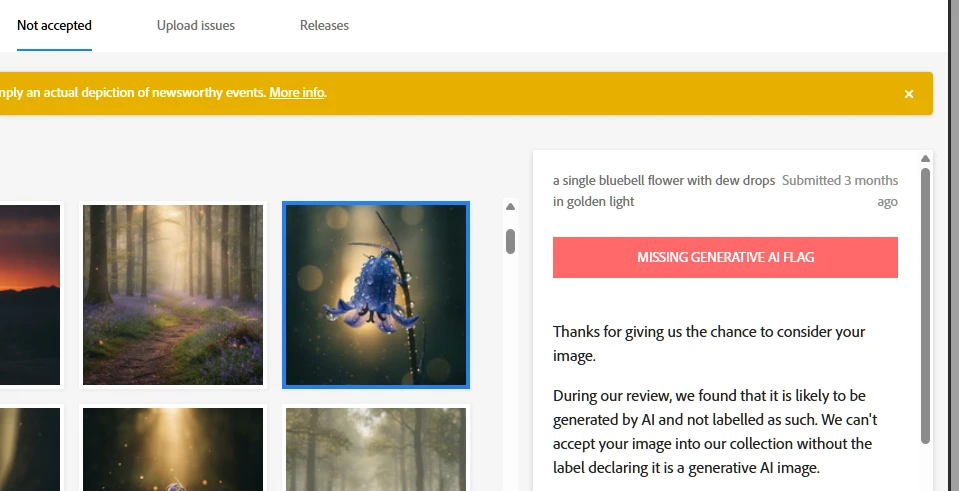
I have had several assets uploaded to the platform but I forgot to tick the AI generated box for the content. i am pasting a sample image here. 

I am talking about the red box as can be clearly seen.

Someone, please help me as to how can I check the tiny images for the images not being accepted.
 

    3 replies

    Nancy OShea
    Community Expert
    Community Expert
    Nov 4, 2026 10:17 PM UTC
    1. I have moved your post from the Stock buyer’s forum to the dedicated Contributors forum. 
    1. Your images were rejected. There’s nothing there. Thumbnails are just reminders of what you submitted. 

    Resubmit your GenAI content with proper labels, keywords, titles & descriptions . DO NOT forget to check the GenAI box. It’s important to avoid customer complaints & refund requests for misleading content.


    Translate
    Nancy O'Shea— Product User & Community Expert
    daniellei4510
    Community Expert
    Community Expert
    Oct 31, 2026 2:53 PM UTC

    Be sure to check if any of your assets presently under review to be sure you checked the correct boxes. Delete and resubmit if so.

    Translate
    Adobe Community Expert | I have miles to go before I sleep, but I'm all done on this end.
    yamato713108855
    Community Expert
    Community Expert
    Oct 31, 2026 12:25 PM UTC

    Click the thumbnail, and the filename will appear in the bottom-right area.
    Please use that information to re-upload the file.

    Translate