
Inspiring
June 25, 2020
Answered

How to know which image was downloaded?

  • June 25, 2020
  • 2 replies
  • 798 views

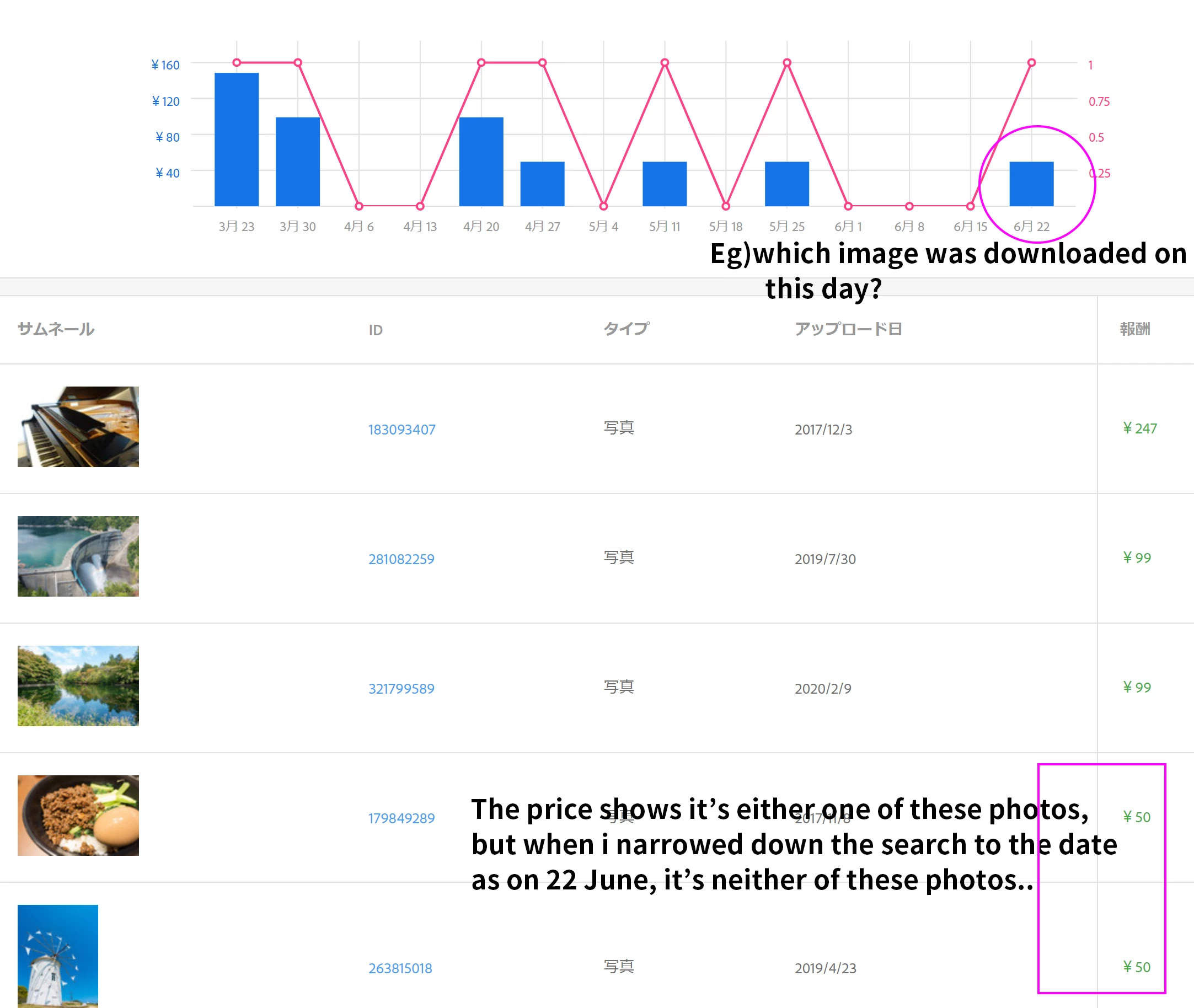
I can only know there is image being downloaded from the graph, but i dunno which image is it as the images shown below the graph are based on the date uploaded and not the date is is being downloaded.

I always have to set the date to single date to check on which image is actually downloaded on the day and today i found that the image being downloaded is not the same as the one in the lists below the graph....

Is this a bug?
This topic has been closed for replies.
Correct answer Abambo

Yes, you need to limit the time range to a less wider one (one day to get it down to the day).

2 replies

fannreiAuthor
Inspiring
October 20, 2020

@jacquelingphoto2017 @Abambo 

Thank you jacqueling and abambo.

As i mentioned , yes i need to narrowed down the time limit to check, but as posted, there is a bug, the photos and price are not same the one in report.

It's not very user-friendly that we need to do all these steps, Why can't adobe stock just list up the images being downloaded based on downloaded date (the most recently being downloaded).

It will be much easier to trace the report.


Thank you anyway.

jacquelingphoto2017
Community Expert
Community Expert
October 20, 2020

Hi Fannreil,

Thank you for the feedback.

I have included this link in a case I've been back and forth with Adobe customer service with - a case the agent has responded with his/her opinion and prompted to close even though he/she has not even attempted to pass the issue on to someone who is qualified to have it resolved. There are a number of bugs that I have identified on my contributor account - bugs I have hinted on several of my post here. All these I wrote about, half of which have not been addressed.  This one I am not going to let go.

Best wishes

JG

jacquelingphoto2017
Community Expert
Community Expert
October 18, 2020

Hi Tannrel,

Sorry for the delay in providing a response. Your question seem to have gotten lost at the end of the queue. I believe you are already familiar with the only way to check daily downloads. However, thank you for raising the point. I will see if this can be looked at by someone that might be better able to assist you. It is likely I will not be providing any further qualified response to this post.

Best wishes

JG

Abambo
Community Expert
AbamboCommunity ExpertCorrect answer
Community Expert
October 19, 2020

Yes, you need to limit the time range to a less wider one (one day to get it down to the day).

ABAMBO | Hard- and Software Engineer | Photographer