



pixelsandshots
Participating Frequently
July 31, 2026
質問

I dont understand the reason of "Quality Issues" rejection, could someone please help me to know what am I doing wrong?
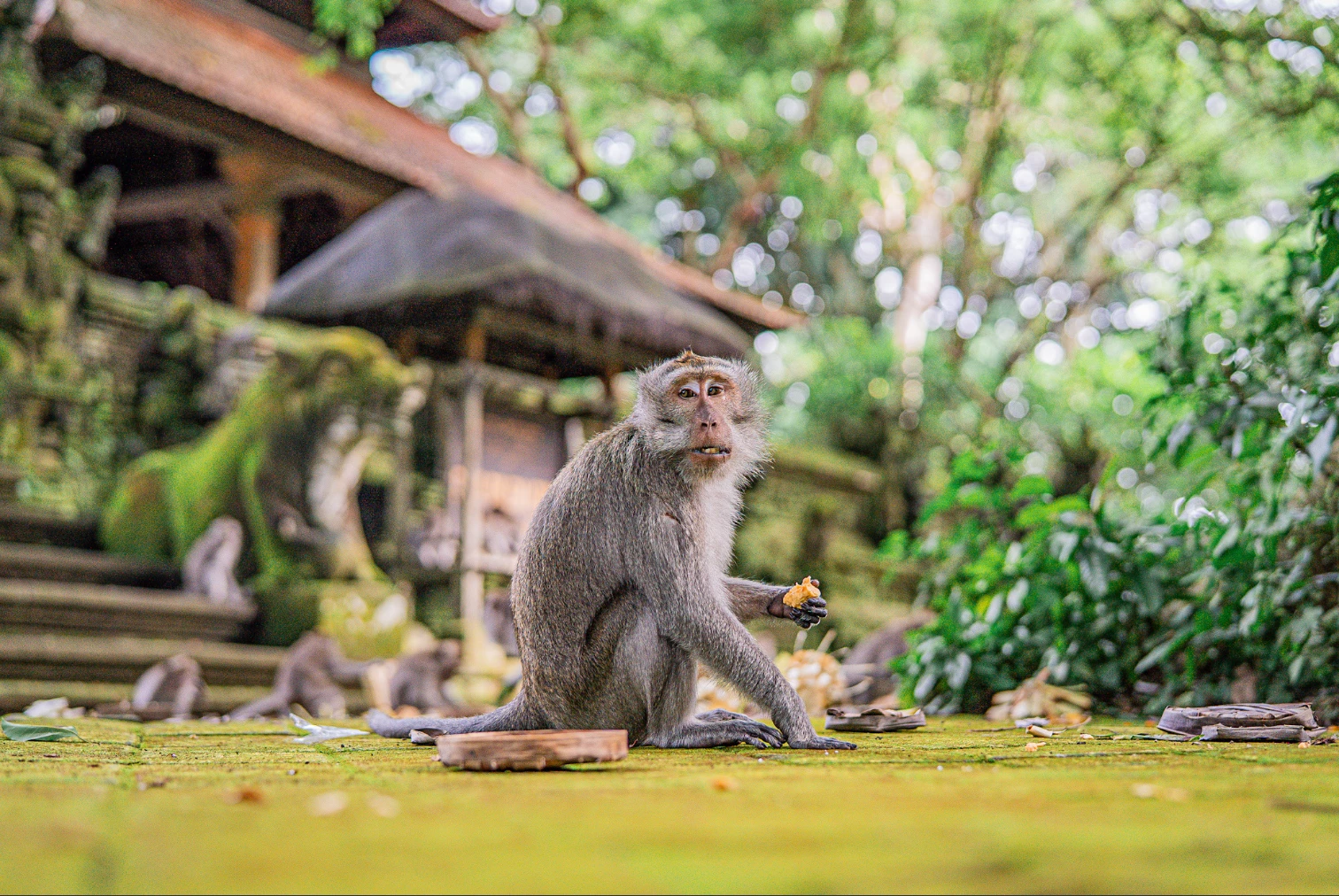
I have uploaded photos some like this, in my perspective are ok but Adobe keeps on rejecting due “Quality Issues” am I missing something? please help

    返信数 12

    Nancy OShea
    Community Expert
    Community Expert
    July 31, 2026

    Ask yourself what buyers will use this image for commercially. 

    This is what you’ll be competing with for views & sales:

    https://stock.adobe.com/search?k=monkey  1.1 million results


    Hope that helps.


    Nancy O'Shea— Product User & Community Expert
    Jill_C
    Community Expert
    Community Expert
    July 31, 2026

    DOF is just shallow causing parts of the monkey to be out of focus - his tail for instance. The face is also out of focus, perhaps due to motion. The background also seems a bit overexposed and oversaturated.


    Jill C., Forum Volunteer
    ZALEZPHOTO
    Legend
    July 31, 2026

    The blurred background looks fake, if did you do that in post, Adobe rejected for that reason what lens did you use? 

    ZALEZPHOTO
    pixelsandshots
    Participating Frequently
    July 31, 2026

    Its actually a 1.4f 50mm, not fake background, perhaps too much bokeh, im trying reducing the intensity of the greens and reducing noise...

    pixelsandshots
    Participating Frequently
    July 31, 2026

    Thank you for the feedback!

    ZALEZPHOTO
    Legend
    July 31, 2026

    Interesting! I also like shooting with fast lenses close to wide open, I’ve learned that Adobe moderators tend to often reject those shots, so I’ve gotten used to closing my lens to at least f4.5.

    Have you tried Topaz Labs Denoise tool? Without a question is superior to Adobe’s denoise both on Photoshop or Lightroom, so much that Adobe is buying Topaz and the deal just needs regulators approval. The key is not using over 30% intensity. 

    It’s so good that Everyone shooting stock should be using it “without exception” 

    Cheers!

    ZALEZPHOTO
    RALPH_L
    Community Expert
    Community Expert
    July 31, 2026

    Looking at the histogram, I conclude that the exposure is just fine. However, when magnifying your image it does look very grainy. You need to reduce the noise.


    yamato713108855
    Community Expert
    Community Expert
    July 31, 2026

    The depth of field may be too shallow.
    On Adobe Stock, images with a wider area in focus are more likely to be approved.
    If users want to blur the background, they can do so using Photoshop or Lightroom.

    yamato713108855
    Community Expert
    Community Expert
    July 31, 2026

    It is difficult to verify due to the small image size, but noise is noticeable even in the small image.

    pixelsandshots
    Participating Frequently
    July 31, 2026

    Thank you for the feedback!

    daniellei4510
    Community Expert
    Community Expert
    July 31, 2026

    The background appears to be overexposed and over-saturated.


    Adobe Community Expert | If you aren't submitting your assets in sRGB, you probably didn't read the rules.
    pixelsandshots
    Participating Frequently
    July 31, 2026

    Thank you for the feedback! Very appreciated