jodij28273193
Inspiring
June 5, 2026
Question

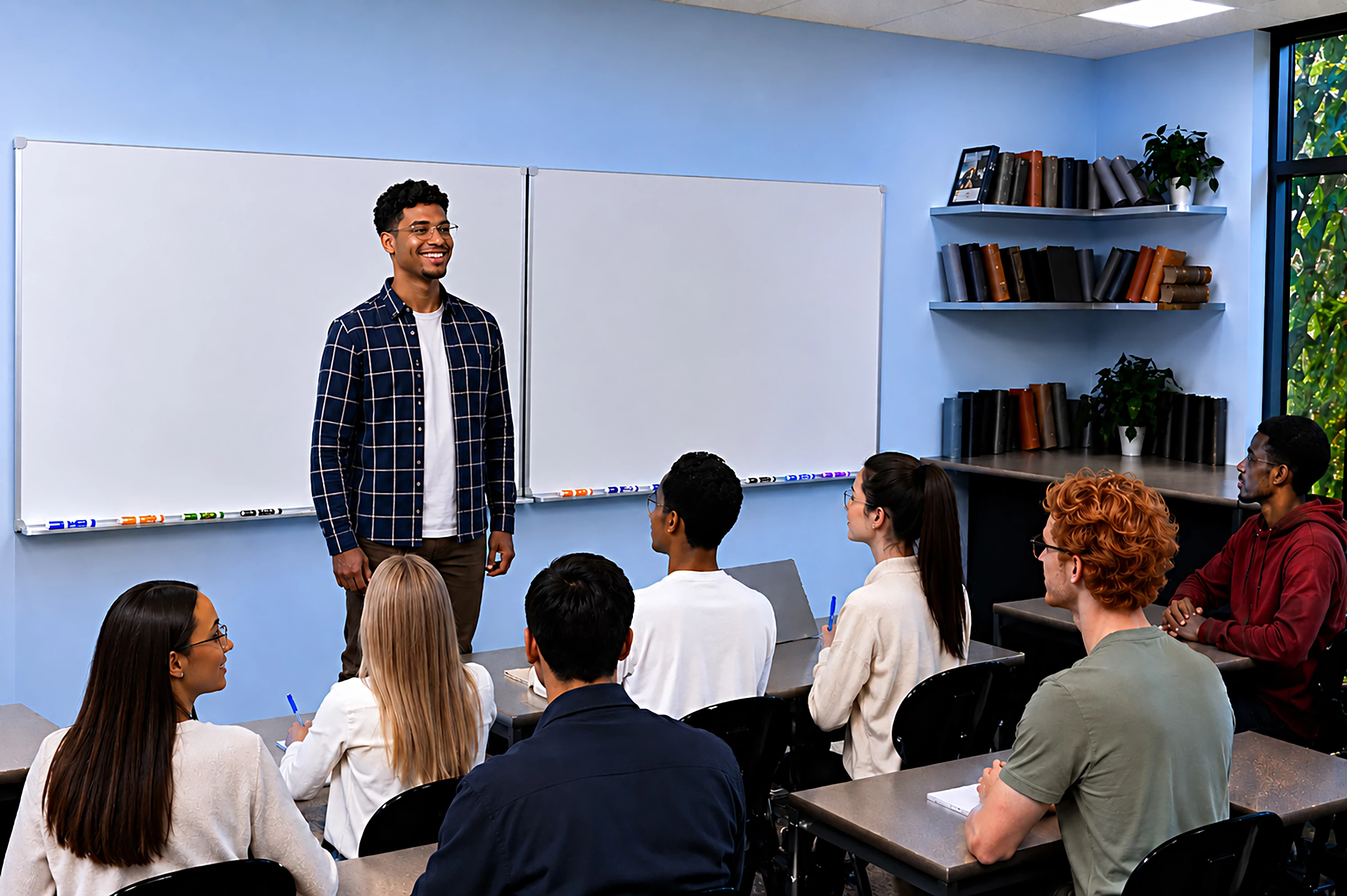
I would like to kow what the problems are with this AI picture, so I can fix them. I worked on it 4 hours so I would really like to get it accepted. Thanks in Advance

  • June 5, 2026
  • 5 replies
  • 72 views

It was rejected.


    5 replies

    jodij28273193
    Inspiring
    June 5, 2026

    First, AI gave me cartoon-looking faces. Then I regenerated, and it gave me faces without noses. Then the boy with the red sweatshirt was missing hands. After 37 generations and regenerations, these were the best faces that AI came up with. What kind of prompt should I use to get their faces to look better? I'm not sure what you're circling on the hands with the boy in the green shirt. Thank you for all your time. 

    daniellei4510
    Community Expert
    Community Expert
    June 5, 2026

    I made two passes, first to concentrate on smoothing out the man’s shirt, with the following prompt: Improve the quality and detail of the man's shirt in this image, followed by improving the quality of his arm and hands. Leave everything else as is.


    Gemini ignored the hands (as it often does, since it prefers to work on one aspect at a time), so I followed up with this prompt: Good. But now concentrate on the man's hands, particularly his fingers and how they are folded. Leave everything else as is.


    Depending on the complexity of the image, I may have to make improvements like this, section by section, through the entire image from corner to corner. Also, since I didn’t refresh, notice how the t-shirt reverted back to the original, more wrinkled version. That happens a lot.

    Adobe Community Expert | If you aren't submitting your assets in sRGB, you probably didn't read the rules.
    Jill_C
    Community Expert
    Community Expert
    June 5, 2026

    White halo around objects, malformed eyes, wonky hands - all make this look like AI from a very early vintage of AI generator software….

    Jill C., Forum Volunteer
    jodij28273193
    Inspiring
    June 5, 2026

    What is the best AI generation software that you use or suggest? This is ChatGPT's pro extended version. This is a new feature on ChatGPT. And I spent $200 for all the generations I can get in a year. Thank you for your time.  

    daniellei4510
    Community Expert
    Community Expert
    June 5, 2026

    I don’t think ​@Jill_C submits AI, I generally use ChatGPT (after they improved it), but Nano Banana most often. 

    Adobe Community Expert | If you aren't submitting your assets in sRGB, you probably didn't read the rules.
    daniellei4510
    Community Expert
    Community Expert
    June 5, 2026

    That would help, but there are a number of issues I would personally correct and improve upon, especially when it comes to hands and faces. My rule of thumb is this: I feel strongly that, in a pinch, an asset should hold up well even if enlarged (not AI upscaled, but enlarged) to 200% of its original size and still be usable, as least for the web. 


    Adobe Community Expert | If you aren't submitting your assets in sRGB, you probably didn't read the rules.
    jodij28273193
    Inspiring
    June 5, 2026

    So, are you saying, just change the teacher and lower the highlights or are there other problems with the exposure?

    daniellei4510
    Community Expert
    Community Expert
    June 5, 2026

    Even the markers could use improvement (although I would put them just slightly out of focus in this particular instance.


    Adobe Community Expert | If you aren't submitting your assets in sRGB, you probably didn't read the rules.
    daniellei4510
    Community Expert
    Community Expert
    June 5, 2026

    Exposure for one. Also, Gemini refused to work from my original selection (as it has begun doing lately) and created an entirely different version, but here the subject is more animated with more natural skin tones.


    Adobe Community Expert | If you aren't submitting your assets in sRGB, you probably didn't read the rules.