Participant
August 30, 2025
Answered

Image Rejected

  • August 30, 2025
  • 2 replies
  • 333 views


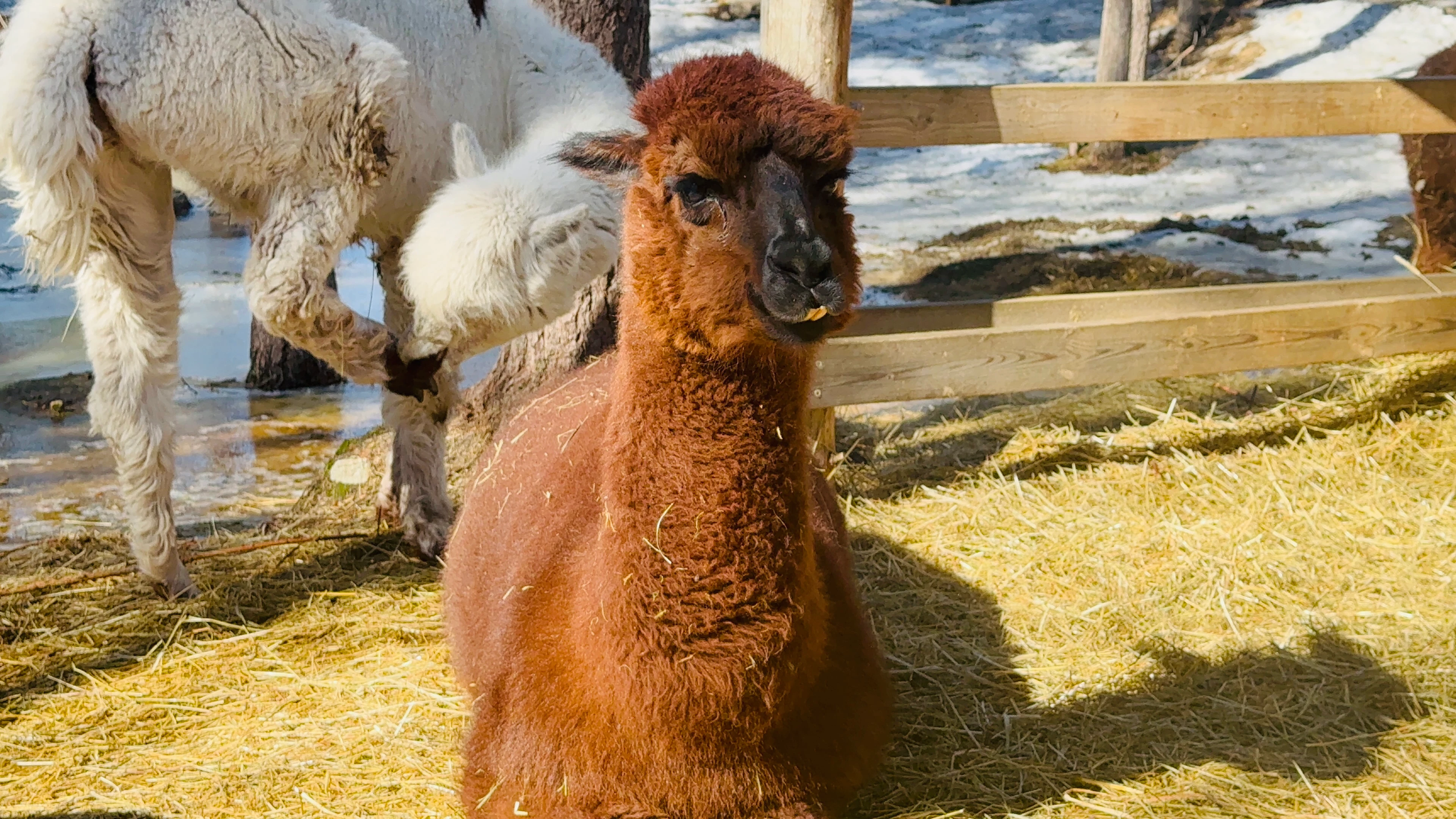
Could someone please guide me on why this picture was rejected and how I can improve my future posts?

Correct answer ZALEZPHOTO

For several reasons:

-1 I realize the lama was in the back. Solutions: wait for the right moment or moving left would have reduced or eliminated the big distraction behind the main subject.  Learn to use AI tools in Photoshop and or Lightroom. The example I'm sending you technically goes beyond adobe's guidelines of not removing with AI 10 or 15% of any image, here removing the lama in the back is beyond that, but it literally took 10 seconds to do that.

-2 You either enlarged the photo too much, or did something in the editing that affected the image beyon acceptable levels. The closeup shot is a screen shot of your image at actual size, and the quality fails adobe minimum standards. Solution: DO NOT over enlarge your photos

if anything use AI tools to do so. 

-3 learn to shoot manual. Here your exposure settings are 1/400 sec  f 1.7  and you need more depth of field... and if you shot this with a cell phone as I suspect you did, you must shot in raw, if your phone doesn't have that, it is doubful Adobe will accept still photos from a cell phone, unless it's an amazing shot for editorial use.  (You are more likely to have good phone videos than photos).

You already got your account going, just keep experimenting, and never be afraid of shooting too much in order to catch the right moment.

Cheers!


2 replies

Jill_C
Community Expert
Community Expert
August 30, 2025

It's not well composed, and the lack of sharp details seems to indicate that this was acquired with a small sensor camera, perhaps a mobile phone. 

Jill C., Forum Volunteer
Participant
August 30, 2025

I captured with iPhone 16 Pro Max, i don't have a DSLR, and I am still in the learning phase

Jill_C
Community Expert
Community Expert
August 30, 2025

It is possible for iPhone images, particularly those captured under ideal lighting conditions, to be accepted into Adobe Stock, but best to capture in RAW format and edit carefully. 

Jill C., Forum Volunteer
ZALEZPHOTOCorrect answer
Inspiring
August 30, 2025

For several reasons:

-1 I realize the lama was in the back. Solutions: wait for the right moment or moving left would have reduced or eliminated the big distraction behind the main subject.  Learn to use AI tools in Photoshop and or Lightroom. The example I'm sending you technically goes beyond adobe's guidelines of not removing with AI 10 or 15% of any image, here removing the lama in the back is beyond that, but it literally took 10 seconds to do that.

-2 You either enlarged the photo too much, or did something in the editing that affected the image beyon acceptable levels. The closeup shot is a screen shot of your image at actual size, and the quality fails adobe minimum standards. Solution: DO NOT over enlarge your photos

if anything use AI tools to do so. 

-3 learn to shoot manual. Here your exposure settings are 1/400 sec  f 1.7  and you need more depth of field... and if you shot this with a cell phone as I suspect you did, you must shot in raw, if your phone doesn't have that, it is doubful Adobe will accept still photos from a cell phone, unless it's an amazing shot for editorial use.  (You are more likely to have good phone videos than photos).

You already got your account going, just keep experimenting, and never be afraid of shooting too much in order to catch the right moment.

Cheers!



Francisco ZALEZPHOTO
RALPH_L
Community Expert
Community Expert
August 30, 2025

The photo is poorly cropped. There are three different animals and all are cut. Also, the fence is distracting. The focus on the main subject is not sharp and there appears to be some posterization. Still, I believe it can be fixed by doing the following:

Participant
August 30, 2025

I am not a professional photographer; I just love to capture nature, but I am trying to learn now.