
TedAMessenger
Participant
April 26, 2026
Question

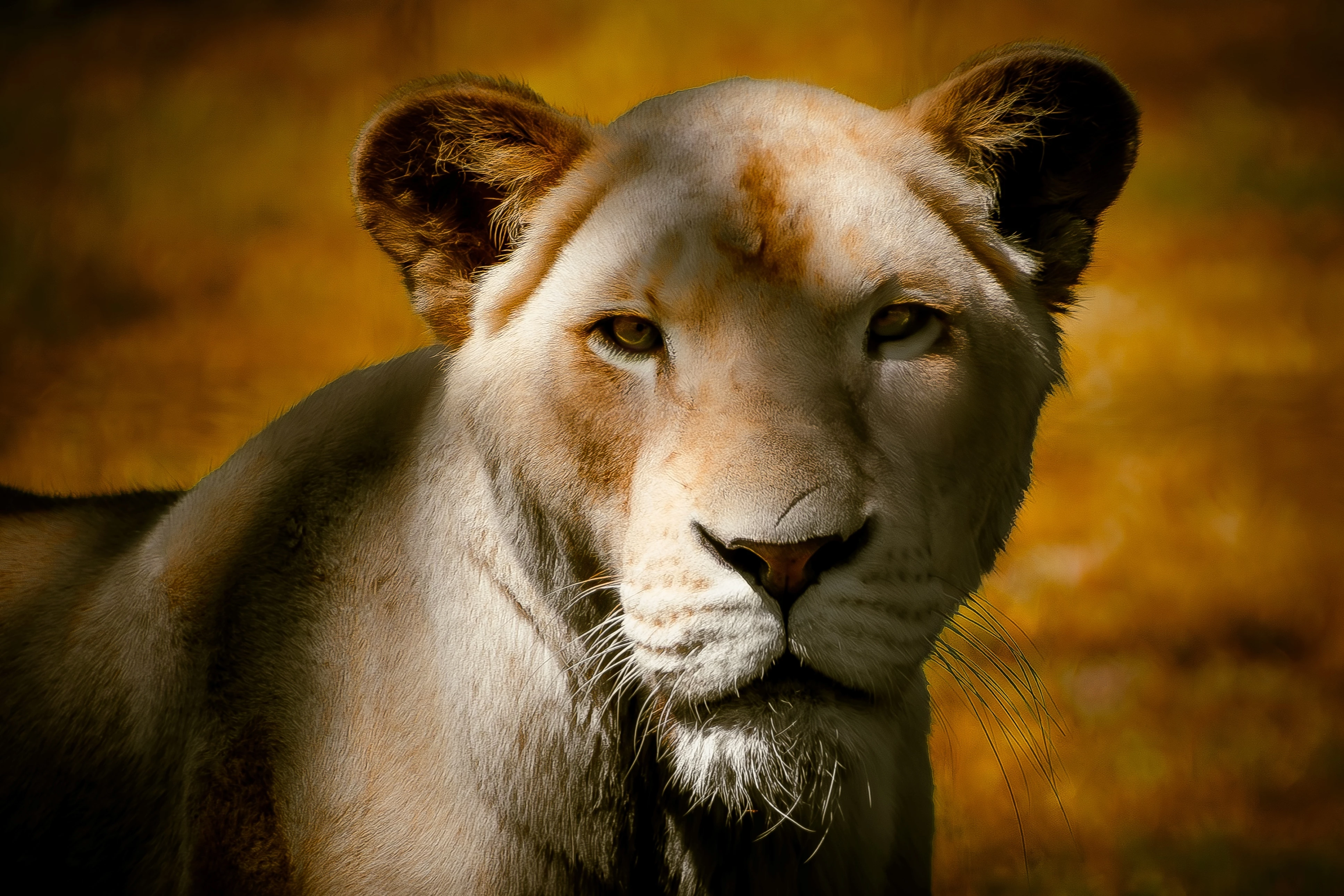
Is this photo really as low quality as Stock says it is?

  • April 26, 2026
  • 4 replies
  • 49 views

Stock rejected this photo for quality issues. I used Adobe RBG color on camera settings, I used Lightroom to edit with culling score showing as 97, I used Photoshop for minimal lighting touchups. The sample is reduced in resolution by a factor of ten with the original export being 300 dpi at 10,000x7,000 resolution with a file size of 29MB. I’ve had photos much worse looking than this pass inspection on Stock, so what exact quality issues caused this photo to fail? Is it really such low quality?
 

    4 replies

    Nancy OShea
    Community Expert
    Community Expert
    April 26, 2026

    Did you read your Stock Contributor User Guide?

    https://helpx.adobe.com/stock/contributor/user-guide.html


    I see two disqualifying issues off the top:

    1. vignetting 
    2. uneven exposure

    See Photo Dos & Don’ts below:

    https://helpx.adobe.com/stock/contributor/help/editing-dos-and-dont.html 


    This is what you’re competing with in Stock inventory

    https://stock.adobe.com/search?k=lioness

    https://stock.adobe.com/search?k=lion

    https://stock.adobe.com/search?k=cougar

    https://stock.adobe.com/search?k=puma


    Hope that helps.


    Nancy O'Shea— Product User & Community Expert
    TedAMessenger
    Participant
    April 26, 2026

    Thanks! I appreciate the contributions! This is a sample of what I changed so far. 

    daniellei4510
    Community Expert
    Community Expert
    April 26, 2026

    Much better. Good luck!

    Adobe Community Expert | If you can't fix it, hide it; if you can't hide it, delete it.
    Ricky336
    Community Expert
    Community Expert
    April 26, 2026

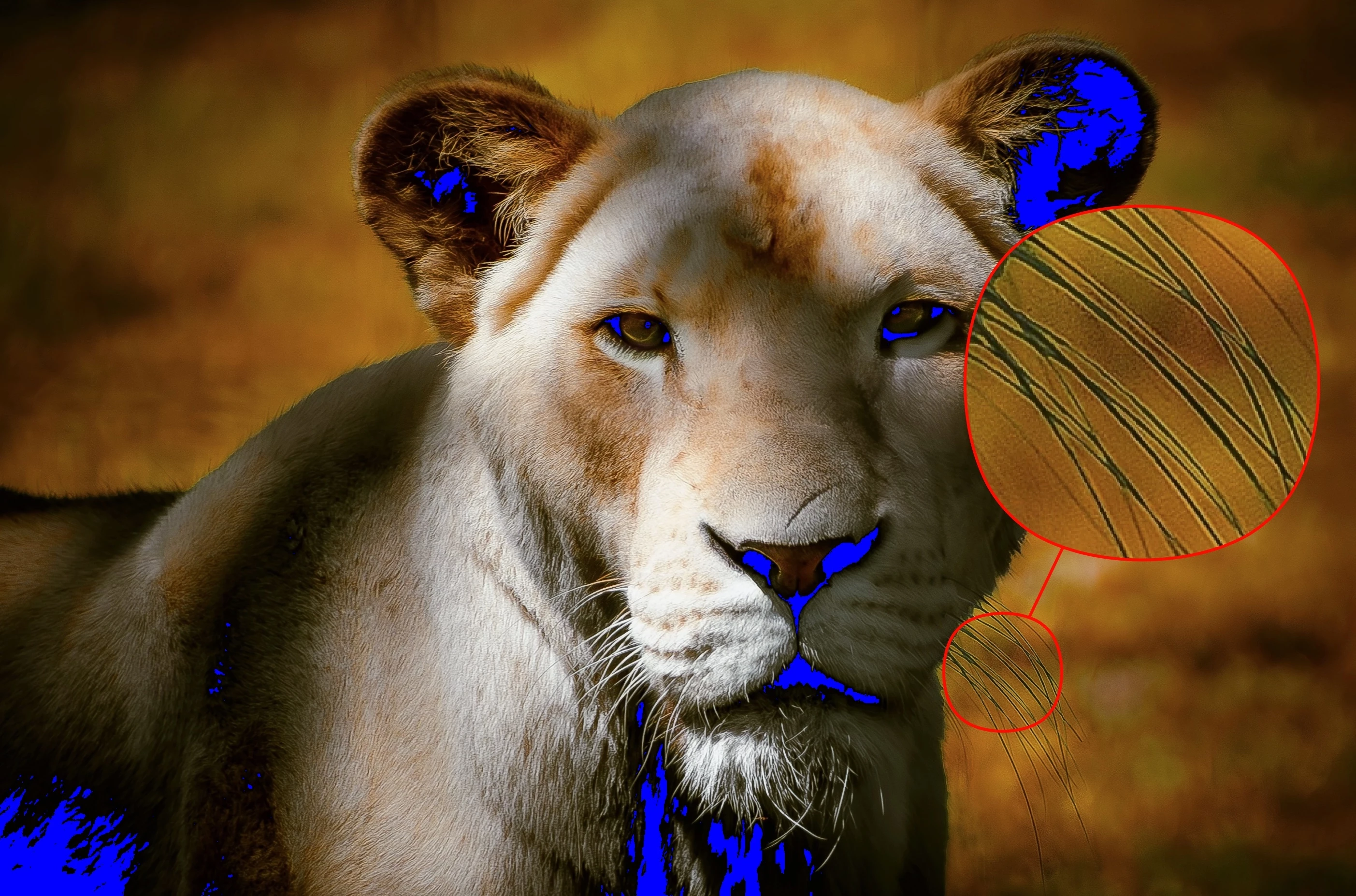
    I would also give a thought about your white balance. It could be agrued that it is too yellow. However, this may also be due to exposure. The shadows are clipped as pointed out.

    RALPH_L
    Community Expert
    Community Expert
    April 26, 2026

    like ​@daniellei4510 says, underexposed shadows and the halo. Both can be corrected.

    TedAMessenger
    Participant
    April 26, 2026

    Yeah lol, I feel kinda dumb about that now, as far as the shadow clipping. Still trying to get the haloing sorted on the whiskers. Dehaze and moiré won’t do it, only desaturate but I want to keep the color. 

    daniellei4510
    Community Expert
    Community Expert
    April 26, 2026

    You might try something like this, but maybe more carefully than I’ve done in this example. Create a new layer above the original layer in Photoshop and select the Darken mode. Select the Clone tool and make sure “All layers” are selected, then start cloning out the halos. The dark whiskers won’t be affected. 


    Adobe Community Expert | If you can't fix it, hide it; if you can't hide it, delete it.
    daniellei4510
    Community Expert
    Community Expert
    April 26, 2026

    Underexposure in the shadows, a slight yellow cast on the lion, and some haloing on the whiskers.


    Adobe Community Expert | If you can't fix it, hide it; if you can't hide it, delete it.
    TedAMessenger
    Participant
    April 26, 2026

    Thank you for clarifying that for me! The whiskers are translucent, which made me think it was natural after I tried fixing them without success, and my screen resolution tricked me into thinking the blacks were still within range. Much appreciated!