

Participant
September 4, 2025
Answered

Looking for feedback about quality issues

  • September 4, 2025
  • 5 replies
  • 467 views

I would like to learn about quality issues that could be the reason this image was declined.

Thank you

Correct answer daniellei4510

Haloing and misshapen edges, noticeable even at this size. Slightly underexposed in the shadows.


5 replies

Nancy OShea
Community Expert
Community Expert
September 4, 2025

This looks like AI.

The texture on everything is oddly synthetic and unnatural.  I would have refused it for that reason alone. 


Nancy O'Shea— Product User & Community Expert
wilkasAuthor
Participant
September 5, 2025

I shuold have mentioned this. Yes, this is ChatGPT made, marked as AI content, with a face transfer (my face) and has a person release 🙂

daniellei4510
Community Expert
Community Expert
September 5, 2025

ChatGPT is not my go-to AI platform unless I use it to edit existing AI. It leans heavily on a deep yellow, almost sepia color tint that's difficult to correct.

Adobe Community Expert | If you can't fix it, hide it; if you can't hide it, delete it.
daniellei4510
Community Expert
Community Expert
September 4, 2025

In addition to manual editing, keep in mind you have additional AI options to improve the quality of an asset: ChatGPT, GPT Image (available in Firefly), Gemini 2.5 Flash (a.k.a, Nano Banana, also available in Firefly), Krea (image enhancement) and many others. They all come at an additional cost, of course, but if you're dead set on submitting quality content from crappy or at least less than perfect AI, you'll need to take the plunge. I ran this example through ChatGPT and then manually removed the haloing. Would it be accepted? I dunno. The coat looks a little too stylized and cartoonish, but I think you get the idea.

Adobe Community Expert | If you can't fix it, hide it; if you can't hide it, delete it.
Abambo
Community Expert
Community Expert
September 4, 2025

😂 @daniellei4510 : No, check the cheek! And the skin texture is still bad. 🫣

ABAMBO | Hard- and Software Engineer | Photographer
daniellei4510
Community Expert
Community Expert
September 4, 2025

Oh, there are still plenty of issues. But I do have a limited number of credits. 🙂

Adobe Community Expert | If you can't fix it, hide it; if you can't hide it, delete it.
Jill_C
Community Expert
Community Expert
September 4, 2025

The skin texture is unrealistic and there is haloing around some edges.

Jill C., Forum Volunteer
daniellei4510
Community Expert
daniellei4510Community ExpertCorrect answer
Community Expert
September 4, 2025

Haloing and misshapen edges, noticeable even at this size. Slightly underexposed in the shadows.
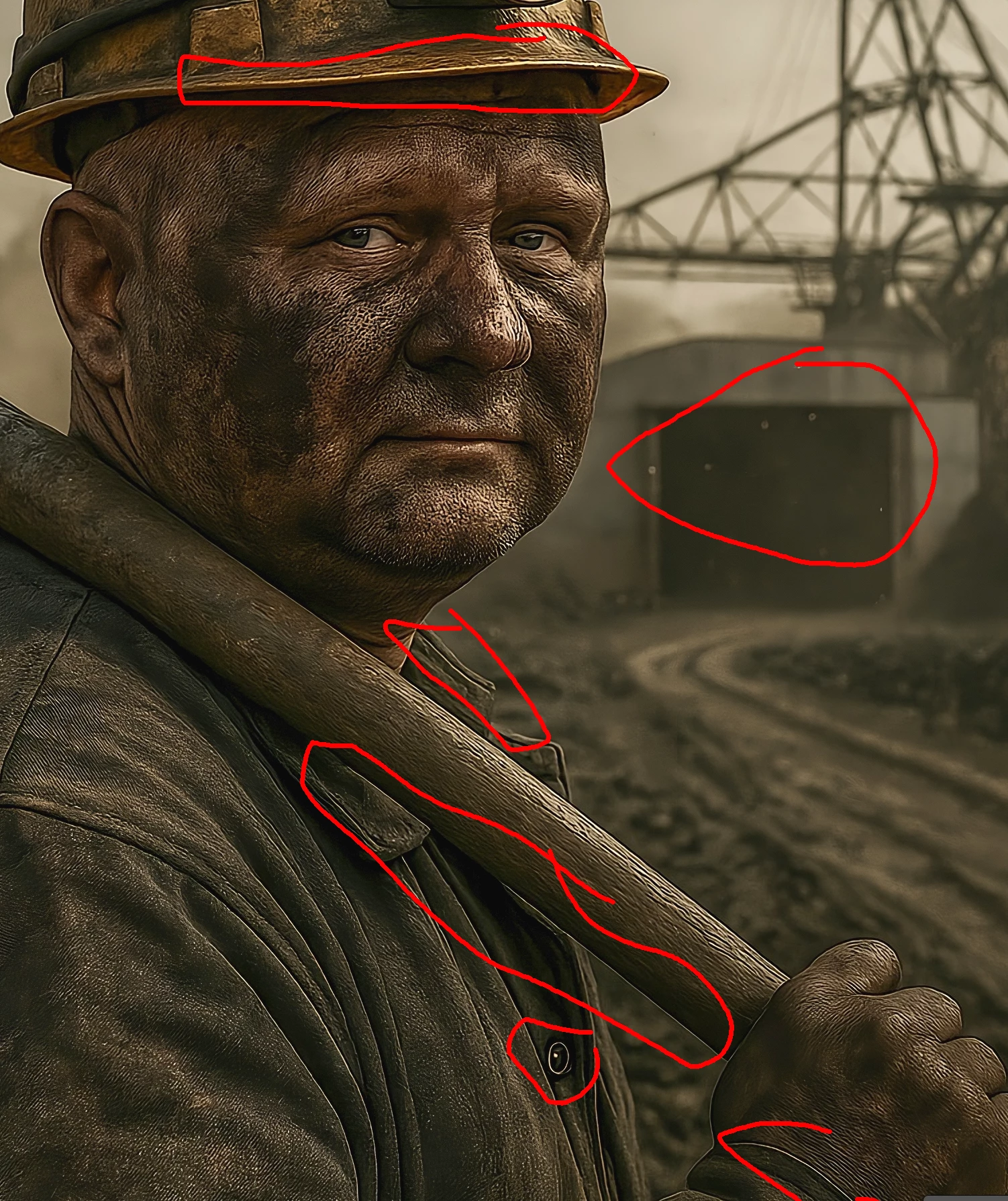
 

Adobe Community Expert | If you can't fix it, hide it; if you can't hide it, delete it.
wilkasAuthor
Participant
September 4, 2025

Wow, are all these being found automatically? I haven't noticed misshapen edges until you showed me. These bright edges are what you call Haloing? I wonder if these are inherent to AI generated images and if I can easily fix them in post editing.

daniellei4510
Community Expert
Community Expert
September 4, 2025

Haloing can happen in AI images, but it can also happen when an asset is upscaled. There are YouTube videos on how to fix haloing. No, misshapen objects are not found automatically but by moderators. Always view your assets at a minimum of 100% after upscaling. 200% is even better. Sure, lots of issues can be addressed and corrected in Photoshop. It just depends on how much time you are willing to spend fixing things. 

Adobe Community Expert | If you can't fix it, hide it; if you can't hide it, delete it.
yamato713108855
Community Expert
Community Expert
September 4, 2025

Is this the same size as the image you submitted?
Please upload the same image as you submitted.

wilkasAuthor
Participant
September 4, 2025

I did upload 9MB full resolution image, it might have been downscalled for preview

yamato713108855
Community Expert
Community Expert
September 4, 2025

Sorry, I checked.

As other community experts have mentioned, I'm concerned about the edges of the image being emphasized.
These lines can appear due to the algorithm and sharpening process used when enlarging an image.