Participating Frequently
August 2, 2023
Answered

Losing Texts in Preview Image

  • August 2, 2023
  • 2 replies
  • 143 views

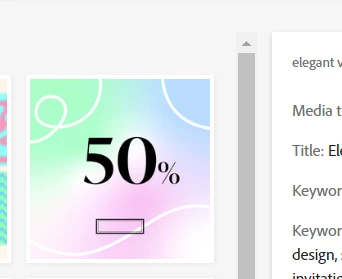
Hello, I currently posted vector files on Adobe stock but there is a problem. I don't know how will it look like after review but the summit preview seems to have an error as suddenly my texts disappeared from the preview image when I uploaded it on site, I have already zipped both the AI file and JPG in the same zip files. In another file i uploaded the texts in the preview image didn't disappear but suddenly it changed the fonts of AI files.  Please help me, thanks!
 

This topic has been closed for replies.
Correct answer Abambo

First: there is no need anymore to submit the preview with the .ai file in a zip archive, as Adobe now generates a correct preview. Your JPEG file simply gets ignored. If, by generating the preview, there is a font issue, it is very probable, that this issue is in the .ai file. As @Jill_C mentioned, it is primordial that all fonts get sourced from Adobe fonts. This ensures that the buyer can use the file as intended.


If you want us having a look into your file, you need to post the file here. 

2 replies

Abambo
Community Expert
AbamboCommunity ExpertCorrect answer
Community Expert
August 2, 2023

First: there is no need anymore to submit the preview with the .ai file in a zip archive, as Adobe now generates a correct preview. Your JPEG file simply gets ignored. If, by generating the preview, there is a font issue, it is very probable, that this issue is in the .ai file. As @Jill_C mentioned, it is primordial that all fonts get sourced from Adobe fonts. This ensures that the buyer can use the file as intended.


If you want us having a look into your file, you need to post the file here. 

ABAMBO | Hard- and Software Engineer | Photographer
Jill_C
Community Expert
Community Expert
August 2, 2023

Did you use Adobe fonts? Perhaps it has to do with legal use of the fonts.

https://helpx.adobe.com/fonts/using/font-licensing.html


Jill C., Forum Volunteer