Participant
February 14, 2025
Answered

'Lovely' Quality Issues with PNG:)

  • February 14, 2025
  • 4 replies
  • 704 views

Hello, esteemed community:)

PNG is hard work. But important! Attached is the rejected file. I think I did everything perfectly, but unfortunately it was rejected.

I appeal to the collective mind for help, so as not to repeat mistakes in the future.

Cheers!

Correct answer Nancy OShea

This file should be submitted as a vector graphic -- .ai, .svg or .eps file.

Also, your use of uneditable text limits its sales potential. Remember, Stock is a global service. Most customers don't use English as their primary language.  It's best to allow customers to add their own fonts & text after purchase.


Raster images saved as JPEG or PNG are uneditable and prone to pixelation when re-scaled. This isn't a problem for vector graphics because they maintain sharp, crisp edges as any size.
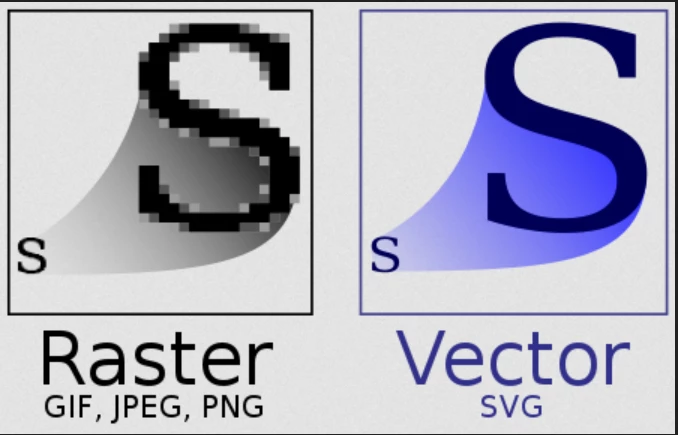


Hope that helps.

 

4 replies

Abambo
Community Expert
Community Expert
February 14, 2025

There is no issue with this asset. It is normal that in a correctly designed asset, and viewed under hig magnification that you see the effect of antialiasing. 


However, an asset like this should be provided as a vector file. 


My guess is that the refusal reason is the wrong one.

ABAMBO | Hard- and Software Engineer | Photographer
Jill_C
Community Expert
Community Expert
February 14, 2025

Is this a transparent image? PNG file type is to be used only for transparencies.

Jill C., Forum Volunteer
Abambo
Community Expert
Community Expert
February 14, 2025
quote

Is this a transparent image?


By @Jill_C

Yes.

ABAMBO | Hard- and Software Engineer | Photographer
Participant
February 14, 2025

Thank you!


1. Do I need to send the file metadata for analysis?


2. Purposeis to create a series of simple modern icons, as I see a lot of works of rather low quality in this category.

Participant
February 14, 2025

File Metadata:

file_size 164 kB
file_type PNG
file_type_extension png
mime_type image/png
image_width 6400
image_height 3400
bit_depth 8
color_type RGB with Alpha
compression Deflate/Inflate
filter Adaptive
interlace Noninterlaced
pixels_per_unit_x 2835
pixels_per_unit_y 2835
pixel_units meters
srgb_rendering Perceptual
gamma 2.2
image_size 6400x3400
megapixels 21.8


Basic design make mostly in Figma.

jacquelingphoto2017
Community Expert
Community Expert
February 14, 2025

Hi @vladdudnik ,

I'm not sure why, but some edges are jagged while others are smooth. The jagged edge is a problem.

Best wishes

Jacquelin


Participant
February 14, 2025

Thank you @jacquelingphoto2017 

Just checked and I see this problem too. Didn't enlarge the file so much before uploading. At 200-300% magnification it looked fine.

Do you know how to avoid this problem? Maybe it would be better to upload in SVG format.

jacquelingphoto2017
Community Expert
Community Expert
February 14, 2025

Hi @vladdudnik ,

Yes I do notice that at 200% and below it does not show. I only enlarge beyond because I know your file should be good for billboard size.

To be honest, I don't know what might cause it. I use Photoshop and had never had that problem or seen it before. I am thinking that it might be a software problem, probably the software need updating or new update with built error, or your computer memory being a bit sluggish due to workload. These are the only possible reason I can think of.

Best wishes

Jacquelin


