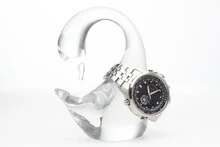
This topic has been closed for replies.
Correct answer Nancy OShea

Too small.

Too dark.

Too blurry.


4 replies

jacquelingphoto2017
Community Expert
Community Expert
February 15, 2023

Hi @sergioe77646470 ,

These are too small for us to give you details. I see compression issues of which I cannot say if those were introduced while reducing the file size. 

The other issues I see include poor white balance and

Lacking sharpness

Zoom in on your file to between 100 and 200% to inspect them. If at 100% the edge of your files are not sharp they will not be accepted. 

Best wishes

Jacquelin

Nancy OShea
Community Expert
Nancy OSheaCommunity ExpertCorrect answer
Community Expert
February 14, 2023

Too small.

Too dark.

Too blurry.


Nancy O'Shea— Product User & Community Expert
Participant
February 16, 2023
Thank you.

Any advice to improve that?

Regards from México.
Nancy OShea
Community Expert
Community Expert
February 16, 2023

Make bigger, brighter, sharper images.  See this post from yesterday.

https://community.adobe.com/t5/stock-contributors-discussions/looking-for-a-bit-of-critique/m-p/13582872#M54242


Consider taking some Photography courses or join a photography club where you'll get tips & feedback from other photographers.


Hope that helps.

Regards from California.


Nancy O'Shea— Product User & Community Expert
Legend
February 14, 2023

However, don't bother with the pics with the glass model, or the watch. You would later need IP releases from the maker of the model, or the watch.

Participant
February 14, 2023

You're right¡¡ Thanks for your advice.

Jill_C
Community Expert
Community Expert
February 14, 2023

These tiny thumbnails are much too small to inspect and comment on. Upload 2-3 images in the original size exactly as submitted to Adobe.

Jill C., Forum Volunteer
Participant
February 14, 2023

Ok. I will do that. I appreciate your quick response, thank you!