


Gary Franklyn Mosby
Participating Frequently
May 2, 2024
Answered

model release inquiry
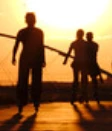
How do I get model releases for people who can't be id'ed? 

Adobe gave an example of a image that doesn't require a release, and it's an image  of a woman's face: where her eyes and forehead are hidden in like a 'milk' bath, exposing just like nose and mouth with red lipstick on in a opened position.  I feel that person could be id'ed faster then my shadow people. 
This topic is closed to new replies. Start a new post to keep the conversation going.
RALPH_L
RALPH_LCorrect answer
Community Expert
May 2, 2024

Your image is too small for us to review. Be carefull with silohuettes. Often if someone just increases the exposure details can be seen which might require a model release.

15 replies

daniellei4510
Community Expert
Community Expert
May 2, 2024

There are a number of model release apps for cell phones if something like that would be helpful for you.

Translate
Adobe Community Expert | I have miles to go before I sleep, but I'm all done on this end.
Nancy OShea
Community Expert
Community Expert
May 2, 2024

Make it habit to carry model & property release forms with you.  It's better to collect a signed release form that you may not use than not have one when you do.  Nobody can penalize you for being thorough.


Translate
Nancy O'Shea— Product User & Community Expert
Abambo
Community Expert
Community Expert
May 2, 2024

Your cutout here does not need a model release, and if you get asked for one, it's by error. But as you did probably not show the complete picture, I can't be sure that there is not a different issue with your asset. What was the correct refusal reason given to you?


As others pointed out, you can't dispute refusals, but you may well submit the assets again.

Translate
ABAMBO | Hard- and Software Engineer | Photographer
Gary Franklyn Mosby
Participating Frequently
May 2, 2024

Thank you for your feedback! The rest of the image is just another couple even further back. Someone else replied that exposure settings could be changed to reveal faces. Which is possible I guess. I plan to check that out.  It said I needed model releases. 

Translate
Abambo
Community Expert
Community Expert
May 2, 2024

I prefer copy past of the refusal title. Sometimes people paraphrase and don't get it right. 😉

Translate
ABAMBO | Hard- and Software Engineer | Photographer
Jill_C
Community Expert
Community Expert
May 2, 2024

The guideline is that if a person could recognize themselves in an image, you need a model release. So, even an image taken of the back of a person could require a model release if there is something distinctive about the shape, clothing, hat, etc. I submitted an image of a nun seated on a bench outside a monastery, with her face hidden, completely covered almost head to toe in a black habit, and they wanted a model release. 

Translate
Jill C., Forum Volunteer
Gary Franklyn Mosby
Participating Frequently
May 2, 2024

Thank you for your feedback and experiences!! 

Translate
RALPH_L
Community Expert
RALPH_LCommunity ExpertCorrect answer
Community Expert
May 2, 2024

Your image is too small for us to review. Be carefull with silohuettes. Often if someone just increases the exposure details can be seen which might require a model release.

Translate
Gary Franklyn Mosby
Participating Frequently
May 2, 2024

Best reply so far. I will test that out on jpeg vs and raw.  Thank you. 

Translate
Gary Franklyn Mosby
Participating Frequently
May 3, 2024

You could be right! Although still hard to make her face, exposure settings still has revealed more details.


Translate
daniellei4510
Community Expert
Community Expert
May 2, 2024

Was your image in question refused based on requiring a model release? If it was, there's no way to appeal the moderator's decision.

Translate
Adobe Community Expert | I have miles to go before I sleep, but I'm all done on this end.
Gary Franklyn Mosby
Participating Frequently
May 2, 2024

That is correct. Someone's reply said that exposure settings could expose faces, so maybe that's the issue. 

Translate
Abambo
Community Expert
Community Expert
May 2, 2024

You can test that. When I have silhouettes in pictures, they are far away, if the picture your posted is the whole composition, chances are that with little effort, you can make the faces visible.

Translate
ABAMBO | Hard- and Software Engineer | Photographer