55thElementphotography
Participant
March 27, 2026
Answered

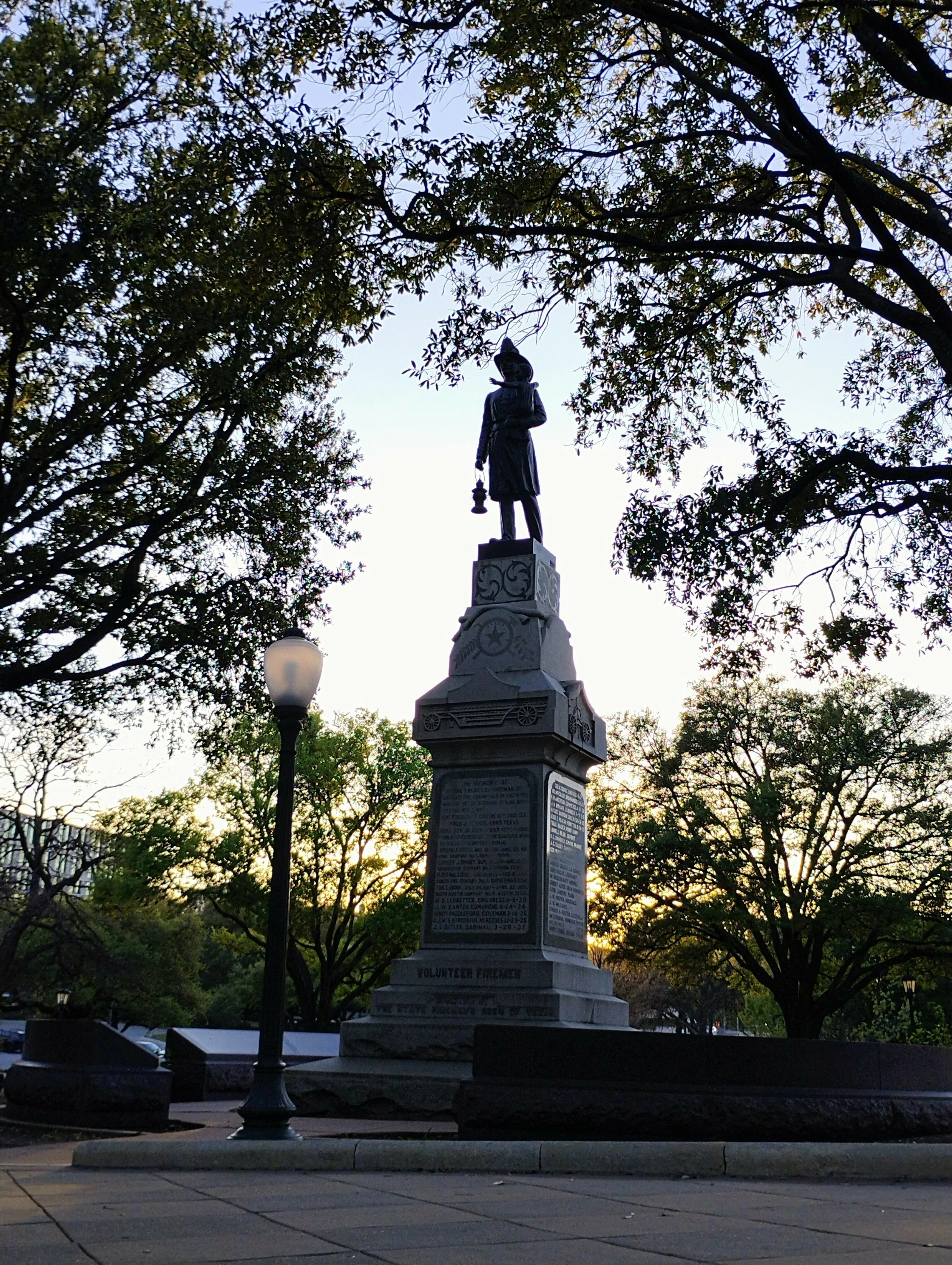
one of my photos got denied but it follows the standards for adobe I believe any advice on what I can fix or how I can improve?

  • March 27, 2026
  • 6 replies
  • 156 views


    Correct answer Ricky336

    Hello,

    People will point out the slanted lampost and statue. Another point is your exposure. As the subject is taken in the shade, it is too dark. The light from the background is too bright, hence it has made the main subject too dark.

    Also think about you composition.

    Composition (Adobe)


    Exposure (Adobe)

    6 replies

    Nancy OShea
    Community Expert
    Community Expert
    March 28, 2026

    What was the refusal reason-- Quality/Technical or IP?


    I don’t think Adobe can accept this image without a Property Release. 

    You can’t sell other people’s artwork without their legal permission. That goes for the artist who created the statue and the entity that owns the park or plaza where it’s installed. 

    https://helpx.adobe.com/stock/contributor/help/property-release.html


    You know that saying, “timing is everything.”  This image needed to be taken earlier in the day, when the sun was over your shoulder, not in front of the camera lens.


    To illustrate, I added an Adjustment Layer to boost highlights and bring out details from the foreground. But that worsens the chromatic aberration. You didn’t have enough light at the time you took this photo.  Sorry. 


    Nancy O'Shea— Product User & Community Expert
    jacquelingphoto2017
    Community Expert
    Community Expert
    March 28, 2026

    Hi ​@55thElementphotography 

    The picture is underexposed, causing details to be lost in the shadows. Also it has chromatic noise.

    Best ishes

    Jacquelin

    Jill_C
    Community Expert
    Community Expert
    March 27, 2026

    The image is underexposed in the shadows, exhibits chromatic aberration and is a softly focused.

    Jill C., Forum Volunteer
    RALPH_L
    Community Expert
    Community Expert
    March 27, 2026

    I am sorry but you do not fully understand what makes a quality photo and what the Adobe requirements are. These are the issues that I see:
    1. The photo is way too dark. This is because your camera’s exposure is set for the bright sky.
    2. The lamp post and statue are slanted.
    3. The photo is not sharp.
    4. When I zoom in, I see artifacts around the small branches, leaves and sky.
    5. The photo should be cropped down.

    Here an example:
     

    Notice the difference?


    March 27, 2026

    Hey ​@55thElementphotography 

    With the light behind the statue, you are going to get a dark image. 
    Very seldom can I take an image from camera and put it into a stock sight like Adobe. I need to take some time and make edits in Lightroom and Photoshop.

    Crop the image to remove some that sidewalk and zoom into the statue to really highlight and focus on the statue.
     

    Cheers

    Nate

    jacquelingphoto2017
    Community Expert
    Community Expert
    March 28, 2026

    Hi ​@Oh.N8 

    There is a photography technique that allows you to take pictures with bright backlighting without the dark forefront..

    Best wishes

    Jacquelin


    March 28, 2026

    Thanks ​@jacquelingphoto2017  
    Go on… I m interested in hearing this. :)

    Ricky336
    Community Expert
    Ricky336Community ExpertCorrect answer
    Community Expert
    March 27, 2026

    Hello,

    People will point out the slanted lampost and statue. Another point is your exposure. As the subject is taken in the shade, it is too dark. The light from the background is too bright, hence it has made the main subject too dark.

    Also think about you composition.

    Composition (Adobe)


    Exposure (Adobe)