

Participant
April 23, 2023
Answered

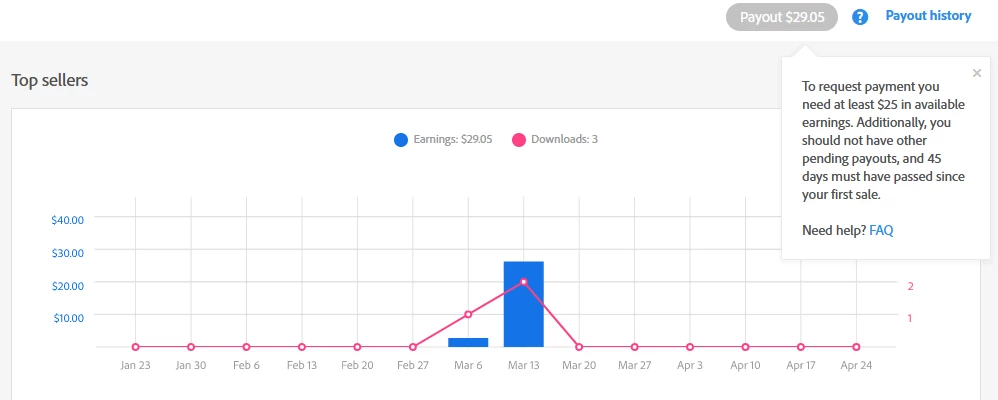
Payout button is still grey even i have reached payout requirements
  • April 23, 2023
  • 2 replies
  • 390 views


Payout button is still grey even i have reached payout requirements


(moderator cured topics and deleted duplicate image)

This topic has been closed for replies.
Correct answer Nancy OShea

Read the requirements again.  You're not eligible yet.

https://helpx.adobe.com/stock/contributor/help/getting-paid.html


2 replies

Nancy OShea
Community Expert
Nancy OSheaCommunity ExpertCorrect answer
Community Expert
April 23, 2023

Read the requirements again.  You're not eligible yet.

https://helpx.adobe.com/stock/contributor/help/getting-paid.html


Nancy O'Shea— Product User & Community Expert
Jill_C
Community Expert
Community Expert
April 23, 2023

It appears, from the graph, that it has not been more than 45 days since your first sale. When you pass that threshold, you'll be able to request a payout.


Here are the payment requirements:

Once you’ve accrued more than US$25 in royalties on Adobe Stock, you can request a payout as long as the following criteria is met:

  • You've got a validated tax form on file in your account.

  • At least 45 days have passed since your first Adobe Stock sale. (You can make subsequent payment requests when you reach the US$25 threshold again).

  • You've got a valid PayPal, Payoneer, or Skrill account available to receive funds. 

Jill C., Forum Volunteer
