Known Participant
November 4, 2022
Answered

Photo feedback (quality issues)

  • November 4, 2022
  • 2 replies
  • 557 views

Hi Commuity,

I would love to know, what I can do, that my pictures get better and so not get rejected.

Attached you find an image that was rejected because of quality issues.


Some images from the same series have been approved, but the attached image has not, for quality reasons. I would like to know what I can do better so that further pictures that I intend to take are not rejected.


You can see the approved ones here:

https://stock.adobe.com/de/contributor/201380936/roland-kiessling


Thank you for your help
Roland
This topic has been closed for replies.
Correct answer George_F

Along with the great advice @Abambo already gave you:


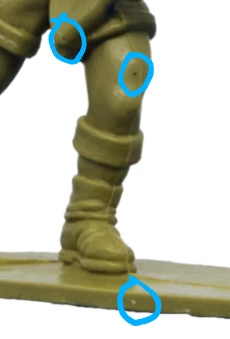
There were several spots on the toy itself that I would have cloned out.

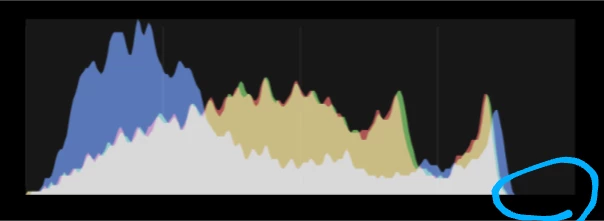
When looking at the histogram the underexposure was noticeable with the missing whites.  Correcting it helped some, although the shadows were still strong on key areas of the toy like the face and the lighting should be repositioned to adequately light these areas.  Or at least soften the shadows there.


I'm sure you already know you need a property release, but I case you don't make sure you have one 🙂


2 replies

George_F
Community Expert
George_FCommunity ExpertCorrect answer
Community Expert
November 4, 2022

Along with the great advice @Abambo already gave you:


There were several spots on the toy itself that I would have cloned out.

When looking at the histogram the underexposure was noticeable with the missing whites.  Correcting it helped some, although the shadows were still strong on key areas of the toy like the face and the lighting should be repositioned to adequately light these areas.  Or at least soften the shadows there.


I'm sure you already know you need a property release, but I case you don't make sure you have one 🙂


George F, Photographer & Forum Volunteer
Known Participant
November 7, 2022

Hi George_F,
thanks for your time to replie to my question and thanks for the advice.

Regarding the spots you would have cloned out. I thought about showing the toy as it actually is or as it was produced. I'll follow your advice anyway, thank you.

Regarding the histogram
If I understand correctly, the histogram has to go over the entire x-axis and I can influence this when creating the photo. Or is it more advisable to edit the images in Photoshop afterwards? I had read that an image edited too much would also be rejected.

Regarding the property release
I have a license to photograph the toys, is that sufficient or does it need to be deposited here at Adobe Stock? I thought this would only be necessary for pictures of people in the form of a model contract, but of course I would like to do it right to prevent further rejections, what do you recommend?

Kind regards an thanks a lot
Roland

George_F
Community Expert
Community Expert
November 7, 2022

Great follow up questions!

With cloning out the manufacturing defects, I've always thought about cloning out spots like that as "putting the best foot of the product forward" instead of trying to distort reality.  That's my view at least.

Yes, ideally the histogram covers the entire span of the x-axis as you call it.  I've always understood the histogram to represent histogram to represent pure black at one end and pure white at the other, and all the midtones are in between.  Whether a photo should have pure black or white spots in it is debatable, but I usually try to get it pretty close on the other side. 

Theoretically a photo can be taken with a correct histogram in-camera or have the white and black points set and other tonal corrections made after the fact.  I personally have never taken a photo that I thought didn't need some tonal corrections or white & black points set. 

I think what you refer to as editing refers more to things like filter effects or heavy HDR and such.  Think about it this way:  All photos are edited by either you or your camera.  I think that you know better than the camera what white balance and basic adjustments work well for the image you've taken.  I believe it is a view shared among many of us that most photos need some adjustments.

I'm not sure I could speculate with any accuracy about whether a license would count as a property release, but here is a link to the IP guidelines and the property release form:  https://helpx.adobe.com/stock/contributor/help/terminology-and-importance-of-copyright.html

https://contributor.stock.adobe.com/static/releases/property/Releases-en.0fc657ba4429206364e631d0849c4e75.pdf

Good luck!

George F, Photographer & Forum Volunteer
Abambo
Community Expert
Community Expert
November 4, 2022

Your cutout is not clean. You see this at the first sight.

There are other places, at the elbow for example. 


The model is also poorly lighted. The soldier's face is underexposed. I would also increase the contrast.


And I just looked into your link: if I would buy this, you would get them straight back, because the poor cutout work also on those. 


If you are using Photoshop on a PC, use the line effect to detect minimal leftovers. I'm now on my iPad, and can't demonstrate, but if you enable that, you easily see, where yo have done bad work. Happens with cutout objects, the art is to do the correct clean-up work.

ABAMBO | Hard- and Software Engineer | Photographer
Known Participant
November 7, 2022

Hi Abambo,
thanks for your time to replie to my question and thanks for the advice.

I looked up "line effect" but couldn't figure out, what you mean. Would you please explain to me how this "line effect" works?

The cutout work was done via the object finding tool, but I clearly missed some settings, or is it recommended to do this "by hand"?

Kind regards an thanks a lot
Roland